AI Blog Writer

TravelFeed

TravelFeed: Create and share your travel blog, explore stories, insider tips, and earn crypto with Hive. Join the traveler community now!

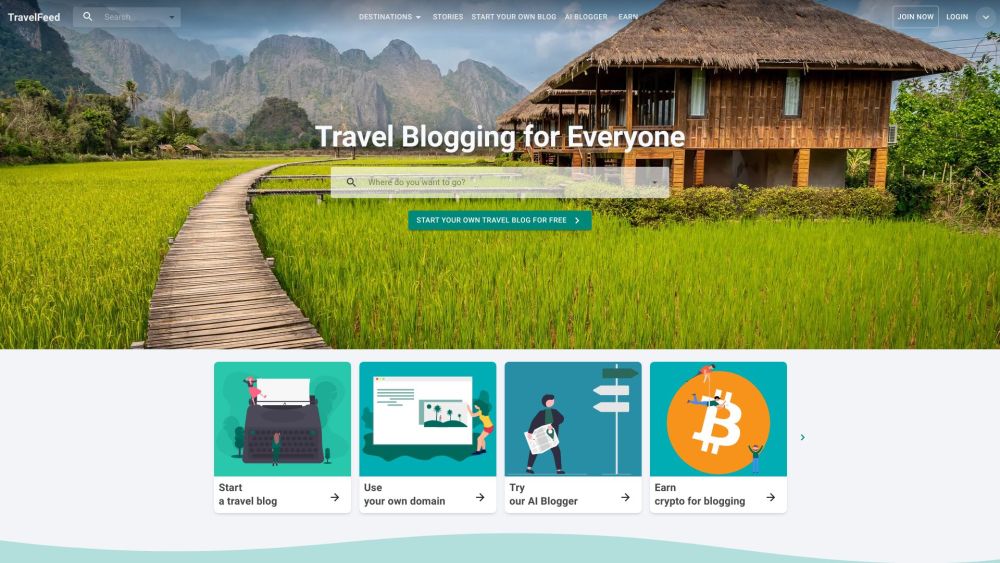
TravelFeed website preview

TravelFeed Website screenshot

What is TravelFeed?

TravelFeed is an innovative platform designed for travelers to create and share engaging travel blogs. It offers a vibrant community where users can discover travel stories, gain insider tips, and explore destination recommendations. With TravelFeed, users can launch their own travel blogs, customize them, and even earn cryptocurrency by cross-posting to Hive.

How to use TravelFeed?

1. Register for a free account on TravelFeed's website. No credit card is needed. 2. Optionally, use the site builder to create a personalized domain for your blog. 3. Engage with the TravelFeed community to find your audience and connect with fellow travelers. 4. Enhance your blog with features like custom maps, automatic categorization by destination, and destination search. 5. Use advanced editor blocks, such as maps, photo galleries, and Instagram embeds, to create visually appealing posts. 6. Leverage AI Blogger, an AI-driven tool, to generate high-quality blog content efficiently. 7. Benefit from fast article loading with edge caching and enjoy a maintenance-free blogging experience. 8. Utilize the mobile app to create and share travel stories on the go.

TravelFeed's Core Features

Customizable travel blogs

Community of travelers

Custom maps

Automatic categorization and destination search

Powerful editor blocks

AI Blogger for content creation

Fast article loading with edge caching

Maintenance-free platform

TravelFeed's Use Cases

Individual travel bloggers

Travel influencers

Travel agencies promoting destinations

Tour operators sharing travel experiences

Product source: TravelFeed official website. Check the provider for current plans, limits and availability.

FAQ

TravelFeed questions and answers

Product context and practical checks for evaluating TravelFeed.

What is TravelFeed used for?

TravelFeed: Create and share your travel blog, explore stories, insider tips, and earn crypto with Hive. Join the traveler community now!

How do I get started with TravelFeed?

1. Register for a free account on TravelFeed's website. No credit card is needed. 2. Optionally, use the site builder to create a personalized domain for your blog. 3. Engage with the TravelFeed community to find your audience and connect with fellow travelers. 4. Enhance your blog with features like custom maps, automatic categorization by destination, and destination search. 5. Use advanced editor blocks, such as maps, photo galleries, and Instagram embeds, to create visually appealing posts. 6. Leverage AI Blogger, an AI-driven tool, to generate high-quality blog content efficiently. 7. Benefit from fast article loading with edge caching and enjoy a maintenance-free blogging experience. 8. Utilize the mobile app to create and share travel stories on the go.

Which capabilities are described for TravelFeed?

Customizable travel blogsCommunity of travelersCustom mapsAutomatic categorization and destination searchPowerful editor blocksAI Blogger for content creationFast article loading with edge cachingMaintenance-free platform

What projects can I evaluate TravelFeed for?

Individual travel bloggersTravel influencersTravel agencies promoting destinationsTour operators sharing travel experiences TravelFeed Support Email & Customer service contact & Refund contact etc. For more contact information, visit the contact us page. TravelFeed Company Learn more about TravelFeed by visiting the about us page. TravelFeed Login Login to TravelFeed here: https://travelfeed.com/join TravelFeed Sign up Sign up for TravelFeed here: https://travelfeed.com/join

What should I compare before choosing a TravelFeed plan?

Check TravelFeed’s current pricing page for included usage, renewal terms and any credit charges. Compare the cost of a usable result, including retries, rather than assuming that account registration includes free usage.

What inputs should I prepare for a TravelFeed trial?

Compare support for source documents, style instructions, outlines and length limits. Check whether citations link to real material rather than merely looking like references.

How can I check the quality of a TravelFeed result?

Verify names, dates, quotations and factual claims against the original sources. Edit tone, remove repetition and make sure the text answers the intended reader’s question.

Which export options should I check in TravelFeed?

Check export to plain text, Markdown, documents or your publishing system. Formatting, headings and working links matter when moving a draft into production.

What is a practical way to test TravelFeed against alternatives?

Use a real brief and a short source document. Compare factual accuracy, structure and editing time rather than accepting the longest or most confident draft.

Where is the official TravelFeed website?

The website linked from this profile is https://travelfeed.io. Use the provider’s own documentation, account area and support channels to confirm current product details.

Visit TravelFeed