General Writing

Texta Chrome Extension

Texta Chrome Extension: Boost productivity with AI-powered assistance. Streamline tasks, write faster, and get smart suggestions effortlessly!

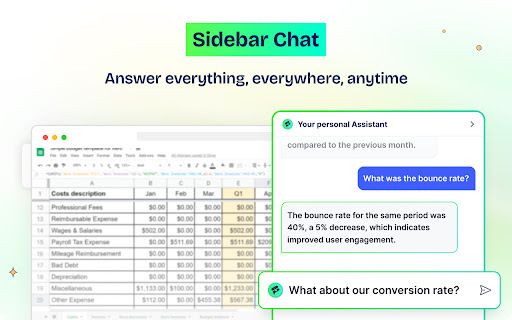
Texta Chrome Extension website preview

Texta Chrome Extension - Chrome Extension Website screenshot

What is the Texta Chrome Extension?

The Texta Chrome Extension is an AI-driven productivity tool designed to streamline online tasks. It offers advanced writing assistance, simplified web browsing, and improved communication, all powered by intelligent AI to make your daily workflow more efficient.

How to use the Texta Chrome Extension?

1. Install the Texta Chrome Extension from the Chrome Web Store
2. Register using an email, or link your Google, Facebook, or GitHub account
3. Start using its productivity-enhancing features for a better online experience

Key Features of the Texta Chrome Extension

Enhanced Search Capabilities

Find information faster with AI-assisted search that refines and optimizes your queries for quicker and more relevant results.

Summarize Web Content

Get concise summaries of web pages, articles, or lengthy documents, making it easier to digest information at a glance.

Multilingual Support

Communicate globally with real-time AI translations in multiple languages, ensuring your writing is accessible no matter where you are.

Quick Email Responses

Respond to emails promptly with intelligently generated responses tailored to your communication style.

Paraphrasing Tool

Rework and refine your text effortlessly with a paraphrasing tool that helps you generate unique content.

Customizable Snippets

Save time by creating and storing customizable snippets for frequently used content or templates.

Practical Applications of the Texta Chrome Extension

Email Automation for Professional Communication

Draft professional emails in seconds using AI-generated replies that align with your business needs and tone.

Enhanced Writing Efficiency

Improve your writing with the paraphrasing feature, helping you articulate your ideas more clearly while maintaining originality.

Increased Team Productivity with Snippets

Boost team collaboration by sharing customizable snippets for standardized communication and document templates.

Product source: Texta Chrome Extension official website. Check the provider for current plans, limits and availability.

FAQ

Texta Chrome Extension questions and answers

Product context and practical checks for evaluating Texta Chrome Extension.

What is Texta Chrome Extension used for?

Texta Chrome Extension: Boost productivity with AI-powered assistance. Streamline tasks, write faster, and get smart suggestions effortlessly!

How do I get started with Texta Chrome Extension?

1. Install the Texta Chrome Extension from the Chrome Web Store 2. Register using an email, or link your Google, Facebook, or GitHub account 3. Start using its productivity-enhancing features for a better online experience

Which capabilities are described for Texta Chrome Extension?

Enhanced Search Capabilities Find information faster with AI-assisted search that refines and optimizes your queries for quicker and more relevant results. Summarize Web Content Get concise summaries of web pages, articles, or lengthy documents, making it easier to digest information at a glance. Multilingual Support Communicate globally with real-time AI translations in multiple languages, ensuring your writing is accessible no matter where you are. Quick Email Responses Respond to emails promptly with intelligently generated responses tailored to your communication style. Paraphrasing Tool Rework and refine your text effortlessly with a paraphrasing tool that helps you generate unique content. Customizable Snippets Save time by creating and storing customizable snippets for frequently used content or templates.

What projects can I evaluate Texta Chrome Extension for?

Email Automation for Professional Communication Draft professional emails in seconds using AI-generated replies that align with your business needs and tone. Enhanced Writing Efficiency Improve your writing with the paraphrasing feature, helping you articulate your ideas more clearly while maintaining originality. Increased Team Productivity with Snippets Boost team collaboration by sharing customizable snippets for standardized communication and document templates.

What should I compare before choosing a Texta Chrome Extension plan?

Check Texta Chrome Extension’s current pricing page for included usage, renewal terms and any credit charges. Compare the cost of a usable result, including retries, rather than assuming that account registration includes free usage.

What inputs should I prepare for a Texta Chrome Extension trial?

Look for text prompts, image references, masks or sketches as appropriate. Compare composition control, supported upload types and the ability to revise a selected area.

How can I check the quality of a Texta Chrome Extension result?

Inspect text, hands, edges, reflections and repeated objects at full size. Check that important product or brand details survive editing.

Which export options should I check in Texta Chrome Extension?

Compare pixel dimensions, transparency, file formats and any enlargement options. Confirm that the downloaded result works in your design or publishing software.

What is a practical way to test Texta Chrome Extension against alternatives?

Prepare a brief with a subject, composition, lighting and required output size. Test a first generation and a targeted revision to see how much control you retain.

Where is the official Texta Chrome Extension website?

The website linked from this profile is https://chromewebstore.google.com/detail/textaai-ai-copilot-and-ai/lfepjkclahhfmmgmfneedmimfmojjioo. Use the provider’s own documentation, account area and support channels to confirm current product details.

Visit Texta Chrome Extension