AI Lead Generation

TeqID – Connect

TeqID – Connect: AI-powered B2B platform that intelligently matches businesses with high-value growth opportunities—fast,精准, scalable.

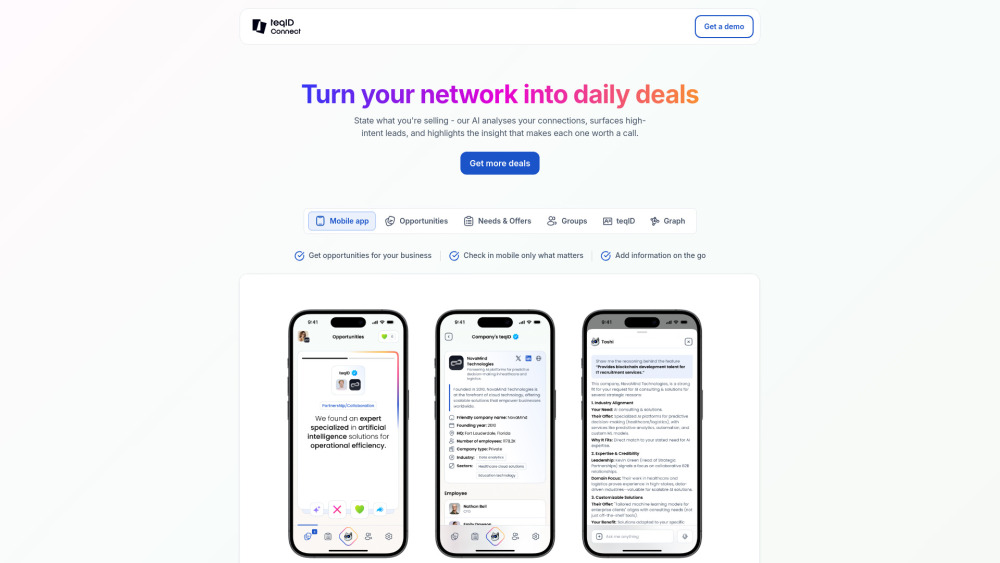
TeqID – Connect website preview

TeqID – Connect Website screenshot

TeqID – Connect: Where Intelligent B2B Discovery Begins

TeqID – Connect redefines B2B relationship building—not through cold outreach or broad prospecting, but through precision-powered connection. Built on proprietary AI architecture, the platform transforms static professional networks into dynamic opportunity engines. By interpreting behavioral signals, organizational shifts, and contextual intent across your full network graph, TeqID – Connect surfaces high-potential matches that traditional search or manual outreach would miss—delivering speed without sacrificing relevance.

How It Works: From Post to Precision Match

Start by articulating a specific business need (e.g., “seeking SaaS integration partners in fintech”) or offer (e.g., “enterprise-grade cybersecurity audit services”). TeqID – Connect instantly scans your 1st-, 2nd-, and extended group-level connections—then enriches that map with real-time AI-detected signals: recent funding rounds, leadership hires, cloud migration announcements, or product launches. The result? A ranked shortlist of prospects, partners, or suppliers whose timing, capacity, and strategic alignment match your objective—verified, actionable, and ready for warm introduction. All managed seamlessly via web dashboard or iOS/Android app.

Engineered for B2B Relevance

Context-Aware Network Intelligence

Intent-Driven Match Scoring (not keyword matching)

Dynamic Lead Prioritization Based on Fit + Timing

Multi-Tier Relationship Mapping (1st–3rd degree + community clusters)

Real-Time Signal Layering (funding, hiring, tech adoption, M&A activity)

Cross-Platform Sync & Mobile-First Opportunity Management

Who Benefits—and Why

Sales Leaders accelerating pipeline velocity with warm, context-rich intros.

Procurement Teams sourcing vetted, strategically aligned vendors—without RFP fatigue.

Startup Founders identifying co-sell partners, channel allies, or pilot customers within trusted circles.

Enterprise Strategists uncovering adjacency opportunities before competitors do—using their own network as intelligence infrastructure.

Product source: TeqID – Connect official website. Check the provider for current plans, limits and availability.

FAQ

TeqID – Connect questions and answers

Product context and practical checks for evaluating TeqID – Connect.

What is TeqID – Connect used for?

TeqID – Connect: AI-powered B2B platform that intelligently matches businesses with high-value growth opportunities—fast,精准, scalable.

How do I get started with TeqID – Connect?

Start by articulating a specific business need (e.g., “seeking SaaS integration partners in fintech”) or offer (e.g., “enterprise-grade cybersecurity audit services”). TeqID – Connect instantly scans your 1st-, 2nd-, and extended group-level connections—then enriches that map with real-time AI-detected signals: recent funding rounds, leadership hires, cloud migration announcements, or product launches. The result? A ranked shortlist of prospects, partners, or suppliers whose timing, capacity, and strategic alignment match your objective—verified, actionable, and ready for warm introduction. All managed seamlessly via web dashboard or iOS/Android app.

What should I compare before choosing a TeqID – Connect plan?

Check TeqID – Connect’s current pricing page for included usage, renewal terms and any credit charges. Compare the cost of a usable result, including retries, rather than assuming that account registration includes free usage.

What inputs should I prepare for a TeqID – Connect trial?

Identify the files, text or account connections your task needs. Confirm that the product accepts those inputs and offers controls for reviewing its work.

How can I check the quality of a TeqID – Connect result?

Test one representative task and inspect the result for accuracy and completeness. Record where manual corrections or extra tools are needed.

Which export options should I check in TeqID – Connect?

Check export formats, integrations and whether you can keep using your work outside the service. Test a real export before committing to a longer plan.

What is a practical way to test TeqID – Connect against alternatives?

Choose one task with a clear success condition. Keep the input consistent, record the time spent reviewing and compare the complete workflow cost.

What should I review before uploading material to TeqID – Connect?

Read the provider’s rules on access, retention, deletion and use of uploaded material. Start with a non-confidential sample that you have permission to use.

How can I check whether TeqID – Connect fits my existing workflow?

List the steps before and after using TeqID – Connect, including preparation, review and export. Test that complete sequence and check whether handoffs require manual conversion or another paid service.

Where is the official TeqID – Connect website?

The website linked from this profile is https://teqid.org. Use the provider’s own documentation, account area and support channels to confirm current product details.

Visit TeqID – Connect