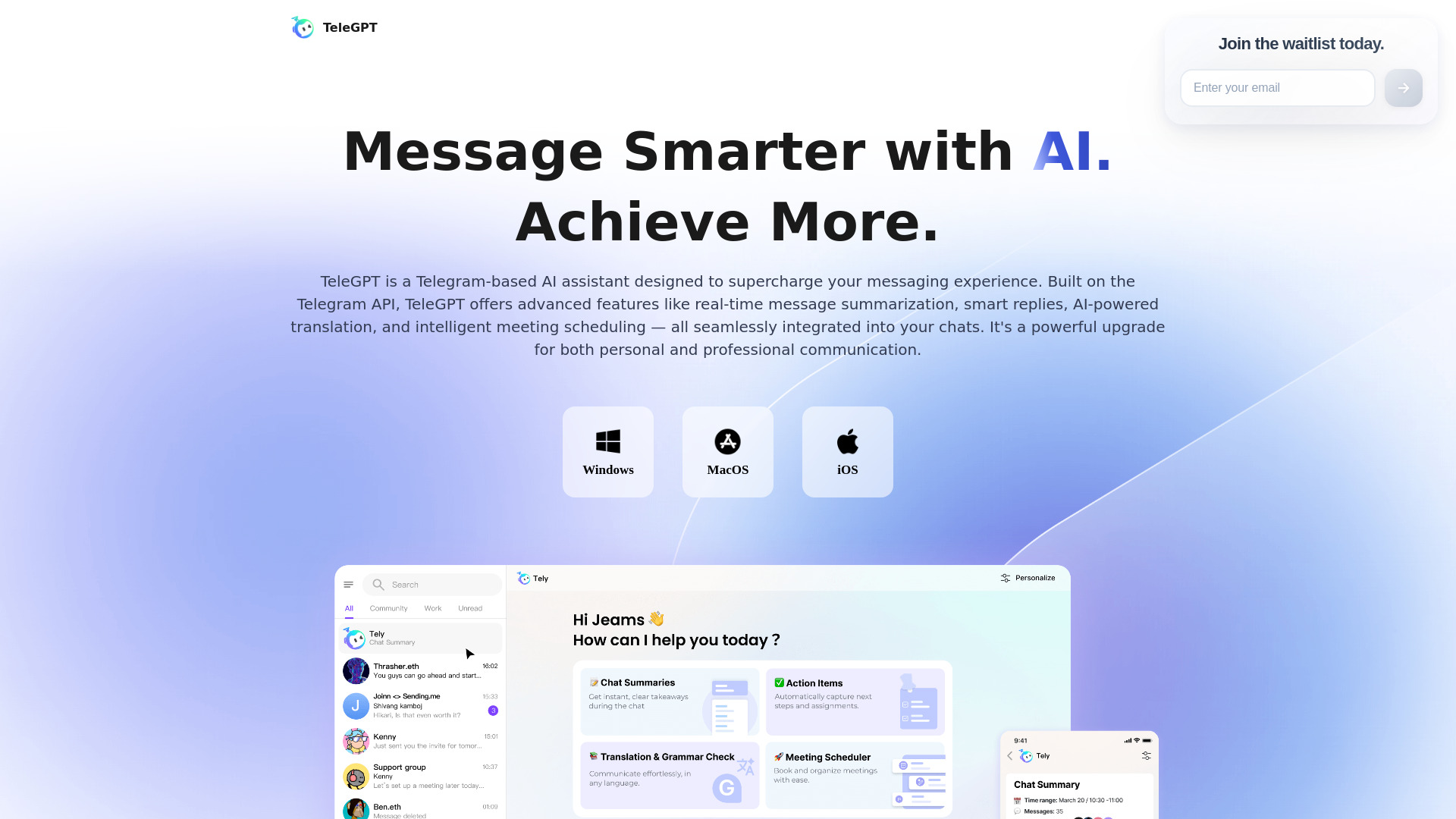
TeleGPT: Telegram AI Hub for Summaries, Translation & Tasks
TeleGPT is an intelligent Telegram-based productivity hub designed to make everyday conversations easier to understand and manage. Built around the Telegram API, the platform adds practical AI tools to the messaging experience, including conversation summaries, instant translation, grammar assistance, meeting coordination, and automatic task detection. Instead of manually reviewing hundreds of messages or transferring information into separate productivity apps, users can organize important details directly within the environment they already use for communication.
From distributed workplaces and international teams to crypto communities and student groups, TeleGPT helps turn busy Telegram conversations into clear information and useful next steps. Its AI capabilities are designed to support faster communication while preserving the familiar structure of Telegram chats, groups, and contacts.
How to Use TeleGPT
Beginning with TeleGPT is simple. Install the application on a supported device, including Windows, macOS, or iOS, and sign in with your existing Telegram credentials. Once connected, your conversations, group memberships, and contacts become available without requiring a separate account or complicated migration process. The familiar Telegram environment remains at the center of the experience, while AI tools are available whenever a conversation needs additional organization or analysis.
After logging in, users can select a lengthy discussion and request a concise summary of its main points. TeleGPT can highlight decisions, announcements, unanswered questions, and other details that may be difficult to locate in a rapidly moving chat. Translation can also be enabled for multilingual conversations, with automatic language recognition helping participants understand messages without repeatedly switching to another service.
TeleGPT also assists with practical follow-up work. When a conversation includes commitments, deadlines, or requests, its task-focused tools can identify those details and turn them into actionable items. Discussions involving dates and appointments can be reviewed by the scheduling assistant, which helps users coordinate meetings and create calendar-related actions from the surrounding chat context. Support for images, links, videos, and shared files extends these capabilities beyond plain text.
Core Features Available in TeleGPT
- Conversation Summaries: Reduce long Telegram discussions to clear overviews covering the most relevant updates, decisions, questions, and conclusions. This makes it easier to catch up after missing a busy chat session or to review a group conversation before taking action.
- Instant Translation: Understand messages written in different languages with automatic language detection and rapid translation. The feature is useful for international teams, global communities, travel groups, and any conversation where participants communicate in more than one language.
- Grammar Assistance: Review messages for common grammar and writing issues before sending them. This gives users a practical way to make important announcements, professional replies, and public community posts clearer and easier to understand.
- Meeting Coordination: Identify scheduling discussions and relevant date or time references within a chat. TeleGPT can help transform scattered planning messages into a more organized meeting workflow, reducing repetitive coordination between participants.
- Automatic Task Detection: Recognize assignments, follow-ups, responsibilities, and deadlines as they appear in messages. Extracted action items help users keep track of what needs to happen after a discussion has ended.
- Multi-Modal Analysis: Work with more than written messages by examining shared links, attachments, images, and videos. This allows users to obtain useful context from the different types of content commonly exchanged in Telegram groups.
- Telegram Account Synchronization: Connect with an existing Telegram account so users can access their established chats, contacts, and groups in one place. The familiar account structure reduces the time needed to learn or configure the application.
- Privacy-Oriented Design: TeleGPT is built to work within the Telegram ecosystem and is designed with attention to account security and personal information. Users can access AI-supported productivity tools while keeping their communication within their established messaging workflow.
Why Use TeleGPT for Telegram Productivity?
Telegram is often used for conversations that move quickly and contain a large amount of information. Important instructions can disappear beneath new messages, multilingual exchanges can slow down collaboration, and small commitments can be forgotten once a discussion moves on. TeleGPT addresses these everyday problems by placing summarization, translation, and task support close to the conversations where the information is created.
The platform is especially useful for people who spend much of their day working inside group chats. It reduces the need to copy messages into separate note-taking, translation, calendar, or task-management tools. Users can review the main points of a discussion, identify the next steps, and clarify messages with less manual effort. This makes TeleGPT a practical option for professionals, community managers, founders, students, and anyone who depends on Telegram for regular coordination.
Because it works with an existing Telegram account, the service can fit into established communication habits. Users do not need to rebuild their contact lists or ask every group member to adopt a new platform. The AI layer adds organization and assistance while the underlying messaging experience remains recognizable.
Who Can Benefit from TeleGPT?
Remote teams can use TeleGPT to review project conversations, identify assigned work, and prepare meeting details without searching through an entire message history. Managers can quickly understand what has changed in a team channel, while individual contributors can identify their own follow-up responsibilities.
International organizations and multilingual communities can use translation and grammar assistance to make conversations more accessible. Automatic language recognition helps participants follow discussions that include several languages, while writing suggestions can improve the clarity of important updates and announcements.
Crypto, Web3, and technology communities often deal with fast-moving channels containing news, technical explanations, event notices, and project updates. Summaries help members catch up with active discussions and locate the information that matters most. Moderators and administrators can also use extracted tasks to organize follow-ups and community responsibilities.
Students and study groups can apply the same features to collaborative assignments. A chat summary can capture the conclusions of a planning session, task extraction can record individual responsibilities, and translation tools can help classmates work together across language differences. Families, event organizers, customer groups, and volunteer communities may also benefit from turning informal Telegram discussions into clearer plans.