AI Chatbot

Suppa

AI platform for designing custom chatbots

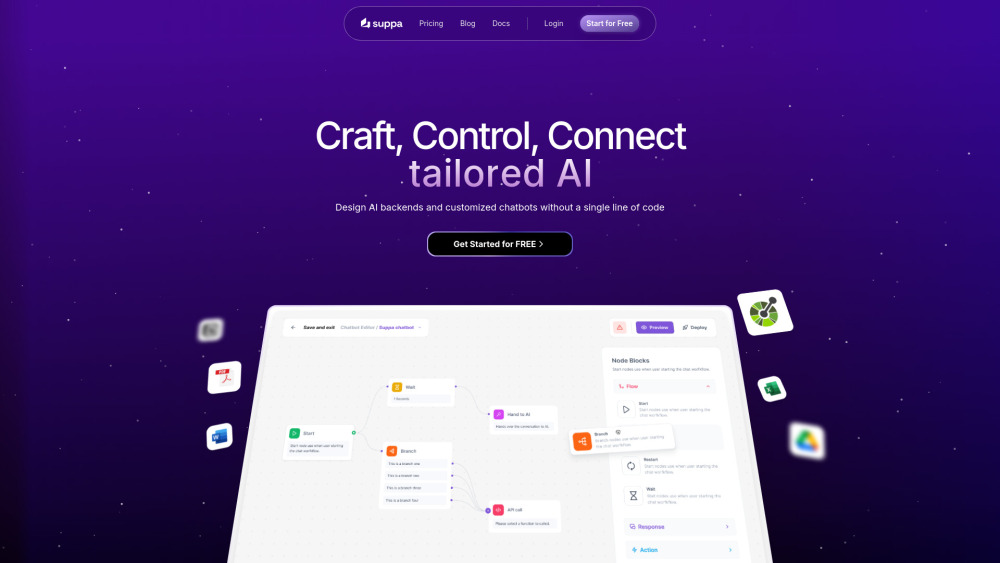
Suppa website preview

Suppa Website screenshot

What is Suppa?

Suppa is a comprehensive AI-driven platform designed to help businesses build AI backends and create custom chatbots without the need for coding expertise. Its no-code tools empower users to easily develop advanced AI solutions tailored to their unique requirements.

How to Use Suppa?

Using Suppa is simple and intuitive. Select the plan that best fits your business needs, and start building AI chatbots with multi-source data. Suppa's drag-and-drop no-code builder and extensive API actions make the process smooth and quick.

Key Features of Suppa

Leverage multi-source data

No-code chatbot creation

Mobile SDK for easy integration

Robust API connectivity

Use Cases for Suppa

Create sophisticated chatbots with no coding

Incorporate data from diverse sources

Add AI functionality to mobile apps seamlessly

Integrate AI with external systems effortlessly

Product source: Suppa official website. Check the provider for current plans, limits and availability.

FAQ

Suppa questions and answers

Product context and practical checks for evaluating Suppa.

What is Suppa used for?

AI platform for designing custom chatbots

How do I get started with Suppa?

Using Suppa is simple and intuitive. Select the plan that best fits your business needs, and start building AI chatbots with multi-source data. Suppa's drag-and-drop no-code builder and extensive API actions make the process smooth and quick.

Which capabilities are described for Suppa?

Leverage multi-source dataNo-code chatbot creationMobile SDK for easy integrationRobust API connectivity

What projects can I evaluate Suppa for?

Create sophisticated chatbots with no codingIncorporate data from diverse sourcesAdd AI functionality to mobile apps seamlesslyIntegrate AI with external systems effortlessly Suppa Support Email & Customer Service For customer support, you can reach out to Suppa via email: mailto:[email protected] . About Suppa Suppa's official company name is simply Suppa. Suppa Login Login to your Suppa account here: https://app.suppa.ai/login Suppa Sign Up New users can sign up for Suppa at this link: https://app.suppa.ai/sign-up Suppa Pricing Check out Suppa's pricing plans here: https://www.suppa.ai/pricing Suppa LinkedIn Follow Suppa on LinkedIn: https://www.linkedin.com/showcase/suppa-ai Suppa Twitter Stay updated by following Suppa on Twitter: https://x.com/suppa_ai

What should I compare before choosing a Suppa plan?

Check out Suppa's pricing plans here: https://www.suppa.ai/pricing Confirm current prices and allowances on the provider’s website before purchasing.

What inputs should I prepare for a Suppa trial?

Look for text prompts, image references, masks or sketches as appropriate. Compare composition control, supported upload types and the ability to revise a selected area.

How can I check the quality of a Suppa result?

Inspect text, hands, edges, reflections and repeated objects at full size. Check that important product or brand details survive editing.

Which export options should I check in Suppa?

Compare pixel dimensions, transparency, file formats and any enlargement options. Confirm that the downloaded result works in your design or publishing software.

What is a practical way to test Suppa against alternatives?

Prepare a brief with a subject, composition, lighting and required output size. Test a first generation and a targeted revision to see how much control you retain.

Where is the official Suppa website?

The website linked from this profile is https://suppa.ai. Use the provider’s own documentation, account area and support channels to confirm current product details.

Visit Suppa