Writing Assistants

superReply - Chrome Extension

Maximize your email productivity with superReply - the Chrome Extension that delivers quick and personalized responses for efficient email replies.

superReply - Chrome Extension website preview

superReply - Chrome Extension Website screenshot

Introducing superReply - Chrome Extension: Efficient Email Replies with Personalized Responses

superReply ai chrome extension is a revolutionary tool designed to enhance your email communication. With its smart technology, superReply offers personalized responses, making your email replies more efficient and effective.

How Does superReply Work?

Using superReply ai chrome extension is simple and straightforward. Just input your email content, and superReply will generate ready-made responses tailored to the specific email. Gone are the days of struggling with writer's block or spending valuable time crafting the perfect reply. superReply takes care of it all, so you can focus on what matters most.

Key Features of superReply ai chrome extension

1. Smart Technology for Personalized Responses

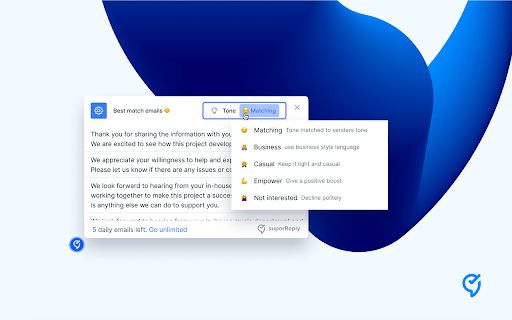
superReply utilizes advanced smart technology to analyze the context of your email and provide personalized responses. Each reply is tailored to match the tone and content of the original message, ensuring a seamless and professional communication experience.

How Can superReply Benefit You?

1. Help non-native English speakers sound professional

For non-native English speakers, expressing thoughts and ideas in a foreign language can be challenging. With superReply, language barriers are overcome as the extension suggests well-crafted responses, helping you sound professional and confident in your email communication.

2. Avoid writer's block

No more staring at a blank screen, struggling to find the right words. superReply's ready-made responses serve as a starting point, inspiring you with ideas and saving you time and effort. Say goodbye to writer's block and hello to productivity.

3. Think of a proper answer

When faced with complex or sensitive questions, it's crucial to provide a well-thought-out answer. superReply ai chrome extension helps you analyze the email content and generates appropriate responses, ensuring you always deliver the right message.

4. Avoid misspelling and missing words

Embarrassing typos and missing words can undermine your professionalism. With superReply, you can eliminate these errors as the extension suggests accurate and well-constructed responses, ensuring your emails are polished and error-free.

Product source: superReply - Chrome Extension official website. Check the provider for current plans, limits and availability.

FAQ

superReply - Chrome Extension questions and answers

Product context and practical checks for evaluating superReply - Chrome Extension.

What is superReply - Chrome Extension used for?

Maximize your email productivity with superReply - the Chrome Extension that delivers quick and personalized responses for efficient email replies.

How do I get started with superReply - Chrome Extension?

Using superReply ai chrome extension is simple and straightforward. Just input your email content, and superReply will generate ready-made responses tailored to the specific email. Gone are the days of struggling with writer's block or spending valuable time crafting the perfect reply. superReply takes care of it all, so you can focus on what matters most.

Which capabilities are described for superReply - Chrome Extension?

1. Smart Technology for Personalized ResponsessuperReply utilizes advanced smart technology to analyze the context of your email and provide personalized responses. Each reply is tailored to match the tone and content of the original message, ensuring a seamless and professional communication experience.

What should I compare before choosing a superReply - Chrome Extension plan?

Check superReply - Chrome Extension’s current pricing page for included usage, renewal terms and any credit charges. Compare the cost of a usable result, including retries, rather than assuming that account registration includes free usage.

What inputs should I prepare for a superReply - Chrome Extension trial?

Compare support for source documents, style instructions, outlines and length limits. Check whether citations link to real material rather than merely looking like references.

How can I check the quality of a superReply - Chrome Extension result?

Verify names, dates, quotations and factual claims against the original sources. Edit tone, remove repetition and make sure the text answers the intended reader’s question.

Which export options should I check in superReply - Chrome Extension?

Check export to plain text, Markdown, documents or your publishing system. Formatting, headings and working links matter when moving a draft into production.

What is a practical way to test superReply - Chrome Extension against alternatives?

Use a real brief and a short source document. Compare factual accuracy, structure and editing time rather than accepting the longest or most confident draft.

What should I review before uploading material to superReply - Chrome Extension?

Read the provider’s rules on access, retention, deletion and use of uploaded material. Start with a non-confidential sample that you have permission to use.

Where is the official superReply - Chrome Extension website?

The website linked from this profile is https://chromewebstore.google.com/detail/ai-email-response-generat/hpenfopogkamibjfobmdbdclpefokejk. Use the provider’s own documentation, account area and support channels to confirm current product details.

Visit superReply - Chrome Extension