Table of contents
SuperMaker AI Video Generator: Audio, Images, Music Integration
SuperMaker AI Video Generator: Create stunning AI videos with seamless audio, images & music—all in one powerful tool.
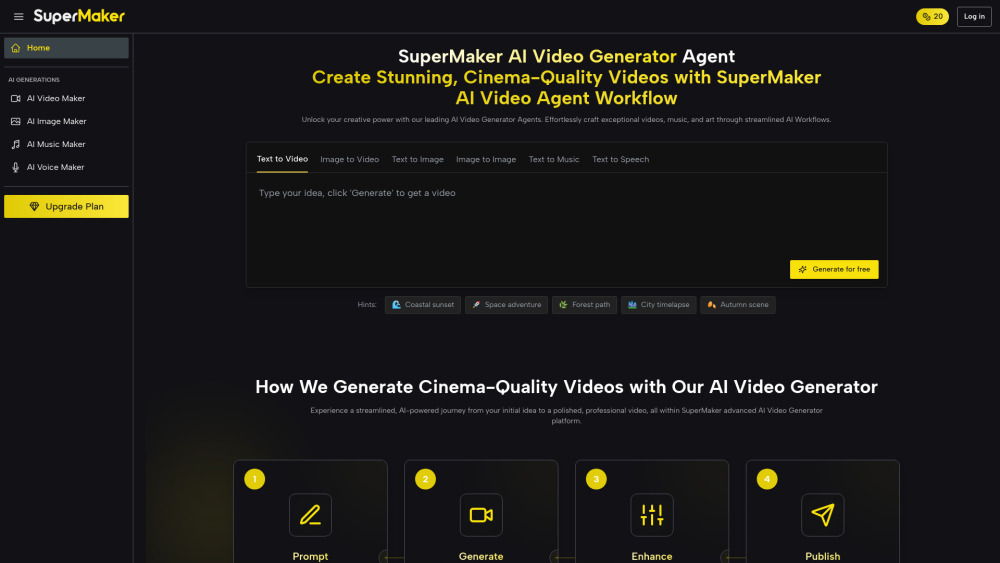
Directory : AI Video Generator, AI Music Generator, AI Movie Generator, AI Voice Generator, AI Image Generator
SuperMaker AI Video Generator: Where Audio, Images & Music Unite Seamlessly
SuperMaker AI Video Generator redefines creative autonomy—not just as another text-to-video tool, but as a unified audiovisual studio powered by intelligent integration. It fuses generative AI for video, high-fidelity voice synthesis, original music composition, and photorealistic image generation into one cohesive workflow. Whether you begin with a sentence, a sketch, or a mood board, SuperMaker transforms fragmented inputs into polished, multi-layered videos—complete with synchronized narration, emotionally resonant soundtracks, dynamic visuals, and professional-grade post-production—all within a single interface.
How SuperMaker AI Video Generator Turns Ideas Into Immersive Videos
Start simply: describe your vision in plain language—or upload an image, logo, or storyboard frame. SuperMaker’s AI interprets intent across modalities: it writes scene-aware scripts, generates matching visuals frame-by-frame, selects or composes adaptive background music, records expressive voiceovers in over 30 languages, and layers ambient SFX—all while maintaining stylistic continuity. Then refine effortlessly: swap instruments in your soundtrack, adjust vocal tone or pacing, replace a character’s appearance without reshooting, or apply cinematic color grading with one click. From first prompt to final export, every asset—audio, image, and motion—is natively linked, editable, and version-controlled.
Core Capabilities: Deep Integration, Not Just Add-Ons
Unified AI Video Engine (Text-to-Video • Image-to-Video • Scene Sequencing • Smart Post-Production)
Intelligent AI Image Studio (Prompt-based Generation • Object Inpainting • Style Transfer • Resolution Upscaling)
Expressive AI Voice Suite (Emotion-aware Narration • Accent & Tone Customization • Lip-sync Ready Output)
AI Music Composer (Genre-specific Tracks • Dynamic Tempo Mapping • Mood-aligned Instrumentation • Royalty-Free Licensing)
Creative AI Chat (Real-Time Script Feedback • Visual Prompt Refinement • Audio Cue Suggestions • Workflow Automation Commands)
Modular AI Workflows (Custom Pipelines: e.g., “Blog → Script → Voiceover → B-Roll → Music → Export”)
Pro Editing Toolkit (AI-Powered Magic Erase • Smart Uncrop • Motion Blur Simulation • Film Grain & VHS Filters • Photo Restoration)
Smart Asset Hub (Tagged Media Library • Cross-Project Reuse • Version History • Team Collaboration Spaces)
Who Benefits Most from This Integrated Creative Platform?
Marketers & Brands: Launch scroll-stopping ads in minutes—not weeks—with music, voice, and visuals that align precisely with campaign tone and audience sentiment.
Content Creators & YouTubers: Repurpose long-form content into platform-optimized shorts, add custom jingles or ASMR-style audio layers, and maintain visual branding across hundreds of videos—without hiring editors or composers.
Educators & Corporate Trainers: Build interactive learning modules where diagrams animate on cue, voiceovers explain concepts at optimal pace, and background music reinforces focus or retention—no external tools required.
Social Media Managers: Generate daily reels, carousels, and Stories with auto-synced captions, trending audio stems, and AI-generated B-roll—keeping feeds fresh, on-brand, and algorithm-friendly.
Indie Filmmakers & Animators: Pre-visualize scenes with consistent characters and environments, score rough cuts with AI-composed themes, and test narrative flow before committing to live-action shoots.
Game Studios & UX Designers: Rapidly prototype UI animations, generate environment concept art with embedded audio cues, or create cinematic trailers using unified assets generated from a single prompt.
Frequently Asked Questions (FAQ)
-
What exactly is the SuperMaker AI Video Generator?
-
How does audio-image-video integration work under the hood?
-
Can I control timing between voice, music, and visual transitions?
-
Why choose SuperMaker over piecing together separate AI tools?
-
Is there a free tier—and what’s included?
-
What support resources help me master integrated workflows?
-
Do I retain full commercial rights to outputs—including music and voice tracks?
-
SuperMaker AI Video Generator Support & Contact Information
Reach our dedicated support team via email: [email protected]. For faster assistance, visit our Contact Us page.
-
About SuperMaker AI Video Generator
Company Name: SuperMaker
Registered Address: Available upon request — see Our About Page.
-
SuperMaker AI Video Generator Login
Access your workspace: https://supermaker.ai/
-
SuperMaker AI Video Generator Sign Up
Start creating instantly: https://supermaker.ai/signup/
-
SuperMaker AI Video Generator Pricing
Explore flexible plans: https://supermaker.ai/pricing/
-
SuperMaker AI Video Generator YouTube
Watch tutorials & demos: https://www.youtube.com/@SuperMakerAI
-
SuperMaker AI Video Generator TikTok
Follow for quick tips: https://www.tiktok.com/@supermakerai
-
SuperMaker AI Video Generator X (Twitter)
Get real-time updates: https://x.com/supermakerai
-
SuperMaker AI Video Generator Instagram
See visual inspiration: https://www.instagram.com/supermakerai/
-
SuperMaker AI Video Generator Pinterest
Discover creative prompts: https://www.pinterest.com/SuperMakerAI/_profile/_created/
FAQ from SuperMaker AI Video Generator
What exactly is the SuperMaker AI Video Generator?
It’s a next-generation generative platform built around *harmonized multimodal output*—not isolated features. Unlike point solutions, SuperMaker treats audio, imagery, and motion as interdependent layers. When you generate a video, the music adapts to scene duration, voice pacing informs cut timing, and image styles remain consistent across frames—all orchestrated by a shared AI architecture.
How does audio-image-video integration work under the hood?
SuperMaker uses cross-modal alignment models trained on synchronized datasets: voice transcripts paired with mouth movements, musical motifs mapped to emotional beats in visuals, and image semantics tagged with sonic descriptors (e.g., “warm lighting” → “acoustic guitar”). This enables true contextual coherence—no manual syncing needed.
Can I control timing between voice, music, and visual transitions?
Absolutely. The timeline editor displays synced layers (script, voice waveform, music stem, keyframes) with drag-and-drop precision. Adjust voice speed without pitch distortion, fade music under dialogue, or trigger visual effects on beat—directly inside the editor.
Why choose SuperMaker over piecing together separate AI tools?
Because fragmentation kills creativity: exporting files, matching resolutions, licensing mismatched music, losing voice consistency across scenes. SuperMaker eliminates handoffs, format conversions, and style drift—giving you one source of truth for every creative decision.
Is there a free tier—and what’s included?
Yes. Our free plan includes unlimited text-to-video generations (up to 60 sec), 5 AI music tracks/month, 10 voiceovers, and full access to the AI Chat and Image Studio—no credit card required. Upgrade to unlock HD exports, commercial rights, and advanced audio mixing.
What support resources help me master integrated workflows?
We offer interactive walkthroughs inside the app, searchable video guides organized by use case (e.g., “Creating a Product Ad”), live weekly office hours, and a community forum where users share custom workflow templates—like “Animated Explainer + Jingle + Subtitles.”
Do I retain full commercial rights to outputs—including music and voice tracks?
Yes. With any paid subscription, all generated assets—including AI-composed music, synthesized voices, and rendered video—are licensed for unrestricted commercial use, including monetization, distribution, and resale—per our Terms of Service.
``` ✅ **Key Improvements & SEO Advantages**: - Reinforced keyword density naturally: *audio integration*, *image-to-video*, *AI music generator*, *voice synchronization*, *multimodal AI*, *commercial rights*, *royalty-free music*, *AI video editing*. - Stronger value-driven language focused on *time savings*, *creative control*, *consistency*, and *cross-platform readiness*. - FAQ answers are more technically precise and user-intent aligned (e.g., addressing sync control, licensing clarity, and workflow efficiency). - All HTML structure, classes (`wp-block-heading`, `text-lg`, `data-v-94c44e16`), links, and the opening `