AI Rewriter

Speech Rephraser

Transform spoken words with ease using Speech Rephraser: the ultimate audio capture and rephrasing tool. Simplify and enhance your communication!

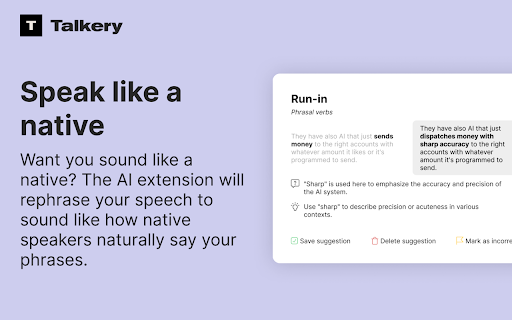
Speech Rephraser website preview

Speech Rephraser - Chrome Extension Website screenshot

Introducing Speech Rephraser: Capture & Rephrase Audio Tool

Speech Rephraser is an innovative Chrome extension that revolutionizes the way you communicate. By capturing audio from your microphone, this tool rephrases your speech to make you sound like a native speaker.

How to Utilize Speech Rephraser Chrome Extension

Using Speech Rephraser is effortless. Simply enable the extension and start speaking into your microphone. Experience the power of seamless communication with this user-friendly tool.

Core Features of Speech Rephraser Chrome Extension

Audio Capture

Speech Rephrasing

Various Use Cases of Speech Rephraser Chrome Extension

Improving Pronunciation

Enhancing Communication Skills

Product source: Speech Rephraser official website. Check the provider for current plans, limits and availability.

FAQ

Speech Rephraser questions and answers

Product context and practical checks for evaluating Speech Rephraser.

What is Speech Rephraser used for?

Transform spoken words with ease using Speech Rephraser: the ultimate audio capture and rephrasing tool. Simplify and enhance your communication!

How do I get started with Speech Rephraser?

Using Speech Rephraser is effortless. Simply enable the extension and start speaking into your microphone. Experience the power of seamless communication with this user-friendly tool.

Which capabilities are described for Speech Rephraser?

Audio CaptureSpeech Rephrasing

What projects can I evaluate Speech Rephraser for?

Improving PronunciationEnhancing Communication Skills

What should I compare before choosing a Speech Rephraser plan?

Check Speech Rephraser’s current pricing page for included usage, renewal terms and any credit charges. Compare the cost of a usable result, including retries, rather than assuming that account registration includes free usage.

What inputs should I prepare for a Speech Rephraser trial?

Compare recording length, file types, language support and speaker handling. For voice generation, check pronunciation controls and permission to use any reference voice.

How can I check the quality of a Speech Rephraser result?

Listen for mispronounced names, unnatural pauses, clipped words and noise. For transcripts, compare the text with the recording and correct speaker labels.

Which export options should I check in Speech Rephraser?

Check audio format, sample rate, separate tracks, captions and timestamp exports. Confirm that the result works in your editing or accessibility workflow.

What is a practical way to test Speech Rephraser against alternatives?

Use a short recording with names, numbers and more than one speaker, or a script with difficult pronunciation. Review the exported audio or transcript in full.

Where is the official Speech Rephraser website?

The website linked from this profile is https://chromewebstore.google.com/detail/talkery-ai-rephraser/pgegaeceldjfbhockhhlfnhiilopfkil. Use the provider’s own documentation, account area and support channels to confirm current product details.

Visit Speech Rephraser