Text to Image

SoulGen

SoulGen is a free AI image generator that allows users to create art of real or anime girls from text or prompts. It utilizes machine learning algorithms and deep neural networks to generate customized AI characters based on user descriptions.

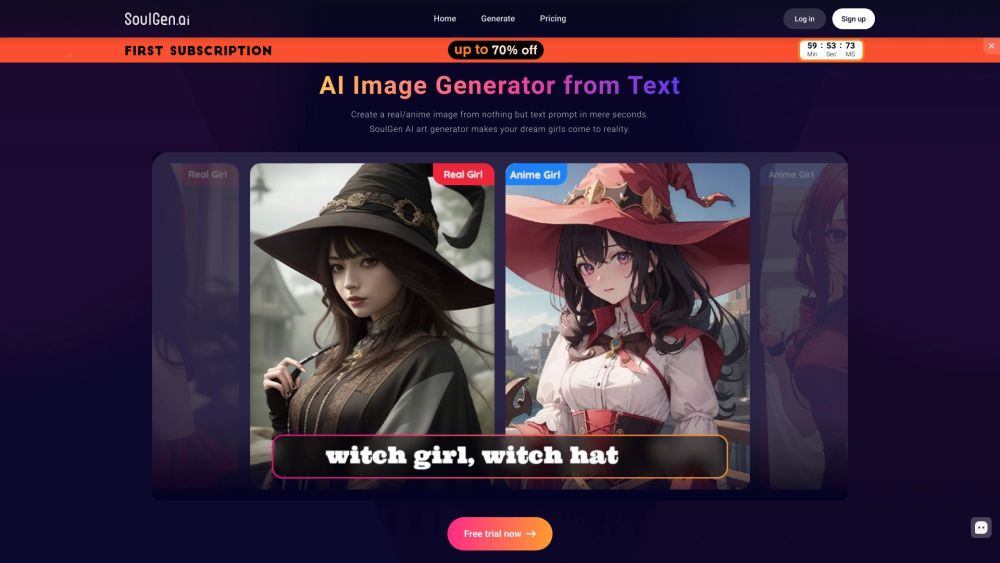
SoulGen website preview

SoulGen Website screenshot

Discovering SoulGen

SoulGen is a revolutionary AI tool designed to generate impressive images of real or anime girls from textual prompts. By leveraging advanced machine learning algorithms and deep neural networks, SoulGen creates customized characters based on user inputs.

Getting Started with SoulGen

Using SoulGen is straightforward: 1. Sign in or create a free trial account. 2. Input a text description or prompt of your desired character. 3. Select the style: real girl or anime girl. 4. Click the 'Generate' button to receive your AI-crafted image.

Key Features of SoulGen

SoulGen offers: - AI-driven image creation from text descriptions - Options to create real or anime girl images - Customization to mimic specific individuals or celebrities - Image editing tools for adding, extending, or modifying content - AI Outpainting for expanding and enhancing images - A variety of anime art styles to choose from

Applications of SoulGen

SoulGen can be used for: - Crafting unique anime characters for stories or design projects - Generating personalized avatars or profile pictures - Visualizing fictional characters or dream figures - Creating art that resembles specific people - Exploring creative visual possibilities with AI-generated images

Product source: SoulGen official website. Check the provider for current plans, limits and availability.

FAQ

SoulGen questions and answers

Product context and practical checks for evaluating SoulGen.

What is SoulGen used for?

SoulGen is a free AI image generator that allows users to create art of real or anime girls from text or prompts. It utilizes machine learning algorithms and deep neural networks to generate customized AI characters based on user descriptions.

How do I get started with SoulGen?

Using SoulGen is straightforward: 1. Sign in or create a free trial account. 2. Input a text description or prompt of your desired character. 3. Select the style: real girl or anime girl. 4. Click the 'Generate' button to receive your AI-crafted image.

Which capabilities are described for SoulGen?

SoulGen offers: - AI-driven image creation from text descriptions - Options to create real or anime girl images - Customization to mimic specific individuals or celebrities - Image editing tools for adding, extending, or modifying content - AI Outpainting for expanding and enhancing images - A variety of anime art styles to choose from

What projects can I evaluate SoulGen for?

SoulGen can be used for: - Crafting unique anime characters for stories or design projects - Generating personalized avatars or profile pictures - Visualizing fictional characters or dream figures - Creating art that resembles specific people - Exploring creative visual possibilities with AI-generated images Join the SoulGen Community on Discord Connect with the SoulGen community on Discord: https://discord.gg/8Fa42kvrNA. For additional Discord information, click here(/discord/8fa42kvrna). Contact SoulGen Support For customer service, reach out via email: [email protected]. SoulGen Login Access your account here: https://www.soulgen.ai/ SoulGen Sign Up Create an account here: https://www.soulgen.ai/ SoulGen Pricing View pricing details here: https://www.soulgen.ai/pricing?from=home Follow SoulGen on Facebook Stay updated on Facebook: https://www.facebook.com/profile.php?id=100088580054541 Subscribe to SoulGen on YouTube Check out our YouTube channel: https://www.youtube.com/channel/UCEDjK17qzObFEyAHFEYhK7g Follow SoulGen on TikTok Find us on TikTok: https://www.tiktok.com/@soulgen_ai Follow SoulGen on Twitter Follow us on Twitter: https://twitter.com/SoulGen_AI Follow SoulGen on Instagram Check us out on Instagram: https://www.instagram.com/soulgen_ai/

What should I compare before choosing a SoulGen plan?

View pricing details here: https://www.soulgen.ai/pricing?from=home Confirm current prices and allowances on the provider’s website before purchasing.

What inputs should I prepare for a SoulGen trial?

Look for text prompts, image references, masks or sketches as appropriate. Compare composition control, supported upload types and the ability to revise a selected area.

How can I check the quality of a SoulGen result?

Inspect text, hands, edges, reflections and repeated objects at full size. Check that important product or brand details survive editing.

Which export options should I check in SoulGen?

Compare pixel dimensions, transparency, file formats and any enlargement options. Confirm that the downloaded result works in your design or publishing software.

What is a practical way to test SoulGen against alternatives?

Prepare a brief with a subject, composition, lighting and required output size. Test a first generation and a targeted revision to see how much control you retain.

Where is the official SoulGen website?

The website linked from this profile is https://www.soulgen.net. Use the provider’s own documentation, account area and support channels to confirm current product details.

Visit SoulGen