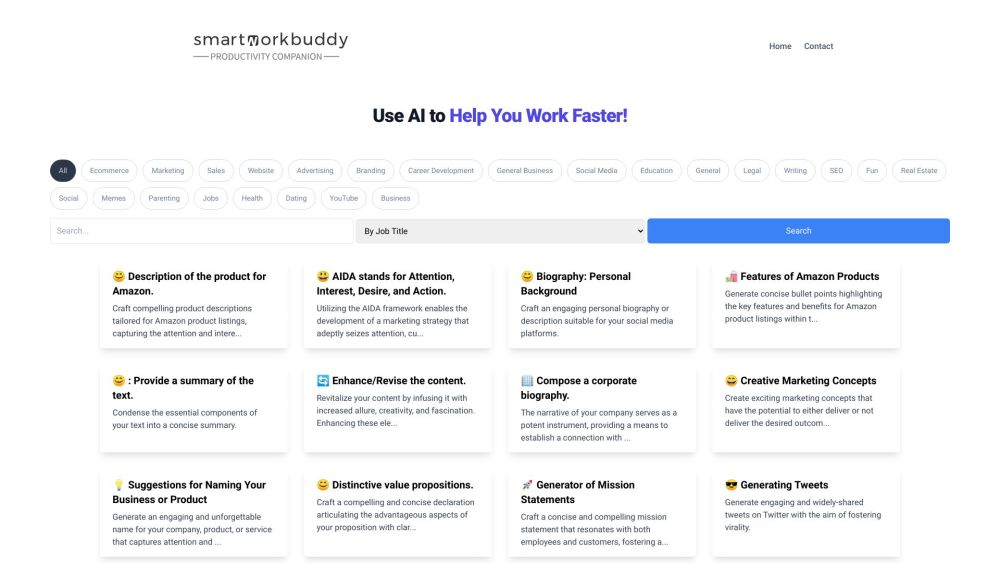
### SmartWorkBuddy: AI-Powered Tool for Enhanced Work Efficiency  --- #### What is SmartWorkBuddy? SmartWorkBuddy is an innovative AI-powered tool designed to help you work faster and more efficiently. Leveraging advanced artificial intelligence, SmartWorkBuddy provides tailored solutions to streamline your workflow, making your tasks easier and more effective. --- #### How to Use SmartWorkBuddy? Using SmartWorkBuddy is simple and intuitive. Here’s how you can get started: 1. **Select Pre-Made Prompts**: Browse through a variety of common prompts categorized by job title or task type. 2. **Customize Your Workflow**: Use the AI to refine and customize the prompts to suit your specific needs. 3. **Boost Efficiency**: Implement these AI-enhanced prompts to speed up your work processes. 4. **Free Access**: Take advantage of SmartWorkBuddy’s AI capabilities for free. --- #### SmartWorkBuddy's Core Features SmartWorkBuddy offers a wide array of features to cover diverse professional needs: 1. **Product Descriptions for Amazon**: Craft compelling descriptions tailored for Amazon listings. 2. **Marketing Strategy Development**: Utilize the AIDA framework to create effective marketing strategies. 3. **Personal Biographies for Social Media**: Compose engaging bios for platforms like LinkedIn and Instagram. 4. **Concise Bullet Points**: Highlight key features and benefits in a clear and succinct manner. 5. **Text Summarization**: Condense lengthy texts into concise summaries. 6. **Content Revitalization**: Enhance and add creativity to your existing content. 7. **Marketing Concepts**: Develop innovative and exciting marketing ideas. 8. **Twitter Engagement**: Generate tweets that are engaging and widely shared. 9. **Captivating Paragraphs**: Create paragraphs that capture attention and entertain. 10. **Imaginative Narratives**: Write short, imaginative stories. 11. **Sentence Transformation**: Turn simple phrases into intricate sentences. 12. **Formal Cover Letters**: Compose professional cover letters. 13. **Review Responses**: Craft professional and friendly responses to customer reviews. 14. **Job Descriptions**: Write compelling job descriptions. 15. **Subject Reviews**: Compose reviews on various topics. 16. **LinkedIn Biographies**: Create polished bios for LinkedIn profiles. 17. **FAQs**: Develop a comprehensive set of frequently asked questions. 18. **eBook Outlines**: Craft detailed outlines for eBooks. 19. **Customer Testimonials**: Create authentic and compelling customer testimonials. 20. **Legal Documents**: Generate comprehensive Non-Disclosure Agreements and other legal documents. 21. **Business Names**: Create unique names for businesses. 22. **Advertising Copy**: Develop compelling ad copy for Facebook, Google, and other platforms. 23. **Real Estate Insights**: Generate factual insights and market updates for the real estate sector. 24. **Email Templates**: Compose various professional email templates for different needs. --- #### SmartWorkBuddy's Use Cases Here are some practical applications of SmartWorkBuddy: - **Amazon Product Descriptions**: Write detailed and appealing product descriptions for Amazon. - **Marketing Strategies**: Develop comprehensive marketing plans using proven frameworks like AIDA. - **Social Media Content**: Create engaging bios, posts, and tweets. - **Text Summarization**: Summarize long documents or articles. - **Content Enhancement**: Add flair and creativity to your content. - **Legal Documentation**: Generate essential legal documents and agreements. - **Email Communication**: Create a wide range of professional email templates for different purposes. - **Real Estate Market Analysis**: Provide insightful and factual market analyses. - **Business Naming**: Generate creative and unique business names. --- #### Support and Contact Information For customer service, support, or refund inquiries, contact SmartWorkBuddy at: - **Support Email**: [email protected] - **Visit**: [SmartWorkBuddy Contact Page](https://smartworkbuddy.com/) --- #### About SmartWorkBuddy - **Company Name**: SmartWorkBuddy, Inc. For more details and frequently asked questions, visit our website and explore the comprehensive resources we offer to maximize your work efficiency.
Product source: SmartWorkBuddy official website. Check the provider for current plans, limits and availability.