AI Ad Generator

SJinn

SJinn: Your all-in-one AI agent for images, videos, audio & 3D content—create smarter, faster, and limitless.

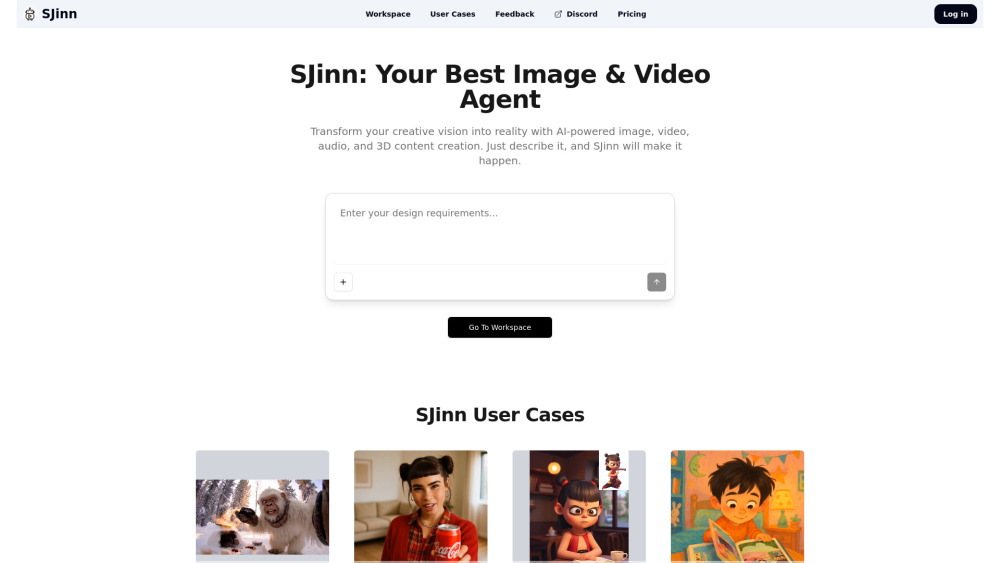
SJinn website preview

SJinn Website screenshot

Introducing SJinn: Your Unified AI Creative Agent

SJinn redefines creative production as an intelligent, multimodal AI agent—engineered from the ground up to understand, interpret, and manifest ideas across images, videos, audio, and 3D environments. Unlike fragmented tools that specialize in just one modality, SJinn operates as a cohesive creative partner: describe your intent in plain language, and it orchestrates high-fidelity generation across all four dimensions—seamlessly, cohesively, and with professional-grade precision.

Getting Started with SJinn

No prompts, no plugins, no pipelines—just clear intention. Enter a natural-language description (e.g., “a steampunk cat astronaut floating above Mars at sunset, cinematic lighting, 4K”), select your output format—image, video, voiceover, or 3D model—and SJinn handles the rest. Its adaptive inference engine selects optimal models, applies cross-modal consistency logic, and delivers polished, production-ready assets in minutes.

SJinn’s Multimodal Engine

Intelligent Image Synthesis

Temporal Video Generation

Voice & Sound Design AI

Parametric 3D Asset Creation

Unified Text-to-Experience Workflow

Real-World Applications

Vlog Storyboarding & Auto-Editing

High-Converting Ad Campaigns (video + voice + thumbnail)

Character Continuity Engine for Animated Series

Scalable 3D Product Libraries for E-commerce

AI-Narrated Baby Lullaby Podcasts (voice + ambient sound)

Dynamic Product Showcases with 360° Rotation & Audio Tags

Iterative Image Refinement Loop (describe → generate → adjust → regenerate)

Thematic Concept Series (e.g., ‘Retro-Futuristic Vehicles’)

ASMR Scene Assembly with Spatial Audio & Visual Sync

Historical Photo Revival with Colorization & Motion Enhancement

Fashion Campaign Kits (mood board → poster → runway video)

Stylized Rendering: Transform Any Image into Studio Ghibli Aesthetic

One-Click Background Removal + Shadow & Lighting Matching

Product source: SJinn official website. Check the provider for current plans, limits and availability.

FAQ

SJinn questions and answers

Product context and practical checks for evaluating SJinn.

What is SJinn used for?

SJinn: Your all-in-one AI agent for images, videos, audio & 3D content—create smarter, faster, and limitless.

How do I get started with SJinn?

No prompts, no plugins, no pipelines—just clear intention. Enter a natural-language description (e.g., “a steampunk cat astronaut floating above Mars at sunset, cinematic lighting, 4K”), select your output format—image, video, voiceover, or 3D model—and SJinn handles the rest. Its adaptive inference engine selects optimal models, applies cross-modal consistency logic, and delivers polished, production-ready assets in minutes.

What projects can I evaluate SJinn for?

Vlog Storyboarding & Auto-EditingHigh-Converting Ad Campaigns (video + voice + thumbnail)Character Continuity Engine for Animated SeriesScalable 3D Product Libraries for E-commerceAI-Narrated Baby Lullaby Podcasts (voice + ambient sound)Dynamic Product Showcases with 360° Rotation & Audio TagsIterative Image Refinement Loop (describe → generate → adjust → regenerate)Thematic Concept Series (e.g., ‘Retro-Futuristic Vehicles’)ASMR Scene Assembly with Spatial Audio & Visual SyncHistorical Photo Revival with Colorization & Motion EnhancementFashion Campaign Kits (mood board → poster → runway video)Stylized Rendering: Transform Any Image into Studio Ghibli AestheticOne-Click Background Removal + Shadow & Lighting Matching

What should I compare before choosing a SJinn plan?

Flexible plans built for creators and teams: https://sjinn.ai/pricing Confirm current prices and allowances on the provider’s website before purchasing.

What inputs should I prepare for a SJinn trial?

Compare text prompts, reference frames, source footage and audio support. Check duration, aspect ratio and whether the tool lets you keep a subject consistent between shots.

How can I check the quality of a SJinn result?

Watch the entire clip for motion errors, distorted objects, changing identities, lip-sync problems and abrupt transitions. Inspect the downloaded file as well as the preview.

Which export options should I check in SJinn?

Check export resolution, frame rate, aspect ratio, audio tracks and watermark rules. A good preview is not a substitute for an export that fits your publishing channel.

What is a practical way to test SJinn against alternatives?

Use a short shot with one subject and one camera movement. Keep the prompt and duration constant, then compare usable seconds and the number of regenerations.

What should I review before uploading material to SJinn?

Read the provider’s rules on access, retention, deletion and use of uploaded material. Start with a non-confidential sample that you have permission to use.

Where is the official SJinn website?

The website linked from this profile is https://sjinn.ai. Use the provider’s own documentation, account area and support channels to confirm current product details.

Visit SJinn