Table of contents
SigmaNote: AI-Powered, Editable, Searchable Notes from Files/Links
SigmaNote: Turn files & links into smart, editable, searchable notes—instantly. AI-powered knowledge capture, reimagined.
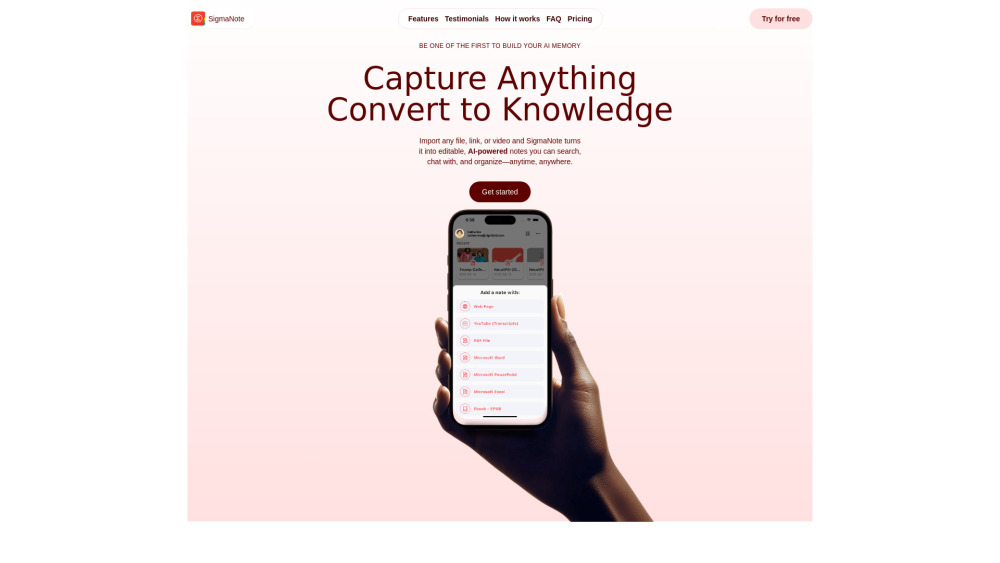
Introducing SigmaNote: Your AI-Native Note-Taking Engine
SigmaNote isn’t just another note app — it’s an intelligent layer between you and your information. Whether it’s a dense research paper, a client pitch deck, a YouTube tutorial, or a long-form article, SigmaNote instantly transforms raw digital content into rich, human-editable, AI-orchestrated notes. Built for thinkers, learners, and doers, it merges capture, comprehension, and recall into one seamless flow — turning passive consumption into active knowledge building.
How SigmaNote Works — In Three Effortless Steps
First, import: drag a PDF, paste a URL, forward an email, or drop a video link (including YouTube). Second, convert: with one tap, SigmaNote extracts key ideas, structures them in clean, semantic Markdown, and preserves source fidelity — so you can toggle between AI summary and original context anytime. Third, engage: search across all your notes in seconds, ask natural-language questions (“Compare these two proposals”), generate action items, or chat across documents to uncover hidden connections.
Why SigmaNote Stands Apart
Convert Anything — Not Just Text
Edit Like a Writer, Think Like a Strategist
Import from Anywhere: Web pages, PDFs, EPUBs, PPTX, DOCX, XLSX, Gmail, Dropbox, Notion, Safari, and YouTube (with auto-transcript)
One-Click Markdown Generation — Optimized for AI reasoning & human readability
Conversational Notes: Ask, summarize, rewrite, outline, or cross-reference — no copying or switching tabs
Spaces That Scale: Organize by project, role, or topic — with nested structure and smart tagging
Intelligent Editor: Auto-suggest headings, link related notes, surface citations, and draft follow-up tasks
Context-Aware Chat: Every message remembers not just your notes — but the exact file, timestamp, and paragraph it came from
Real-World SigmaNote Workflows
Turn academic papers or conference recordings into personalized study notes — then quiz yourself via chat.
Prep for high-stakes meetings in minutes: import decks, contracts, and emails — then prompt SigmaNote to highlight risks, action items, and talking points.
Build a living knowledge base: unify meeting transcripts, design specs, customer feedback, and internal docs — all searchable, editable, and AI-ready.
Frequently Asked Questions
-
Is SigmaNote free to use?
-
What file types and links does SigmaNote support?
-
How does SigmaNote protect my privacy and intellectual property?
-
Can I change or cancel my plan anytime?
-
How do I manage or cancel my subscription?
-
Where can I get fast, friendly support?
-
SigmaNote Support & Contact
Reach our team directly at [email protected]. For faster responses, visit our official Discord community.
-
About SigmaNote
SigmaNote is developed by SignifyID LLC — a U.S.-based company focused on ethical, user-owned AI tools that augment — never replace — human insight.
-
SigmaNote on YouTube
Watch tutorials, feature walkthroughs, and real-user workflows: https://www.youtube.com/@SignifyID
-
SigmaNote on TikTok
Short, actionable tips for power users: https://www.tiktok.com/@signifyid
-
SigmaNote on LinkedIn
Follow for product updates, research insights, and knowledge management best practices: https://www.linkedin.com/company/signifyid/
-
SigmaNote on X (Twitter)
Join the conversation: https://x.com/SignifyID
FAQ from SigmaNote
What is SigmaNote?
SigmaNote is a next-generation knowledge assistant that turns static files and links into dynamic, editable, and AI-interactive notes. It bridges the gap between information ingestion and intelligent application — helping you retain more, think deeper, and act faster — all within a single, secure, Markdown-native environment.
How to use SigmaNote?
Start by importing any supported source — whether it’s a webpage, PDF, presentation, or video. SigmaNote processes it intelligently, generating structured Markdown you can refine, annotate, or expand. Then use the built-in chat to interrogate your notes, synthesize insights across sources, or convert ideas into drafts and tasks — all while retaining full traceability to the original material.
Is SigmaNote free to use?
Yes — the free Starter plan includes 20 monthly imports, 15 AI interactions, and 1 GB of encrypted storage. No credit card required. Upgrade anytime for unlimited conversions, priority AI, advanced search filters, and team collaboration features.
What file types and links can I import?
PDF, DOCX, PPTX, XLSX, EPUB, plain text, web URLs (full-page extraction), YouTube videos (auto-transcribed), Gmail messages, Dropbox files, and iOS Share Sheet integrations. We’re actively expanding support for Notion, Slack, and Figma — with roadmap updates shared monthly on Discord.
How secure is my data and chat history?
Your data is yours — end-to-end encrypted at rest and in transit (TLS 1.3 + AES-256). SigmaNote never trains its models on your content, sells your data, or shares it with third parties. You own full deletion rights: remove individual notes, original sources, or entire chat histories — permanently and instantly.
Can I upgrade, downgrade, or cancel anytime?
Absolutely. All subscriptions are managed directly through the App Store or Google Play. Changes apply at the start of your next billing cycle — and you retain full access to all features and credits until then.
How do I cancel my subscription?
Go to your device’s Settings → [Apple ID / Google Account] → Subscriptions → SigmaNote → Cancel Subscription. Your access remains active through the end of your current period — no prorated refunds, but no surprises either.
How do I get help if I run into issues?
Our fastest support channel is Discord, where engineers and power users respond in real time. For sensitive or account-specific requests, email [email protected]. We aim to reply within 4 business hours.