Large Language Models (LLMs)

Shorty - Chrome Extension

Enhance your reading experience with Shorty - Chrome Extension! Choose from 5 article summary options and save time while staying informed.

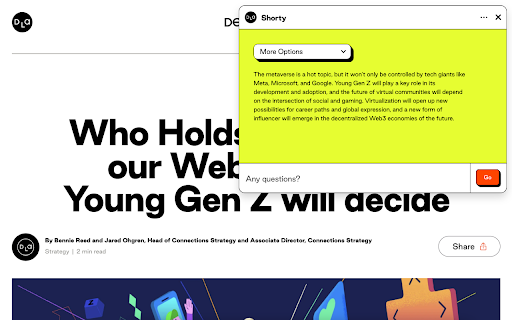
Shorty - Chrome Extension website preview

Shorty - Chrome Extension Website screenshot

Introducing Shorty - Chrome Extension: 5 Article Summary Options

Shorty ai chrome extension is an innovative tool that harnesses the power of artificial intelligence to provide efficient article summarization. With Shorty, you can quickly obtain concise overviews of complex topics and save time while staying up-to-date with the latest news and information.

How to Make the Most of Shorty ai Chrome Extension?

Using Shorty ai chrome extension is as easy as pie. Simply paste the article you want to summarize and select one of the five available summary options. Whether you prefer a brief overview or a more detailed summary, Shorty has got you covered.

The Core Features of Shorty ai Chrome Extension

AI-powered Summarization at Your Fingertips

Shorty utilizes advanced artificial intelligence algorithms to condense lengthy articles into concise summaries. Say goodbye to information overload and enjoy the convenience of digestible content.

Choose from 5 Summary Options

With Shorty, you have the flexibility to select from five different summary options. Whether you want a quick glance or a more comprehensive summary, you can tailor the level of detail to suit your needs.

Specific Follow-up Questions

Shorty doesn't just stop at summarization. It also generates specific follow-up questions based on the article content, allowing you to delve deeper into the topic and enhance your understanding.

Use Cases of Shorty ai Chrome Extension

Summarizing Lengthy Articles Quickly

Long articles can be time-consuming to read. Shorty ai chrome extension streamlines the process by providing concise summaries, enabling you to grasp the main points swiftly and efficiently.

Getting Concise Overviews of Complex Topics

Complex topics often require multiple sources and extensive reading. Shorty simplifies the task by condensing the information into brief summaries, allowing you to gain a comprehensive understanding with ease.

Product source: Shorty - Chrome Extension official website. Check the provider for current plans, limits and availability.

FAQ

Shorty - Chrome Extension questions and answers

Product context and practical checks for evaluating Shorty - Chrome Extension.

What is Shorty - Chrome Extension used for?

Enhance your reading experience with Shorty - Chrome Extension! Choose from 5 article summary options and save time while staying informed.

How do I get started with Shorty - Chrome Extension?

Using Shorty ai chrome extension is as easy as pie. Simply paste the article you want to summarize and select one of the five available summary options. Whether you prefer a brief overview or a more detailed summary, Shorty has got you covered.

Which capabilities are described for Shorty - Chrome Extension?

AI-powered Summarization at Your FingertipsShorty utilizes advanced artificial intelligence algorithms to condense lengthy articles into concise summaries. Say goodbye to information overload and enjoy the convenience of digestible content.Choose from 5 Summary OptionsWith Shorty, you have the flexibility to select from five different summary options. Whether you want a quick glance or a more comprehensive summary, you can tailor the level of detail to suit your needs.Specific Follow-up QuestionsShorty doesn't just stop at summarization. It also generates specific follow-up questions based on the article content, allowing you to delve deeper into the topic and enhance your understanding.

What projects can I evaluate Shorty - Chrome Extension for?

Summarizing Lengthy Articles QuicklyLong articles can be time-consuming to read. Shorty ai chrome extension streamlines the process by providing concise summaries, enabling you to grasp the main points swiftly and efficiently.Getting Concise Overviews of Complex TopicsComplex topics often require multiple sources and extensive reading. Shorty simplifies the task by condensing the information into brief summaries, allowing you to gain a comprehensive understanding with ease.

What should I compare before choosing a Shorty - Chrome Extension plan?

Check Shorty - Chrome Extension’s current pricing page for included usage, renewal terms and any credit charges. Compare the cost of a usable result, including retries, rather than assuming that account registration includes free usage.

What inputs should I prepare for a Shorty - Chrome Extension trial?

Look for text prompts, image references, masks or sketches as appropriate. Compare composition control, supported upload types and the ability to revise a selected area.

How can I check the quality of a Shorty - Chrome Extension result?

Inspect text, hands, edges, reflections and repeated objects at full size. Check that important product or brand details survive editing.

Which export options should I check in Shorty - Chrome Extension?

Compare pixel dimensions, transparency, file formats and any enlargement options. Confirm that the downloaded result works in your design or publishing software.

What is a practical way to test Shorty - Chrome Extension against alternatives?

Prepare a brief with a subject, composition, lighting and required output size. Test a first generation and a targeted revision to see how much control you retain.

Where is the official Shorty - Chrome Extension website?

The website linked from this profile is https://chromewebstore.google.com/detail/shorty-short-on-time-long/khdmegcpniieiijbakjglblieiffeeao. Use the provider’s own documentation, account area and support channels to confirm current product details.

Visit Shorty - Chrome Extension