AI Cooking Assistant

Scan My Kitchen

Scan My Kitchen: Instantly get personalized recipe suggestions using ingredients you already have. Turn what’s in your pantry into delicious meals!

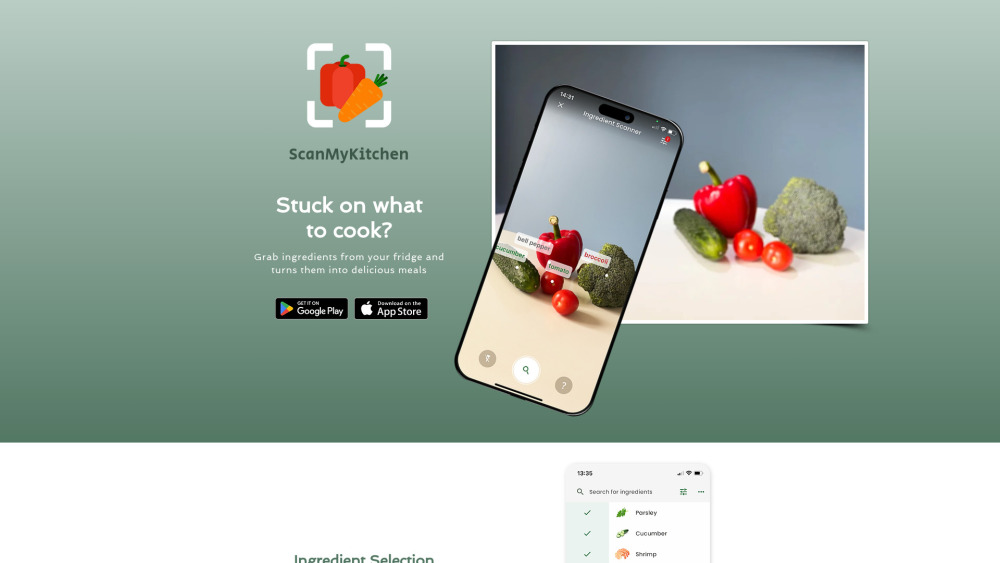
Scan My Kitchen website preview

Scan My Kitchen Website screenshot

Discover Scan My Kitchen

Scan My Kitchen is an innovative app designed to simplify your cooking experience by helping you create delicious meals with ingredients you already have on hand. Whether you're looking for traditional recipes or modern, AI-driven suggestions, this app offers endless culinary inspiration. With customizable filters, users can refine their searches based on dietary preferences, meal types, and more, making it easier than ever to find the perfect dish. Additionally, the app provides the option to explore alternative recipes, ensuring you always have a meal that suits your taste.

How to Get Started with Scan My Kitchen

Using Scan My Kitchen is simple and intuitive. Just gather your ingredients, scan them using the in-app camera, and let the app generate a variety of recipe ideas. Alternatively, you can manually input ingredients and apply filters to find recipes tailored to your specific needs.

Key Features of Scan My Kitchen

Personalized recipe suggestions from your available ingredients

AI-enhanced culinary ideas

Advanced filters for diet and meal customization

Option to explore alternative recipes

In-app camera scanning (Beta)

When to Use Scan My Kitchen

Get meal ideas based on what’s in your kitchen

Tailor recipe searches to your dietary preferences

Discover alternative recipes for a change of pace

  • Scan My Kitchen Support & Contact Information

    For customer service or support, reach out to Scan My Kitchen via email: [email protected]. For more contact details, visit our contact page.

Product source: Scan My Kitchen official website. Check the provider for current plans, limits and availability.

FAQ

Scan My Kitchen questions and answers

Product context and practical checks for evaluating Scan My Kitchen.

What is Scan My Kitchen used for?

Scan My Kitchen: Instantly get personalized recipe suggestions using ingredients you already have. Turn what’s in your pantry into delicious meals!

How do I get started with Scan My Kitchen?

Using Scan My Kitchen is simple and intuitive. Just gather your ingredients, scan them using the in-app camera, and let the app generate a variety of recipe ideas. Alternatively, you can manually input ingredients and apply filters to find recipes tailored to your specific needs.

Which capabilities are described for Scan My Kitchen?

Personalized recipe suggestions from your available ingredientsAI-enhanced culinary ideasAdvanced filters for diet and meal customizationOption to explore alternative recipesIn-app camera scanning (Beta)

What should I compare before choosing a Scan My Kitchen plan?

Check Scan My Kitchen’s current pricing page for included usage, renewal terms and any credit charges. Compare the cost of a usable result, including retries, rather than assuming that account registration includes free usage.

What inputs should I prepare for a Scan My Kitchen trial?

Identify the files, text or account connections your task needs. Confirm that the product accepts those inputs and offers controls for reviewing its work.

How can I check the quality of a Scan My Kitchen result?

Test one representative task and inspect the result for accuracy and completeness. Record where manual corrections or extra tools are needed.

Which export options should I check in Scan My Kitchen?

Check export formats, integrations and whether you can keep using your work outside the service. Test a real export before committing to a longer plan.

What is a practical way to test Scan My Kitchen against alternatives?

Choose one task with a clear success condition. Keep the input consistent, record the time spent reviewing and compare the complete workflow cost.

What should I review before uploading material to Scan My Kitchen?

Read the provider’s rules on access, retention, deletion and use of uploaded material. Start with a non-confidential sample that you have permission to use.

Where is the official Scan My Kitchen website?

The website linked from this profile is https://www.scanmykitchen.net. Use the provider’s own documentation, account area and support channels to confirm current product details.

Visit Scan My Kitchen