Table of contents
SaaS Construct : AWS Template, Pricing, Use Cases, Reviews
Launch your tech startup fast! SaaS Construct is an AWS-powered template with pricing, use cases, reviews, features & alternatives—all in one.
Directory : AI Content Generator, AI Landing Page Builder, No-Code&Low-Code, AI Code Assistant, Code Explanation, AI Code Generator, AI Code Refactoring, AI Customer Service Assistant, AI Chatbot, Large Language Models LLMs, AI Builder
What Is SaaS Construct?
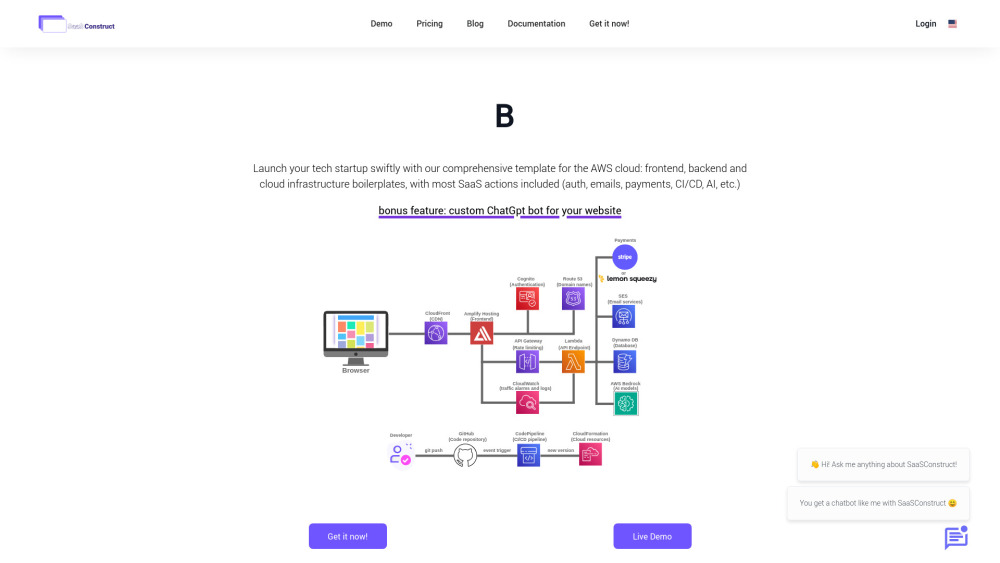
SaaS Construct is an AWS-native infrastructure-as-code framework designed to accelerate the development and deployment of production-ready SaaS products — pre-configured with identity management, subscription billing, observability, AI-powered capabilities, and scalable serverless backends.
Getting Started with SaaS Construct
Begin by forking the open-source repository, customizing the configuration files (e.g., domain, Stripe keys, AI endpoints), and deploying via AWS CDK or the included CLI tool — all in under 15 minutes.
Key Capabilities of SaaS Construct
Pre-built, battle-tested modules: user onboarding, role-based access control (RBAC), recurring billing with Stripe, real-time analytics, and plug-and-play LLM integrations.
Fully serverless, event-driven architecture — leveraging AWS Lambda, API Gateway, DynamoDB, and Cognito — optimized for low idle cost and elastic scaling.
Real-World Use Cases
Launch MVP SaaS products in days instead of months — ideal for indie makers, startups, and internal tools teams seeking production-grade foundations without reinventing the wheel.
Frequently Asked Questions
-
What components come out-of-the-box?
-
What’s the pricing model and what does each tier include?
FAQ from SaaS Construct
What is SaaS Construct?
A developer-first AWS template that delivers a production-hardened SaaS stack — abstracting infrastructure complexity while preserving full ownership, customization, and cloud portability.
How do I deploy my first SaaS app with it?
After setting up your AWS account and configuring environment variables, run cdk deploy — the framework provisions everything: frontend hosting, backend APIs, auth flows, payment webhooks, and monitoring dashboards.
What components come out-of-the-box?
Includes secure multi-tenancy support, OAuth2 login, Stripe billing lifecycle (trial → upgrade → churn), CI/CD pipelines, audit logging, AI inference endpoints (via Bedrock or SageMaker), and admin dashboard scaffolding.
What’s the pricing model and what does each tier include?
The Starter plan ($99) covers core infrastructure and essential SaaS features. The All-in plan ($129) adds advanced capabilities like white-label branding, usage-based metering, SOC 2-aligned compliance templates, and priority Slack support — both offer unlimited deployments and commercial usage rights.