AI Productivity Tools

Routerra

Routerra: AI-powered route planner that cuts delivery time & fuel costs—optimized routes, real-time updates, and team coordination.

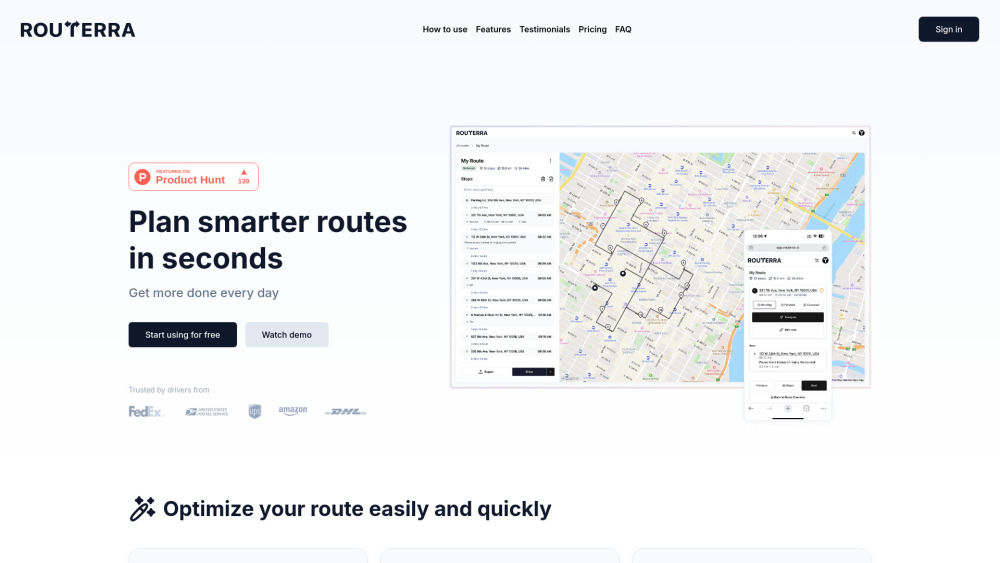
Routerra website preview

Routerra Website screenshot

Introducing Routerra: AI-Powered Route Intelligence for Modern Mobility

Routerra is an intelligent, real-time route planning platform built for speed, precision, and adaptability. Leveraging cutting-edge AI, it transforms how couriers, field service technicians, gig drivers, and logistics teams plan, adjust, and execute multi-stop journeys. Whether you're managing 5 stops or 500, Routerra delivers dynamically optimized routes—factoring in live traffic, vehicle constraints, time windows, and road restrictions—to maximize productivity while minimizing fuel, mileage, and operational friction.

Getting Started with Routerra in Three Steps

Start by importing stops effortlessly—via address search, QR/barcode scanning, or AI-powered extraction from spreadsheets, CSV files, or even photos of delivery manifests. Then, let Routerra’s smart engine compute the most efficient sequence based on your fleet profile (e.g., van, cargo truck, e-bike), delivery windows, and real-time conditions. Finally, deploy the plan: navigate turn-by-turn in-app, share dispatch-ready itineraries with your team, or sync directly to your preferred navigation app—all without leaving the platform.

Why Routerra Stands Out: Intelligent Capabilities, Built-In Flexibility

AI-Powered Stop Ingestion — From Chaos to Clarity

Smart Constraint Handling — Time windows, stop priorities, service durations, and dependencies

Adaptive Optimization Engine — Live traffic integration, vehicle-specific routing (low-clearance, weight-restricted, EV charging-aware), toll/highway avoidance, and eco-routing

Human-in-the-Loop Editing — Drag-and-drop reordering, pinning critical stops, or overriding AI suggestions with confidence

Seamless Output & Collaboration — One-click export to PDF, Excel, CSV; shareable public links with live status tracking

On-the-Ground Execution — GPS-guided navigation, real-time ETA updates, delivery confirmation with photo notes, and automatic status sync across teams

Who Relies on Routerra?

Last-mile delivery fleets scaling daily operations with zero added overhead

Mobile professionals—from HVAC techs to home healthcare workers—optimizing travel between appointments

Independent gig drivers (DoorDash, Instacart, Uber Eats) turning fragmented orders into cohesive, profitable routes

Enterprise logistics coordinators at global carriers like FedEx, DHL, and national postal services

Small businesses and local artisans—bakers, florists, and craft vendors—managing custom multi-stop deliveries with ease

Product source: Routerra official website. Check the provider for current plans, limits and availability.

FAQ

Routerra questions and answers

Product context and practical checks for evaluating Routerra.

What is Routerra used for?

Routerra: AI-powered route planner that cuts delivery time & fuel costs—optimized routes, real-time updates, and team coordination.

How do I get started with Routerra?

Start by importing stops effortlessly—via address search, QR/barcode scanning, or AI-powered extraction from spreadsheets, CSV files, or even photos of delivery manifests. Then, let Routerra’s smart engine compute the most efficient sequence based on your fleet profile (e.g., van, cargo truck, e-bike), delivery windows, and real-time conditions. Finally, deploy the plan: navigate turn-by-turn in-app, share dispatch-ready itineraries with your team, or sync directly to your preferred navigation app—all without leaving the platform.

Which capabilities are described for Routerra?

AI-Powered Stop Ingestion — From Chaos to ClaritySmart Constraint Handling — Time windows, stop priorities, service durations, and dependenciesAdaptive Optimization Engine — Live traffic integration, vehicle-specific routing (low-clearance, weight-restricted, EV charging-aware), toll/highway avoidance, and eco-routingHuman-in-the-Loop Editing — Drag-and-drop reordering, pinning critical stops, or overriding AI suggestions with confidenceSeamless Output & Collaboration — One-click export to PDF, Excel, CSV; shareable public links with live status trackingOn-the-Ground Execution — GPS-guided navigation, real-time ETA updates, delivery confirmation with photo notes, and automatic status sync across teams

What should I compare before choosing a Routerra plan?

Check Routerra’s current pricing page for included usage, renewal terms and any credit charges. Compare the cost of a usable result, including retries, rather than assuming that account registration includes free usage.

What inputs should I prepare for a Routerra trial?

Identify the files, text or account connections your task needs. Confirm that the product accepts those inputs and offers controls for reviewing its work.

How can I check the quality of a Routerra result?

Test one representative task and inspect the result for accuracy and completeness. Record where manual corrections or extra tools are needed.

Which export options should I check in Routerra?

Check export formats, integrations and whether you can keep using your work outside the service. Test a real export before committing to a longer plan.

What is a practical way to test Routerra against alternatives?

Choose one task with a clear success condition. Keep the input consistent, record the time spent reviewing and compare the complete workflow cost.

What should I review before uploading material to Routerra?

Read the provider’s rules on access, retention, deletion and use of uploaded material. Start with a non-confidential sample that you have permission to use.

Where is the official Routerra website?

The website linked from this profile is https://routerra.io. Use the provider’s own documentation, account area and support channels to confirm current product details.

Visit Routerra