AI Product Description Generator

Prompt Finder

Prompt Finder: Publish, Prep & Perfect AI Tool Requests - Elevate your AI results with expert-approved prompts and preparation for top performance.

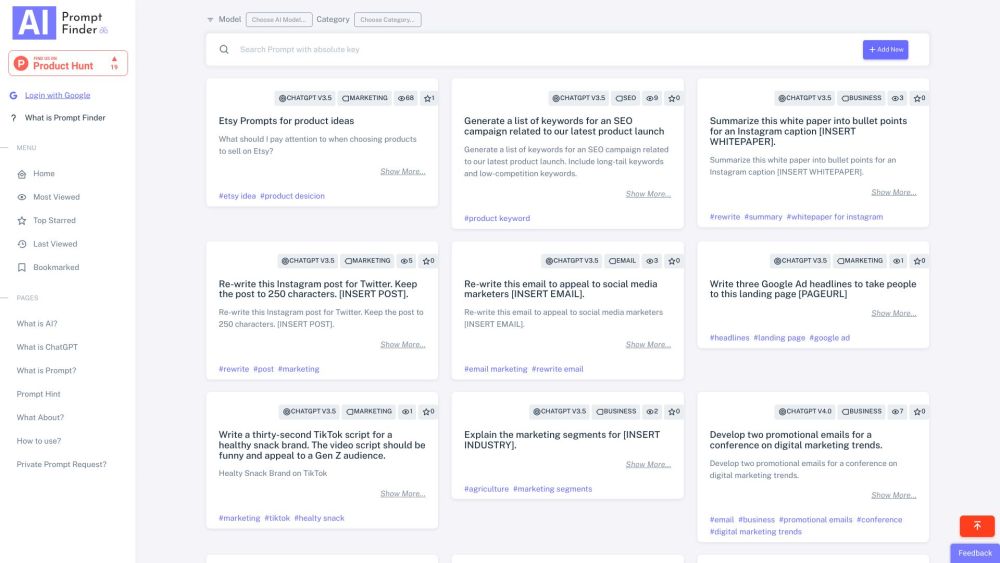
Prompt Finder website preview

Prompt Finder Website screenshot

What is Prompt Finder?

Prompt Finder is a versatile platform where users can publish, prepare, and perfect prompts for any artificial intelligence tool. This application aims to serve as a comprehensive resource for crafting high-quality AI requests, ensuring optimal outputs. By facilitating collaboration among AI experts and offering both custom and pre-made prompts, Prompt Finder enhances your interaction with AI tools and maximizes their performance.

How to use Prompt Finder?

To effectively use Prompt Finder, follow these steps: 1. Sign in using your Google account. 2. Search or browse for prompts that suit your AI tool. 3. Select the appropriate AI model and category. 4. Contribute new prompts if needed. 5. Bookmark, view, or vote for the most useful prompts. 6. Log out when you are finished.

Prompt Finder's Core Features

Publish, share, and access expertly crafted prompts

Improve communication for superior AI output

Engage with a community of AI professionals

Prompt Finder's Use Cases

Generating AI prompts for marketing

Discovering optimal prompts for AI tools like GPT

Creating prompts for e-commerce platforms like Etsy and Amazon

Product source: Prompt Finder official website. Check the provider for current plans, limits and availability.

FAQ

Prompt Finder questions and answers

Product context and practical checks for evaluating Prompt Finder.

What is Prompt Finder used for?

Prompt Finder: Publish, Prep & Perfect AI Tool Requests - Elevate your AI results with expert-approved prompts and preparation for top performance.

How do I get started with Prompt Finder?

To effectively use Prompt Finder, follow these steps: 1. Sign in using your Google account. 2. Search or browse for prompts that suit your AI tool. 3. Select the appropriate AI model and category. 4. Contribute new prompts if needed. 5. Bookmark, view, or vote for the most useful prompts. 6. Log out when you are finished.

Which capabilities are described for Prompt Finder?

Publish, share, and access expertly crafted promptsImprove communication for superior AI outputEngage with a community of AI professionals

What projects can I evaluate Prompt Finder for?

Generating AI prompts for marketingDiscovering optimal prompts for AI tools like GPTCreating prompts for e-commerce platforms like Etsy and Amazon Prompt Finder Company For more information, visit our about us page. Prompt Finder Login Access Prompt Finder here: Login Link Prompt Finder Sign up Sign up for Prompt Finder: Sign up Link

What should I compare before choosing a Prompt Finder plan?

Check Prompt Finder’s current pricing page for included usage, renewal terms and any credit charges. Compare the cost of a usable result, including retries, rather than assuming that account registration includes free usage.

What inputs should I prepare for a Prompt Finder trial?

Identify the files, text or account connections your task needs. Confirm that the product accepts those inputs and offers controls for reviewing its work.

How can I check the quality of a Prompt Finder result?

Test one representative task and inspect the result for accuracy and completeness. Record where manual corrections or extra tools are needed.

Which export options should I check in Prompt Finder?

Check export formats, integrations and whether you can keep using your work outside the service. Test a real export before committing to a longer plan.

What is a practical way to test Prompt Finder against alternatives?

Choose one task with a clear success condition. Keep the input consistent, record the time spent reviewing and compare the complete workflow cost.

Where is the official Prompt Finder website?

The website linked from this profile is https://findgptprompt.com. Use the provider’s own documentation, account area and support channels to confirm current product details.

Visit Prompt Finder