Table of contents
PostPlanify : AI Scheduling, Content Creation & Publishing Tool
PostPlanify: AI-powered tool to schedule, create & publish social content—smarter, faster, and all in one place. 🚀
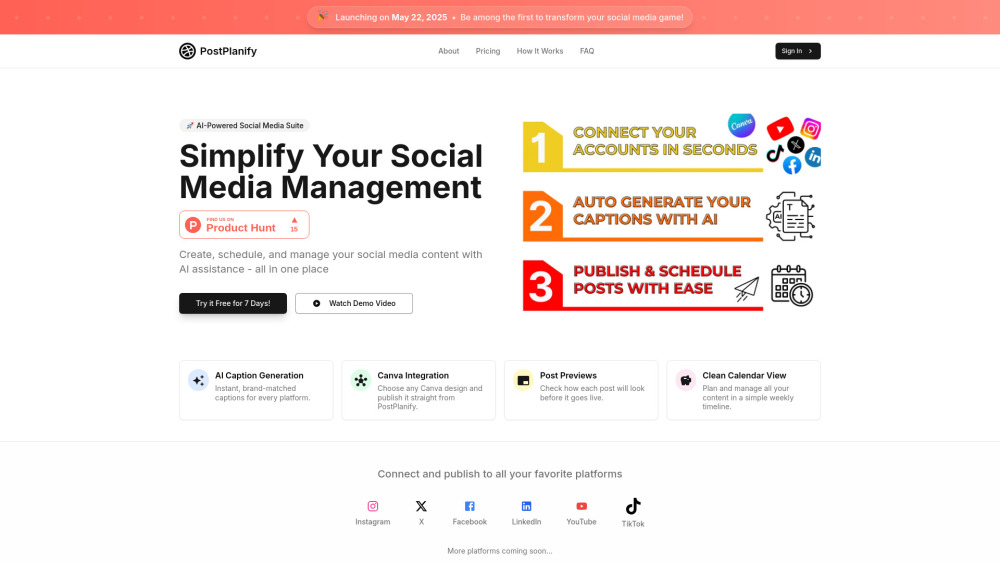
Introducing PostPlanify: Your All-in-One AI Social Media Command Center
PostPlanify is a next-generation AI social media tool engineered for speed, precision, and scalability. It unifies intelligent content ideation, platform-optimized scheduling, and one-click publishing — all within a single, intuitive interface. Whether you're a solo creator, a fast-growing brand, or a full-service agency managing dozens of clients, PostPlanify replaces fragmented workflows with a cohesive, AI-augmented strategy — from first draft to final post.
Get Started in Seconds — Not Hours
Launch your social media workflow in four seamless steps: 1. Choose visuals — upload assets or select ready-made Canva templates directly inside the app. 2. Pick your platforms — Instagram, X (Twitter), Facebook, LinkedIn, YouTube Shorts, and TikTok — all supported natively. 3. Generate on-brand captions instantly using AI trained to reflect your voice, tone, and audience intent. 4. Preview how each post renders per platform, then schedule or publish across all channels with a single click.
Power Features Built for Modern Social Teams
Smart AI Caption Engine
Native Canva Sync (No Downloads, No Drag-and-Drop)
WYSIWYG Platform Previews (Mobile + Desktop)
Drag-and-Drop Weekly Calendar Timeline
True Multi-Platform Publishing (Auto-formatting included)
Full Post Lifecycle Control (Schedule • Edit • Reschedule • Delete)
Native Carousel & Multi-Image Support
Brand Hub — Centralize Voice Guidelines, Hashtags, CTAs & Approved Assets
Who Uses PostPlanify — And Why It Sticks
Marketing teams syncing campaigns across 6+ platforms without switching tabs.
Agencies scaling content delivery for 10+ clients using reusable brand hubs and templated workflows.
Creators repurposing one video into platform-native formats (TikTok vertical, YouTube Shorts, Reels, Feed posts) — automatically optimized.
Designers publishing Canva creations live in seconds — no manual export, compression, or re-uploading.
Social managers auditing content performance with visual calendar planning and real-time scheduling analytics.
Brands enforcing consistency — from emoji usage to tone-of-voice rules — across every caption, every channel.
Frequently Asked Questions
-
How does PostPlanify’s AI understand my brand voice?
-
Can I schedule different versions of the same post for different platforms?
-
Does Canva integration require a paid Canva plan?
-
Are payments processed securely — and is PCI compliance enforced?
-
What’s included in the free trial — and can I import existing calendars?
-
How does PostPlanify protect my connected social accounts and data?
-
What’s your refund policy — and how easy is it to cancel?
-
Need Help? We’re Here.
Reach our dedicated support team at: [email protected]
-
About PostPlanify
Company Name: Tumunuham LLC
Registered Address: 8 The Green, Suite A, Dover, DE 19901
Learn more about our mission, values, and product vision: About Us → -
Log In to Your Dashboard
Access your account instantly: https://postplanify.com/?utm_source=toolify#login
-
Follow Us
Facebook: facebook.com/postplanify
YouTube: youtube.com/@PostPlanify
TikTok: tiktok.com/@PostPlanify
LinkedIn: postplanify.com/platforms/linkedin
X (Twitter): x.com/PostPlanify
Instagram: instagram.com/postplanify
PostPlanify FAQ — Quick Answers
What is PostPlanify?
PostPlanify is an integrated AI scheduling, content creation, and publishing platform built for teams who demand both creativity and control. It eliminates platform-switching fatigue by combining generative AI, native design tools, and smart cross-channel publishing — all governed by your brand’s unique identity.
How do I get started?
It takes under 90 seconds: connect your social accounts, choose a template or upload media, generate AI captions tailored to each platform, preview, and publish — or schedule for optimal timing. No training required.
How does the AI content generation work?
Our AI analyzes your uploaded visuals, selected platform, brand guidelines (from your Brand Hub), and historical performance signals — then crafts concise, engaging, on-voice captions — complete with strategic emojis and context-aware hashtags — in under 3 seconds.
Which social platforms can I post to — and can I schedule them all at once?
Yes — Instagram (Feed, Stories, Reels), X, Facebook Pages & Groups, LinkedIn (Company & Personal), YouTube (Shorts & Description Posts), and TikTok. Schedule identical or customized posts to any combination — with auto-resizing, caption truncation, and link handling handled intelligently.
How does the Canva integration work?
Zero friction. Click “Add Design” → browse or search your Canva library → select and insert. No downloads. No file uploads. No quality loss. Your Canva Pro or Free account works instantly inside PostPlanify.
How secure is the payment process?
All transactions are encrypted end-to-end via Stripe — a PCI DSS Level 1 certified payment processor. We never store or access your card details.
Is there a free trial — and what does it include?
Absolutely. Enjoy full access to all features — including AI captioning, Canva sync, multi-platform publishing, and the Brand Hub — for 7 days. No credit card required to start.
How secure is my social media data?
We follow strict GDPR, CCPA, and SOC 2-aligned practices. Social logins use OAuth 2.0 (read-only permissions unless publishing is enabled), and all data is encrypted at rest and in transit. Our Privacy Policy, Terms of Service, and Cookie Policy are publicly available.
Can I cancel and get a refund if I’m not satisfied?
Yes. Cancel anytime — no questions asked. Plus, all annual and monthly plans come with a 14-day money-back guarantee from your purchase date.