AI Photo Enhancer

Pixlr

Pixlr is a free online photo editing and design tool that allows users to edit photos, create designs, and generate AI-powered images. It offers a range of features including an AI image generator, batch editor, animation design, and enhancer.

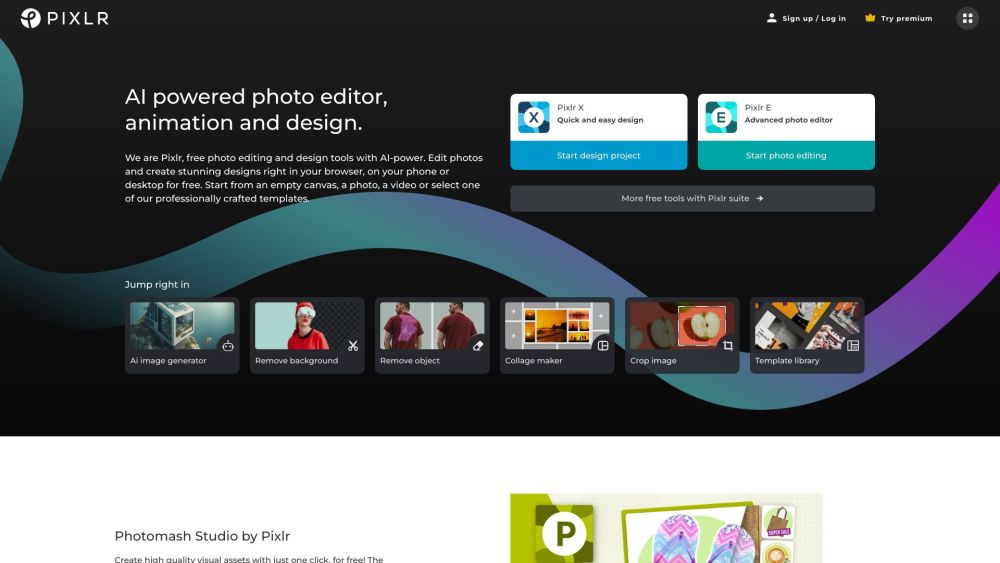
Pixlr website preview

Pixlr Website screenshot

Understanding Pixlr

Pixlr is an innovative online platform that offers free photo editing and design tools. It empowers users to edit images, create eye-catching designs, and utilize AI-generated imagery. Pixlr boasts a variety of features, including an AI image generator, batch processing, animation creation, and enhancement tools.

Getting Started with Pixlr

To begin using Pixlr, sign up or log in on their website. You can access different web and mobile applications like Pixlr X for simple design tasks, Pixlr E for advanced photo edits, and Photomash Studio for quick background removal. Start your project with a blank canvas, an image, a video, or one of the many professionally designed templates. Explore and utilize the wide range of tools and features to enhance your photos and craft beautiful designs.

Key Features of Pixlr

AI Image Generator

Batch Editor

Animation Design

Enhancement Tools

Background Removal

Collage Maker

Template Library

Filters and Effects

Premium Features

Applications of Pixlr

Photo Editing

Design Creation

Profile Picture Enhancement

Product Image Editing

YouTube Thumbnail Creation

Social Media Banner Design

Resume Creation

Brochure Design

Business Card Design

Presentation Creation

Product source: Pixlr official website. Check the provider for current plans, limits and availability.

FAQ

Pixlr questions and answers

Product context and practical checks for evaluating Pixlr.

What is Pixlr used for?

Pixlr is a free online photo editing and design tool that allows users to edit photos, create designs, and generate AI-powered images. It offers a range of features including an AI image generator, batch editor, animation design, and enhancer.

How do I get started with Pixlr?

To begin using Pixlr, sign up or log in on their website. You can access different web and mobile applications like Pixlr X for simple design tasks, Pixlr E for advanced photo edits, and Photomash Studio for quick background removal. Start your project with a blank canvas, an image, a video, or one of the many professionally designed templates. Explore and utilize the wide range of tools and features to enhance your photos and craft beautiful designs.

Which capabilities are described for Pixlr?

AI Image GeneratorBatch EditorAnimation DesignEnhancement ToolsBackground RemovalCollage MakerTemplate LibraryFilters and EffectsPremium Features

What projects can I evaluate Pixlr for?

Photo EditingDesign CreationProfile Picture EnhancementProduct Image EditingYouTube Thumbnail CreationSocial Media Banner DesignResume CreationBrochure DesignBusiness Card DesignPresentation Creation Pixlr Support and Contact Information For support and customer service, visit Pixlr's contact page. About Pixlr Pixlr is operated by Pixlr Pte Ltd. Learn more about the company on the about us page. Pricing Information For details on pricing, visit the Pixlr pricing page. Pixlr on Social Media Follow Pixlr on Facebook, YouTube, Twitter, and Instagram.

What should I compare before choosing a Pixlr plan?

For details on pricing, visit the Pixlr pricing page. Confirm current prices and allowances on the provider’s website before purchasing.

What inputs should I prepare for a Pixlr trial?

Compare text prompts, reference frames, source footage and audio support. Check duration, aspect ratio and whether the tool lets you keep a subject consistent between shots.

How can I check the quality of a Pixlr result?

Watch the entire clip for motion errors, distorted objects, changing identities, lip-sync problems and abrupt transitions. Inspect the downloaded file as well as the preview.

Which export options should I check in Pixlr?

Check export resolution, frame rate, aspect ratio, audio tracks and watermark rules. A good preview is not a substitute for an export that fits your publishing channel.

What is a practical way to test Pixlr against alternatives?

Use a short shot with one subject and one camera movement. Keep the prompt and duration constant, then compare usable seconds and the number of regenerations.

Where is the official Pixlr website?

The website linked from this profile is https://pixlr.com. Use the provider’s own documentation, account area and support channels to confirm current product details.

Visit Pixlr