Translate

PicTranslate - Chrome Extension

Translate text from images effortlessly with PicTranslate - Chrome Extension. Edit translations for accurate communication. Upgrade your language skills now!

PicTranslate - Chrome Extension website preview

PicTranslate - Chrome Extension Website screenshot

Introducing PicTranslate - Chrome Extension: Text Translation with Editing

Are you tired of manually transcribing text from images on your device's screen? Look no further! PicTranslate is a cutting-edge Chrome extension that revolutionizes the way you translate and edit text from images. With PicTranslate, you can seamlessly translate text from any image on your screen and effortlessly edit the translation result to perfection.

Effortless Translation with PicTranslate

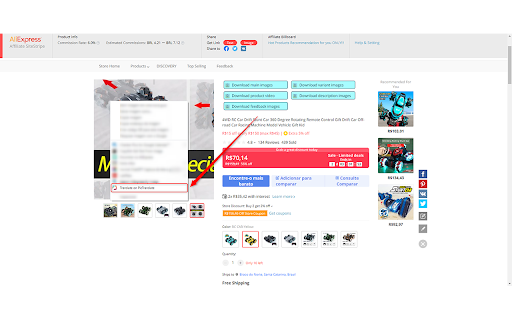
Using PicTranslate is incredibly simple. Just right-click on any image on your screen, select the translate option, and watch as the magic happens. PicTranslate's advanced optical character recognition (OCR) technology instantly recognizes the text in the image and automatically provides a translation. But that's not all - PicTranslate goes a step further by allowing you to customize and edit the translation on the PicTranslate website, ensuring the utmost accuracy and clarity.

Unleashing the Power of PicTranslate

On-screen Image Translation

Optical Character Recognition (OCR)

Automatic Translation

Customized Editing

Automatic Saving

Universal Compatibility

PicTranslate offers a range of powerful features that make it the ultimate translation companion. From on-screen image translation to automatic saving of your edited translations, PicTranslate has got you covered. Its universal compatibility ensures seamless integration with all your favorite websites and applications, making it a versatile tool for all your translation needs.

Versatile Use Cases for PicTranslate

Translate Text from Websites

Translate Text from Documents

Translate Text from Social Media Posts

PicTranslate is not limited to specific use cases. Whether you need to translate text from websites, documents, or social media posts, PicTranslate is your go-to solution. Say goodbye to language barriers and let PicTranslate empower you with seamless translation capabilities.

Product source: PicTranslate - Chrome Extension official website. Check the provider for current plans, limits and availability.

FAQ

PicTranslate - Chrome Extension questions and answers

Product context and practical checks for evaluating PicTranslate - Chrome Extension.

What is PicTranslate - Chrome Extension used for?

Translate text from images effortlessly with PicTranslate - Chrome Extension. Edit translations for accurate communication. Upgrade your language skills now!

How do I get started with PicTranslate - Chrome Extension?

Open the official PicTranslate - Chrome Extension website and identify the workflow that matches your task. Prepare a brief with a subject, composition, lighting and required output size. Test a first generation and a targeted revision to see how much control you retain.

What projects can I evaluate PicTranslate - Chrome Extension for?

Translate Text from WebsitesTranslate Text from DocumentsTranslate Text from Social Media Posts PicTranslate is not limited to specific use cases. Whether you need to translate text from websites, documents, or social media posts, PicTranslate is your go-to solution. Say goodbye to language barriers and let PicTranslate empower you with seamless translation capabilities.

What should I compare before choosing a PicTranslate - Chrome Extension plan?

Check PicTranslate - Chrome Extension’s current pricing page for included usage, renewal terms and any credit charges. Compare the cost of a usable result, including retries, rather than assuming that account registration includes free usage.

What inputs should I prepare for a PicTranslate - Chrome Extension trial?

Look for text prompts, image references, masks or sketches as appropriate. Compare composition control, supported upload types and the ability to revise a selected area.

How can I check the quality of a PicTranslate - Chrome Extension result?

Inspect text, hands, edges, reflections and repeated objects at full size. Check that important product or brand details survive editing.

Which export options should I check in PicTranslate - Chrome Extension?

Compare pixel dimensions, transparency, file formats and any enlargement options. Confirm that the downloaded result works in your design or publishing software.

What is a practical way to test PicTranslate - Chrome Extension against alternatives?

Prepare a brief with a subject, composition, lighting and required output size. Test a first generation and a targeted revision to see how much control you retain.

What should I review before uploading material to PicTranslate - Chrome Extension?

Read the provider’s rules on access, retention, deletion and use of uploaded material. Start with a non-confidential sample that you have permission to use.

Where is the official PicTranslate - Chrome Extension website?

The website linked from this profile is https://chromewebstore.google.com/detail/pictranslate-translate-an/mlpgiiepohbjicfinaliimoliopjgofj. Use the provider’s own documentation, account area and support channels to confirm current product details.

Visit PicTranslate - Chrome Extension