Text to Image

PicPicAI

PicPicAI: Your all-in-one AI image solution. Enhance photos, remove backgrounds, try hairstyles, and more! Competitive pricing, great reviews, unmatched features. Explore use cases & alternatives today!

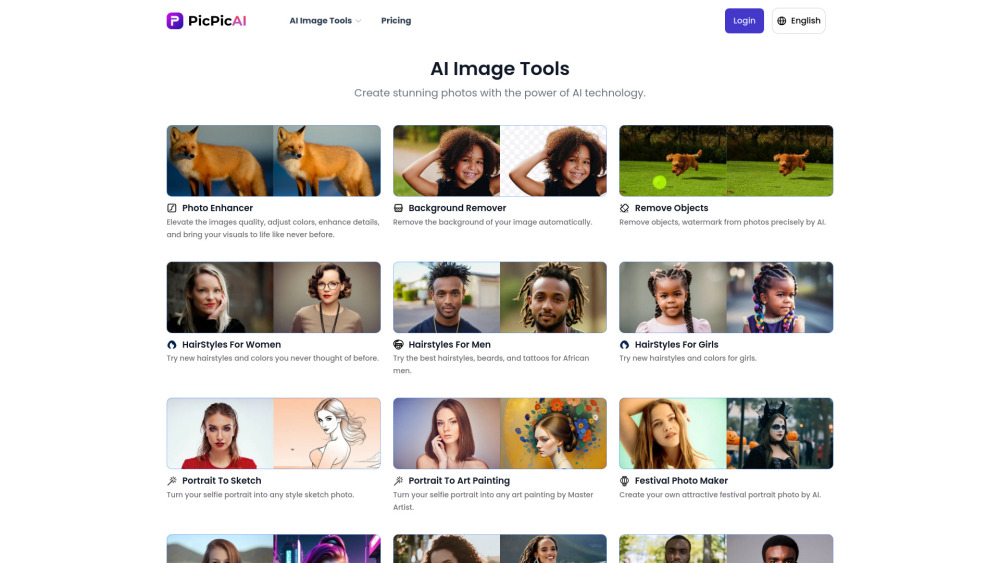
PicPicAI website preview

PicPicAI Website screenshot

Introduction to PicPicAI

PicPicAI is a comprehensive AI-based image solution platform that provides users with an array of tools for enhancing, editing, and transforming images. Whether you need to enhance the quality of your photos, remove backgrounds, or even generate unique hairstyles, PicPicAI has got you covered. The platform offers versatile features such as turning portraits into sketches or art paintings, creating festival-themed photos, generating neon punk designs, colorizing black-and-white images, restoring old photos, and much more.

Getting Started with PicPicAI

Using PicPicAI is incredibly straightforward. Simply navigate to any of the tool pages on the website, upload your chosen image, and let the AI-powered technology handle the rest. With just a few clicks, you can achieve professional-grade results without needing any advanced photo editing skills.

Main Features of PicPicAI

  • Photo Enhancer: Improve the clarity and resolution of your images effortlessly.
  • Background Remover: Effortlessly eliminate unwanted backgrounds from your pictures.
  • HairStyle Generator: Experiment with different hairstyles using AI-generated suggestions.
  • Portrait Transformation: Convert portraits into sketches or artistic paintings with ease.
  • Colorization: Bring life to your black-and-white photographs by adding vibrant colors.
  • Old Photo Restoration: Revive cherished memories by repairing and enhancing old, damaged photos.
  • Headshot Generator: Create professional headshots suitable for various purposes.
  • Neon Punk Generator: Generate futuristic, cyberpunk-inspired visuals.
  • Festival Photo Maker: Design festive-themed images perfect for celebrations.
  • Cartoonify: Turn your photos into cartoon-like illustrations.
  • Wedding Photo Generator: Create stunning wedding-themed imagery.
  • Comic Avatar Maker: Transform photos into comic-style avatars.
  • SDXL AI Generator: Utilize cutting-edge AI models like SDXL for advanced creations.
  • Passport Photo Maker: Generate official passport photos meeting global standards.

Contact Information and Support

Product source: PicPicAI official website. Check the provider for current plans, limits and availability.

FAQ

PicPicAI questions and answers

Product context and practical checks for evaluating PicPicAI.

What is PicPicAI used for?

PicPicAI: Your all-in-one AI image solution. Enhance photos, remove backgrounds, try hairstyles, and more! Competitive pricing, great reviews, unmatched features. Explore use cases & alternatives today!

How do I get started with PicPicAI?

Using PicPicAI is incredibly straightforward. Simply navigate to any of the tool pages on the website, upload your chosen image, and let the AI-powered technology handle the rest. With just a few clicks, you can achieve professional-grade results without needing any advanced photo editing skills.

Which capabilities are described for PicPicAI?

Photo Enhancer: Improve the clarity and resolution of your images effortlessly. Background Remover: Effortlessly eliminate unwanted backgrounds from your pictures. HairStyle Generator: Experiment with different hairstyles using AI-generated suggestions. Portrait Transformation: Convert portraits into sketches or artistic paintings with ease. Colorization: Bring life to your black-and-white photographs by adding vibrant colors. Old Photo Restoration: Revive cherished memories by repairing and enhancing old, damaged photos. Headshot Generator: Create professional headshots suitable for various purposes. Neon Punk Generator: Generate futuristic, cyberpunk-inspired visuals. Festival Photo Maker: Design festive-themed images perfect for celebrations. Cartoonify: Turn your photos into cartoon-like illustrations. Wedding Photo Generator: Create stunning wedding-themed imagery. Comic Avatar Maker: Transform photos into comic-style avatars. SDXL AI Generator: Utilize cutting-edge AI models like SDXL for advanced creations. Passport Photo Maker: Generate official passport photos meeting global standards.

How does PicPicAI handle photo enhancer?

Photo Enhancer: Improve the clarity and resolution of your images effortlessly.

How does PicPicAI handle background remover?

Background Remover: Effortlessly eliminate unwanted backgrounds from your pictures.

What should I compare before choosing a PicPicAI plan?

Check PicPicAI’s current pricing page for included usage, renewal terms and any credit charges. Compare the cost of a usable result, including retries, rather than assuming that account registration includes free usage.

What inputs should I prepare for a PicPicAI trial?

Look for text prompts, image references, masks or sketches as appropriate. Compare composition control, supported upload types and the ability to revise a selected area.

How can I check the quality of a PicPicAI result?

Inspect text, hands, edges, reflections and repeated objects at full size. Check that important product or brand details survive editing.

Which export options should I check in PicPicAI?

Compare pixel dimensions, transparency, file formats and any enlargement options. Confirm that the downloaded result works in your design or publishing software.

Where is the official PicPicAI website?

The website linked from this profile is https://picpicai.com. Use the provider’s own documentation, account area and support channels to confirm current product details.

Visit PicPicAI