AI Builder

Pico

Build your dream website effortlessly with Pico! No coding needed—just choose a template, customize with ease, and launch your site in minutes!

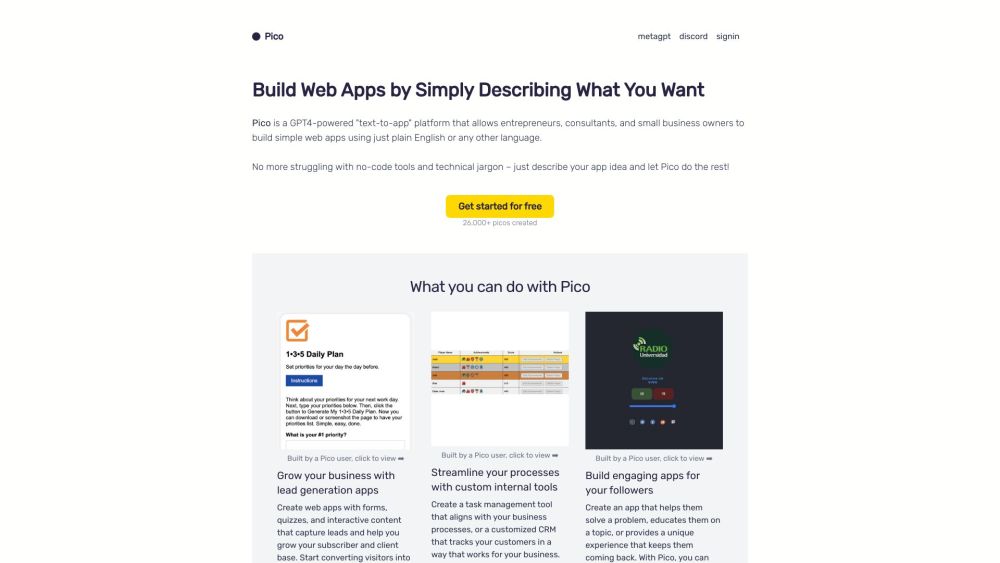
Pico website preview

Pico Website screenshot

What is Pico?

Pico is an intuitive website builder designed for users with no coding experience. It features an easy-to-use interface and a variety of templates, enabling users to create and customize their websites effortlessly.

How to use Pico?

Getting started with Pico is simple. Create an account, select a template that fits your needs, and use the drag-and-drop editor to build your site. You can tweak the design, add your own content, and adjust settings to craft a professional-looking website.

Pico's Core Features

Pico provides essential tools for website creation, such as a drag-and-drop editor, customizable templates, responsive designs, SEO optimization, e-commerce capabilities, domain registration, and hosting services.

Pico's Use Cases

Pico is versatile and can be utilized by individuals, small businesses, and professionals aiming to establish an online presence. It's perfect for personal blogs, portfolios, online stores, and business websites across various industries.

Product source: Pico official website. Check the provider for current plans, limits and availability.

FAQ

Pico questions and answers

Product context and practical checks for evaluating Pico.

What is Pico used for?

Build your dream website effortlessly with Pico! No coding needed—just choose a template, customize with ease, and launch your site in minutes!

How do I get started with Pico?

Getting started with Pico is simple. Create an account, select a template that fits your needs, and use the drag-and-drop editor to build your site. You can tweak the design, add your own content, and adjust settings to craft a professional-looking website.

Which capabilities are described for Pico?

Pico provides essential tools for website creation, such as a drag-and-drop editor, customizable templates, responsive designs, SEO optimization, e-commerce capabilities, domain registration, and hosting services.

What projects can I evaluate Pico for?

Pico is versatile and can be utilized by individuals, small businesses, and professionals aiming to establish an online presence. It's perfect for personal blogs, portfolios, online stores, and business websites across various industries. Pico Discord Join the Pico community on Discord: https://discord.gg/JGz7wRxaAq. For more Discord messages, click here(/discord/jgz7wrxaaq). Pico Support Email & Customer Service Contact For customer service, reach out via Pico support email: [email protected]. Pico Company Pico is a product of WhimsyWorks, Inc. Learn more about Pico on the about us page(https://picoapps.xyz/about). Pico Pricing Find out more about Pico's pricing: https://picoapps.xyz/pricing. Pico YouTube Watch tutorials and updates on Pico's YouTube channel: https://youtube.com/@MadeWithPico. Pico Twitter Follow Pico on Twitter: https://twitter.com/picoapps.

What should I compare before choosing a Pico plan?

Find out more about Pico's pricing: https://picoapps.xyz/pricing. Confirm current prices and allowances on the provider’s website before purchasing.

What inputs should I prepare for a Pico trial?

Identify the files, text or account connections your task needs. Confirm that the product accepts those inputs and offers controls for reviewing its work.

How can I check the quality of a Pico result?

Test one representative task and inspect the result for accuracy and completeness. Record where manual corrections or extra tools are needed.

Which export options should I check in Pico?

Check export formats, integrations and whether you can keep using your work outside the service. Test a real export before committing to a longer plan.

What is a practical way to test Pico against alternatives?

Choose one task with a clear success condition. Keep the input consistent, record the time spent reviewing and compare the complete workflow cost.

Where is the official Pico website?

The website linked from this profile is . Use the provider’s own documentation, account area and support channels to confirm current product details.