AI Photo &amp Image Generator

Photo AI

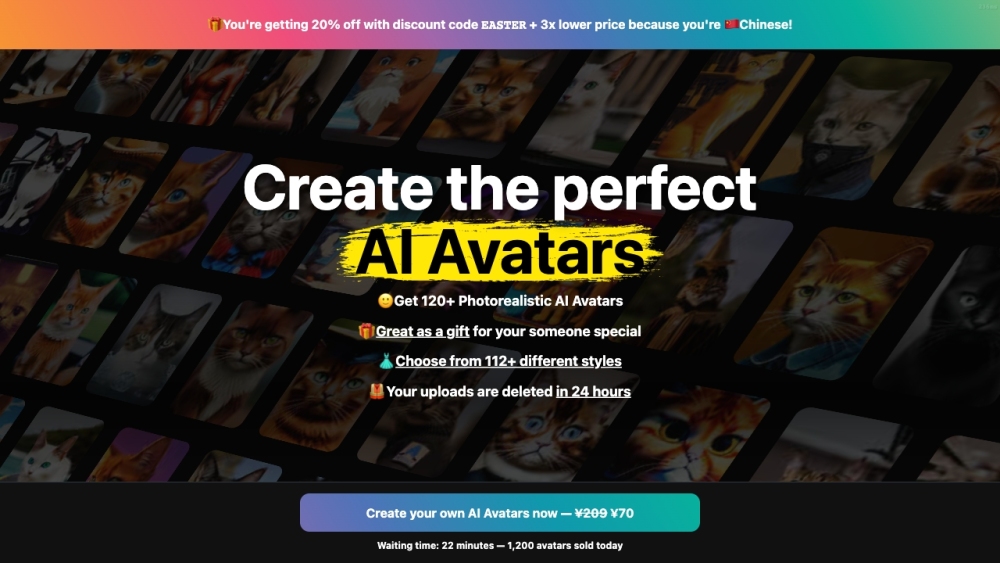
Photo AI is an AI-powered photo app and the world's first AI Photographer. It allows users to generate different styles of avatars and take realistic photos using artificial intelligence. It offers a wide range of features and provides quick turnaround times.

Photo AI website preview

Photo AI Website screenshot

Understanding Photo AI

Photo AI is a groundbreaking photo application that acts as the world's first AI Photographer. Utilizing advanced artificial intelligence, it enables users to create various avatar styles and produce lifelike photographs. It boasts an array of features and delivers fast results.

Getting Started with Photo AI

To begin with Photo AI, you need to upload at least 30 different photos of yourself to create your personalized AI character. After the AI is trained, you can use your avatar to produce photorealistic scenes, experiment with clothing, and design customized photo shoots. Describe the desired scenario or outfit, and Photo AI will generate a realistic image based on your description. Additionally, the Magic Editor allows you to personalize your generated images further.

Key Features of Photo AI

Avatar AI: Create over 120 unique avatar styles

Photo Shoots: Generate realistic photos using your AI avatar

Virtual Wardrobe: Import and try on clothes virtually with your AI model

Scene Creation: Craft photorealistic scenes with specific settings and attire

Magic Editor: Customize your AI-generated photos

Quick Processing: Generate photos in just 124 seconds

Applications of Photo AI

Personalized Avatars

High-quality photos for various purposes like fashion and marketing

Virtual clothing trials

Creative and unique scene design for artistic projects

Product source: Photo AI official website. Check the provider for current plans, limits and availability.

FAQ

Photo AI questions and answers

Product context and practical checks for evaluating Photo AI.

What is Photo AI used for?

Photo AI is an AI-powered photo app and the world's first AI Photographer. It allows users to generate different styles of avatars and take realistic photos using artificial intelligence. It offers a wide range of features and provides quick turnaround times.

How do I get started with Photo AI?

To begin with Photo AI, you need to upload at least 30 different photos of yourself to create your personalized AI character. After the AI is trained, you can use your avatar to produce photorealistic scenes, experiment with clothing, and design customized photo shoots. Describe the desired scenario or outfit, and Photo AI will generate a realistic image based on your description. Additionally, the Magic Editor allows you to personalize your generated images further.

Which capabilities are described for Photo AI?

Avatar AI: Create over 120 unique avatar stylesPhoto Shoots: Generate realistic photos using your AI avatarVirtual Wardrobe: Import and try on clothes virtually with your AI modelScene Creation: Craft photorealistic scenes with specific settings and attireMagic Editor: Customize your AI-generated photosQuick Processing: Generate photos in just 124 seconds

What projects can I evaluate Photo AI for?

Personalized AvatarsHigh-quality photos for various purposes like fashion and marketingVirtual clothing trialsCreative and unique scene design for artistic projects Photo AI Pricing Photo AI Pricing Link: https://photoai.com/upgrade?hash= Photo AI Twitter Photo AI Twitter Link: https://twitter.com/levelsio

What should I compare before choosing a Photo AI plan?

Photo AI Pricing Link: https://photoai.com/upgrade?hash= Confirm current prices and allowances on the provider’s website before purchasing.

What inputs should I prepare for a Photo AI trial?

Compare text prompts, reference frames, source footage and audio support. Check duration, aspect ratio and whether the tool lets you keep a subject consistent between shots.

How can I check the quality of a Photo AI result?

Watch the entire clip for motion errors, distorted objects, changing identities, lip-sync problems and abrupt transitions. Inspect the downloaded file as well as the preview.

Which export options should I check in Photo AI?

Check export resolution, frame rate, aspect ratio, audio tracks and watermark rules. A good preview is not a substitute for an export that fits your publishing channel.

What is a practical way to test Photo AI against alternatives?

Use a short shot with one subject and one camera movement. Keep the prompt and duration constant, then compare usable seconds and the number of regenerations.

Where is the official Photo AI website?

The website linked from this profile is https://avatarai.me. Use the provider’s own documentation, account area and support channels to confirm current product details.

Visit Photo AI