AI Photo &amp Image Generator

Pebblely AI Product Photography

Pebblely AI Product Photography is a tool that uses artificial intelligence to create product photos in seconds. It automatically removes the background from your images and generates photos with perfect lighting, reflections, and shadows. With Pebblely, you can easily create multiple product photos in various settings and customize them to match your brand colors.

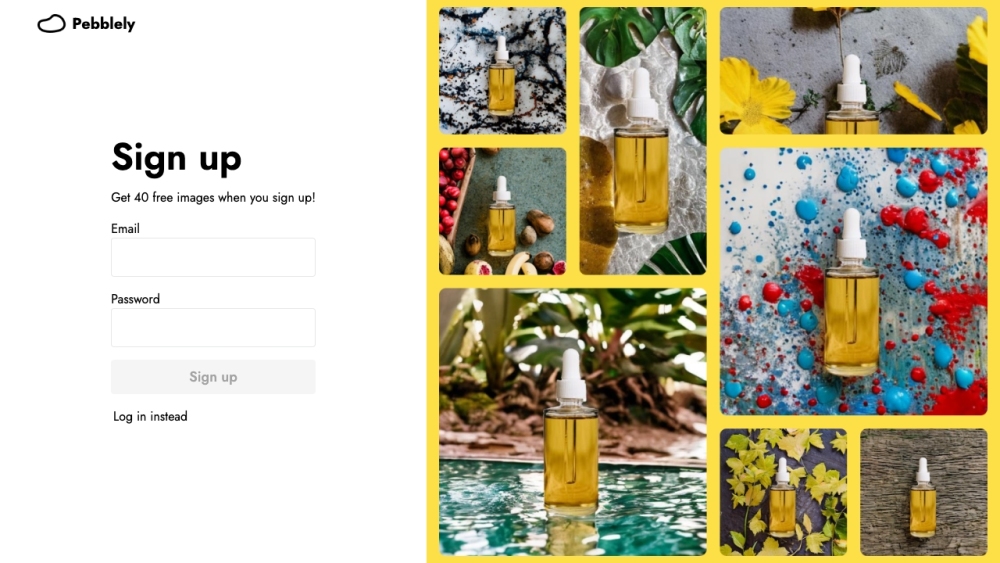
Pebblely AI Product Photography website preview

Pebblely AI Product Photography Website screenshot

Introduction to Pebblely AI Product Photography

Pebblely AI Product Photography leverages cutting-edge artificial intelligence to instantly produce stunning product photos. The tool automatically eliminates backgrounds and creates images with optimal lighting, shadows, and reflections. With Pebblely, users can generate numerous product photos in various contexts and personalize them to align with their brand aesthetics.

How to Utilize Pebblely AI Product Photography

To get started with Pebblely, upload a standard image of your product. The AI will remove the background, and you can download the polished photos. These images are ideal for marketing on social media, in advertisements, email campaigns, and more. Additionally, the tool allows you to resize and adapt the images to fit different needs, maximizing the utility of each photo.

Key Features of Pebblely AI Product Photography

Automatic Background Removal

Creation of High-Quality Photos with Perfect Lighting and Shadows

Customization Options to Match Brand Colors

Ability to Resize and Extend Images

Generation of Multiple Photos in Various Settings

Who Can Benefit from Pebblely AI Product Photography?

Small Business Owners

Creative Agencies

Designers

E-commerce Businesses

Social Media Marketers

Product source: Pebblely AI Product Photography official website. Check the provider for current plans, limits and availability.

FAQ

Pebblely AI Product Photography questions and answers

Product context and practical checks for evaluating Pebblely AI Product Photography.

What is Pebblely AI Product Photography used for?

Pebblely AI Product Photography is a tool that uses artificial intelligence to create product photos in seconds. It automatically removes the background from your images and generates photos with perfect lighting, reflections, and shadows. With Pebblely, you can easily create multiple product photos in various settings and customize them to match your brand colors.

How do I get started with Pebblely AI Product Photography?

To get started with Pebblely, upload a standard image of your product. The AI will remove the background, and you can download the polished photos. These images are ideal for marketing on social media, in advertisements, email campaigns, and more. Additionally, the tool allows you to resize and adapt the images to fit different needs, maximizing the utility of each photo.

Which capabilities are described for Pebblely AI Product Photography?

Automatic Background RemovalCreation of High-Quality Photos with Perfect Lighting and ShadowsCustomization Options to Match Brand ColorsAbility to Resize and Extend ImagesGeneration of Multiple Photos in Various Settings

What should I compare before choosing a Pebblely AI Product Photography plan?

View pricing details Confirm current prices and allowances on the provider’s website before purchasing.

What inputs should I prepare for a Pebblely AI Product Photography trial?

Look for text prompts, image references, masks or sketches as appropriate. Compare composition control, supported upload types and the ability to revise a selected area.

How can I check the quality of a Pebblely AI Product Photography result?

Inspect text, hands, edges, reflections and repeated objects at full size. Check that important product or brand details survive editing.

Which export options should I check in Pebblely AI Product Photography?

Compare pixel dimensions, transparency, file formats and any enlargement options. Confirm that the downloaded result works in your design or publishing software.

What is a practical way to test Pebblely AI Product Photography against alternatives?

Prepare a brief with a subject, composition, lighting and required output size. Test a first generation and a targeted revision to see how much control you retain.

What should I review before uploading material to Pebblely AI Product Photography?

Read the provider’s rules on access, retention, deletion and use of uploaded material. Start with a non-confidential sample that you have permission to use.

Where is the official Pebblely AI Product Photography website?

The website linked from this profile is https://pebblely.com. Use the provider’s own documentation, account area and support channels to confirm current product details.

Visit Pebblely AI Product Photography