AI Reply Assistant

PARQR - Chrome Extension

PARQR Chrome Extension: Elevate your Piazza experience and simplify course management. Boost student engagement and streamline tasks effortlessly.

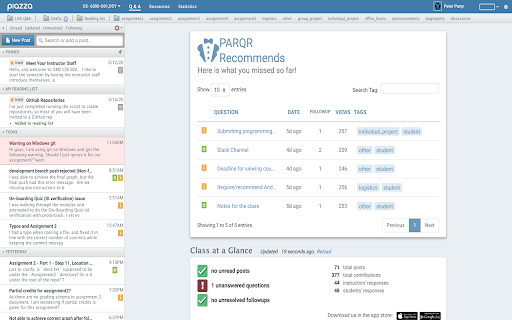
PARQR - Chrome Extension website preview

PARQR - Chrome Extension Website screenshot

What is PARQR Chrome Extension?

PARQR is an innovative Chrome extension designed to enhance interactions on Piazza, an educational platform, while simplifying course management for instructors. It offers powerful tools for both students and teachers, aimed at fostering engagement and efficiency in academic environments.

How to Use PARQR Chrome Extension?

To start using PARQR, you can reach out to the development team for integration support. The PARQR team is readily available to assist in setting up the extension for your course needs.

Real-Time Post Recommendations

With its intelligent recommendation system, PARQR helps students discover relevant posts in real-time, encouraging greater participation and collaboration on Piazza.

Instructor Dashboard for Collaboration and Tracking

Instructors benefit from a centralized dashboard that enables better course management. This feature provides an easy way to track student engagement, collaborate with teaching assistants, and streamline class activities.

PARQR Chrome Extension's Use Cases

Boosting Student Engagement on Piazza

PARQR promotes active participation by guiding students to similar discussions and posts, which improves knowledge sharing and student involvement in large online courses.

Effective Course Management for Large Online Classes

Managing extensive online classes becomes easier with PARQR’s tools, providing instructors with better oversight and more efficient control of class activities.

Product source: PARQR - Chrome Extension official website. Check the provider for current plans, limits and availability.

FAQ

PARQR - Chrome Extension questions and answers

Product context and practical checks for evaluating PARQR - Chrome Extension.

What is PARQR - Chrome Extension used for?

PARQR Chrome Extension: Elevate your Piazza experience and simplify course management. Boost student engagement and streamline tasks effortlessly.

How do I get started with PARQR - Chrome Extension?

To start using PARQR, you can reach out to the development team for integration support. The PARQR team is readily available to assist in setting up the extension for your course needs.Real-Time Post RecommendationsWith its intelligent recommendation system, PARQR helps students discover relevant posts in real-time, encouraging greater participation and collaboration on Piazza.Instructor Dashboard for Collaboration and TrackingInstructors benefit from a centralized dashboard that enables better course management. This feature provides an easy way to track student engagement, collaborate with teaching assistants, and streamline class activities.

What projects can I evaluate PARQR - Chrome Extension for?

Boosting Student Engagement on PiazzaPARQR promotes active participation by guiding students to similar discussions and posts, which improves knowledge sharing and student involvement in large online courses.Effective Course Management for Large Online ClassesManaging extensive online classes becomes easier with PARQR’s tools, providing instructors with better oversight and more efficient control of class activities.

What should I compare before choosing a PARQR - Chrome Extension plan?

Check PARQR - Chrome Extension’s current pricing page for included usage, renewal terms and any credit charges. Compare the cost of a usable result, including retries, rather than assuming that account registration includes free usage.

What inputs should I prepare for a PARQR - Chrome Extension trial?

Identify the files, text or account connections your task needs. Confirm that the product accepts those inputs and offers controls for reviewing its work.

How can I check the quality of a PARQR - Chrome Extension result?

Test one representative task and inspect the result for accuracy and completeness. Record where manual corrections or extra tools are needed.

Which export options should I check in PARQR - Chrome Extension?

Check export formats, integrations and whether you can keep using your work outside the service. Test a real export before committing to a longer plan.

What is a practical way to test PARQR - Chrome Extension against alternatives?

Choose one task with a clear success condition. Keep the input consistent, record the time spent reviewing and compare the complete workflow cost.

What should I review before uploading material to PARQR - Chrome Extension?

Read the provider’s rules on access, retention, deletion and use of uploaded material. Start with a non-confidential sample that you have permission to use.

Where is the official PARQR - Chrome Extension website?

The website linked from this profile is https://chromewebstore.google.com/detail/parqr/ghpadgbcphnomjfjjpockklhcgahebji. Use the provider’s own documentation, account area and support channels to confirm current product details.

Visit PARQR - Chrome Extension