AI Builder

Pagey

Pagey: Build AI-powered portfolios & resumes—no code, no wait. Launch your personal page in minutes! 🚀

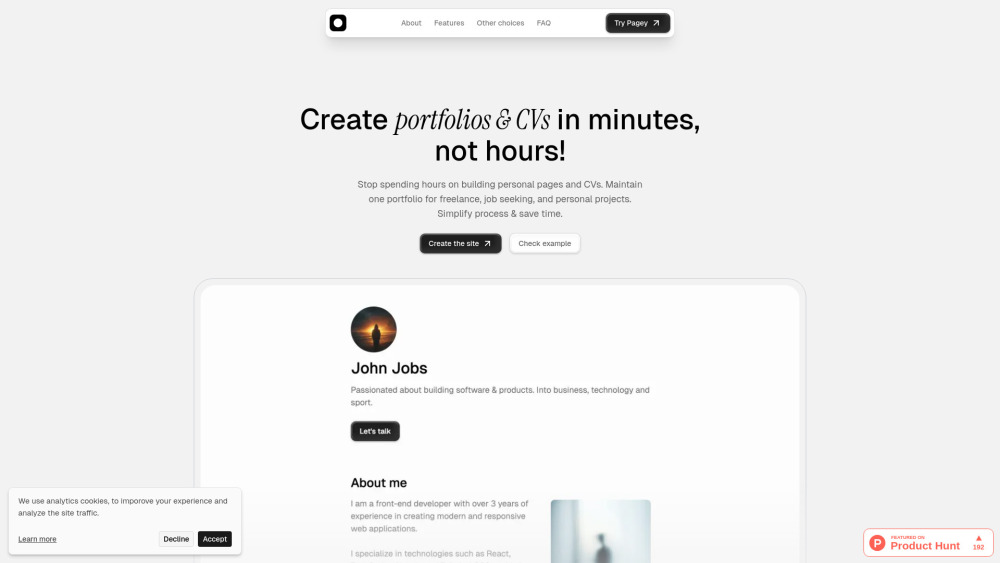
Pagey website preview

Pagey Website screenshot

Introducing Pagey: Your AI-Powered, No-Code Launchpad 🚀

Pagey is more than a portfolio builder—it’s your personal career accelerator. Built for creators, freelancers, students, and early-career professionals who don’t code but *do* want impact, Pagey merges intuitive no-code design with intelligent AI assistance to turn raw experience into polished, professional presence—in under five minutes. Forget juggling templates, hosting, or PDF exports manually: Pagey unifies your resume, project showcase, and personal brand into one responsive, shareable site—complete with AI-suggested copy, smart section recommendations, and real-time optimization tips. Whether you're applying to jobs, pitching clients, or launching your first open-source contribution, Pagey delivers elegance, efficiency, and future-ready AI—all without touching a line of code.

Get Started in Seconds—not Hours

Building your standout online identity takes just four frictionless steps: (1) Sign in or create a free account; (2) Select an AI-curated starter profile—tailored for designers, developers, writers, or generalists; (3) Customize using smart drag-and-drop modules, where AI helps draft bios, refine bullet points, and suggest portfolio highlights; and (4) Publish instantly to your personalized yourname.pagey.xyz subdomain—or download a print-ready PDF/CV with one tap. No setup. No plugins. No waiting.

Why Pagey Stands Out

Truly no-code—zero technical barriers

Embedded AI co-pilot: generate, edit, and optimize content on the fly

Smart templates: role-specific layouts (freelancer, intern, full-stack dev, UX researcher)

One-click multi-format export: responsive web page + ATS-friendly PDF + plain-text CV

Branded subdomains & SEO-optimized pages—ready to rank and share

AI-native infrastructure: auto-generated llms.txt, LLM-friendly metadata, and upcoming AI-powered A/B testing for portfolio performance

Who Thrives With Pagey?

Freelancers building credibility—and landing their next gig

Job seekers optimizing for both human reviewers *and* applicant tracking systems

Students and bootcamp grads showcasing projects with context and clarity

Non-technical founders, marketers, and creatives owning their digital footprint

Product source: Pagey official website. Check the provider for current plans, limits and availability.

FAQ

Pagey questions and answers

Product context and practical checks for evaluating Pagey.

What is Pagey used for?

Pagey: Build AI-powered portfolios & resumes—no code, no wait. Launch your personal page in minutes! 🚀

How do I get started with Pagey?

Open the official Pagey website and identify the workflow that matches your task. Choose a small reproducible bug with an existing failing check. Measure whether the tool fixes the cause, preserves behavior and produces a reviewable change.

What should I compare before choosing a Pagey plan?

Check Pagey’s current pricing page for included usage, renewal terms and any credit charges. Compare the cost of a usable result, including retries, rather than assuming that account registration includes free usage.

What inputs should I prepare for a Pagey trial?

Compare repository access, context limits, supported languages and tool permissions. Check whether the assistant can read relevant files and run your existing checks.

How can I check the quality of a Pagey result?

Review the diff, run tests and inspect error handling and dependency changes. Generated code should meet the same review standard as a human contribution.

Which export options should I check in Pagey?

Prefer changes you can inspect and keep in version control. Check whether code, tests and configuration can be exported without depending on a hosted preview.

What is a practical way to test Pagey against alternatives?

Choose a small reproducible bug with an existing failing check. Measure whether the tool fixes the cause, preserves behavior and produces a reviewable change.

What should I review before uploading material to Pagey?

Read the provider’s rules on access, retention, deletion and use of uploaded material. Start with a non-confidential sample that you have permission to use.

How can I check whether Pagey fits my existing workflow?

List the steps before and after using Pagey, including preparation, review and export. Test that complete sequence and check whether handoffs require manual conversion or another paid service.

Where is the official Pagey website?

The website linked from this profile is https://pagey.xyz. Use the provider’s own documentation, account area and support channels to confirm current product details.

Visit Pagey