AI Assistant

My Better AI

My Better AI makes generative AI effortless—zero prompt engineering required. Powerful, intuitive, and built for everyone.

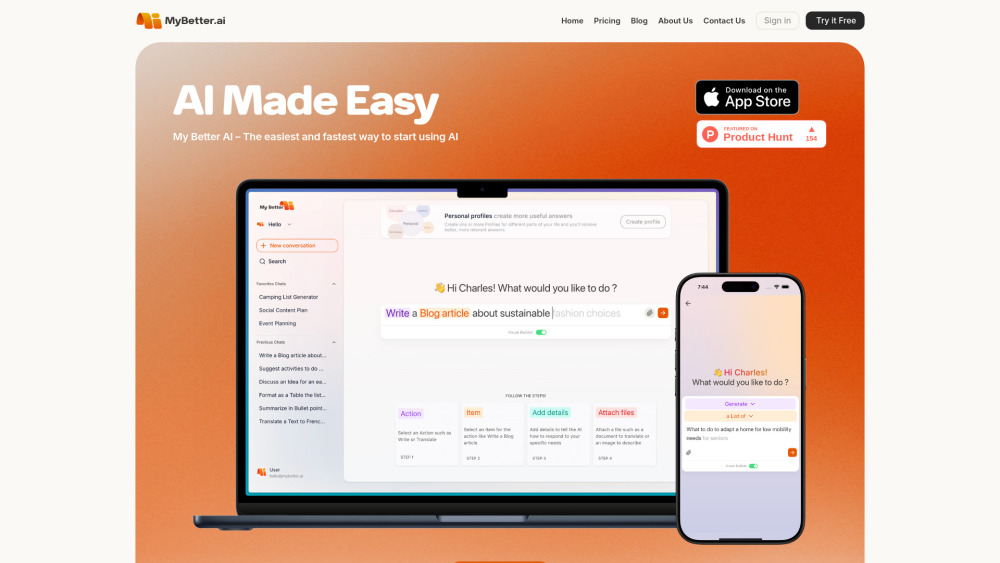
My Better AI website preview

My Better AI Website screenshot

Introducing My Better AI: Generative AI, Finally Effortless

My Better AI (MyBetter.ai) reimagines how people interact with generative AI—not as coders or prompt crafters, but as thinkers, creators, and doers. Built for real life—not labs—it removes the friction of learning syntax, comparing models, or second-guessing phrasing. Whether you're helping your child with homework, drafting a client email, or sketching a weekend meal plan, My Better AI delivers intelligent, actionable results in seconds—no tutorials, no jargon, no guesswork. Available on the App Store, it unifies cutting-edge AI engines—including ChatGPT, Claude, Gemini, Llama, and Mistral—into one intuitive, privacy-first experience.

How It Works: Think First, Create Instantly

At its heart is the Visual Builder—a thought-to-output interface that replaces prompts with purpose. Choose an action (“Explain,” “Summarize,” “Plan,” “Rewrite”) and an item (“this PDF,” “my vacation photo,” “the meeting notes I just uploaded”) from smart, context-aware menus. Add files, snap a photo, or type naturally—the system guides you, suggests completions, and refines intent before a single model runs. Prefer full control? Toggle to Expert Mode anytime. Boost creativity with Lightning Mode for rapid-fire ideation, refine outputs with one-tap tone/format adjustments, and build continuity across sessions using personalized AI profiles—each tuned to your voice, goals, and preferences.

Why People Love My Better AI

Visual Builder — No prompts, just purpose-driven actions and intuitive selections

Unified Intelligence — Seamless access to top-tier models without switching tabs or accounts

Lightning Mode — Generate 5x more ideas in the same time, optimized for flow and focus

AI Profiles — Save preferences, tone, expertise level, and recurring use cases for consistent, personal responses

Smart Conversation History — Search, tag, rename, and favorite past interactions like digital notes

One-Click Refinement — Adjust clarity, length, formality, or structure—no rewriting needed

Drag-and-Drop File Analysis — Upload documents, spreadsheets, images, or scans for instant insight

Real Human Support — Responsive email assistance, not chatbots or FAQs alone

Zero-Training Data Policy — Your inputs, files, and conversations never train public or private AI models

Real People, Real Moments—Powered by My Better AI

Teachers designing engaging, standards-aligned lesson hooks in under 90 seconds

Freelancers crafting compelling proposals tailored to each prospect’s industry

Parents generating balanced weekly menus—and shopping lists—based on pantry photos

Students breaking down complex topics into visual summaries or study quizzes

Local artisans creating social media posts, packaging copy, and seasonal campaign ideas

Nonprofit coordinators drafting grant language, volunteer briefs, and community updates

Product source: My Better AI official website. Check the provider for current plans, limits and availability.

FAQ

My Better AI questions and answers

Product context and practical checks for evaluating My Better AI.

What is My Better AI used for?

My Better AI makes generative AI effortless—zero prompt engineering required. Powerful, intuitive, and built for everyone.

How do I get started with My Better AI?

At its heart is the Visual Builder—a thought-to-output interface that replaces prompts with purpose. Choose an action (“Explain,” “Summarize,” “Plan,” “Rewrite”) and an item (“this PDF,” “my vacation photo,” “the meeting notes I just uploaded”) from smart, context-aware menus. Add files, snap a photo, or type naturally—the system guides you, suggests completions, and refines intent before a single model runs. Prefer full control? Toggle to Expert Mode anytime. Boost creativity with Lightning Mode for rapid-fire ideation, refine outputs with one-tap tone/format adjustments, and build continuity across sessions using personalized AI profiles—each tuned to your voice, goals, and preferences.

What should I compare before choosing a My Better AI plan?

Check My Better AI’s current pricing page for included usage, renewal terms and any credit charges. Compare the cost of a usable result, including retries, rather than assuming that account registration includes free usage.

What inputs should I prepare for a My Better AI trial?

Identify the files, text or account connections your task needs. Confirm that the product accepts those inputs and offers controls for reviewing its work.

How can I check the quality of a My Better AI result?

Test one representative task and inspect the result for accuracy and completeness. Record where manual corrections or extra tools are needed.

Which export options should I check in My Better AI?

Check export formats, integrations and whether you can keep using your work outside the service. Test a real export before committing to a longer plan.

What is a practical way to test My Better AI against alternatives?

Choose one task with a clear success condition. Keep the input consistent, record the time spent reviewing and compare the complete workflow cost.

What should I review before uploading material to My Better AI?

Read the provider’s rules on access, retention, deletion and use of uploaded material. Start with a non-confidential sample that you have permission to use.

How can I check whether My Better AI fits my existing workflow?

List the steps before and after using My Better AI, including preparation, review and export. Test that complete sequence and check whether handoffs require manual conversion or another paid service.

Where is the official My Better AI website?

The website linked from this profile is https://MyBetter.ai. Use the provider’s own documentation, account area and support channels to confirm current product details.

Visit My Better AI