Text&ampWriting

Music Eleven AI

Turn text into professional, royalty-free music in 30 seconds with Music Eleven AI. Enjoy 30+ genres, commercial licensing, and WAV/MP3/STEM exports.

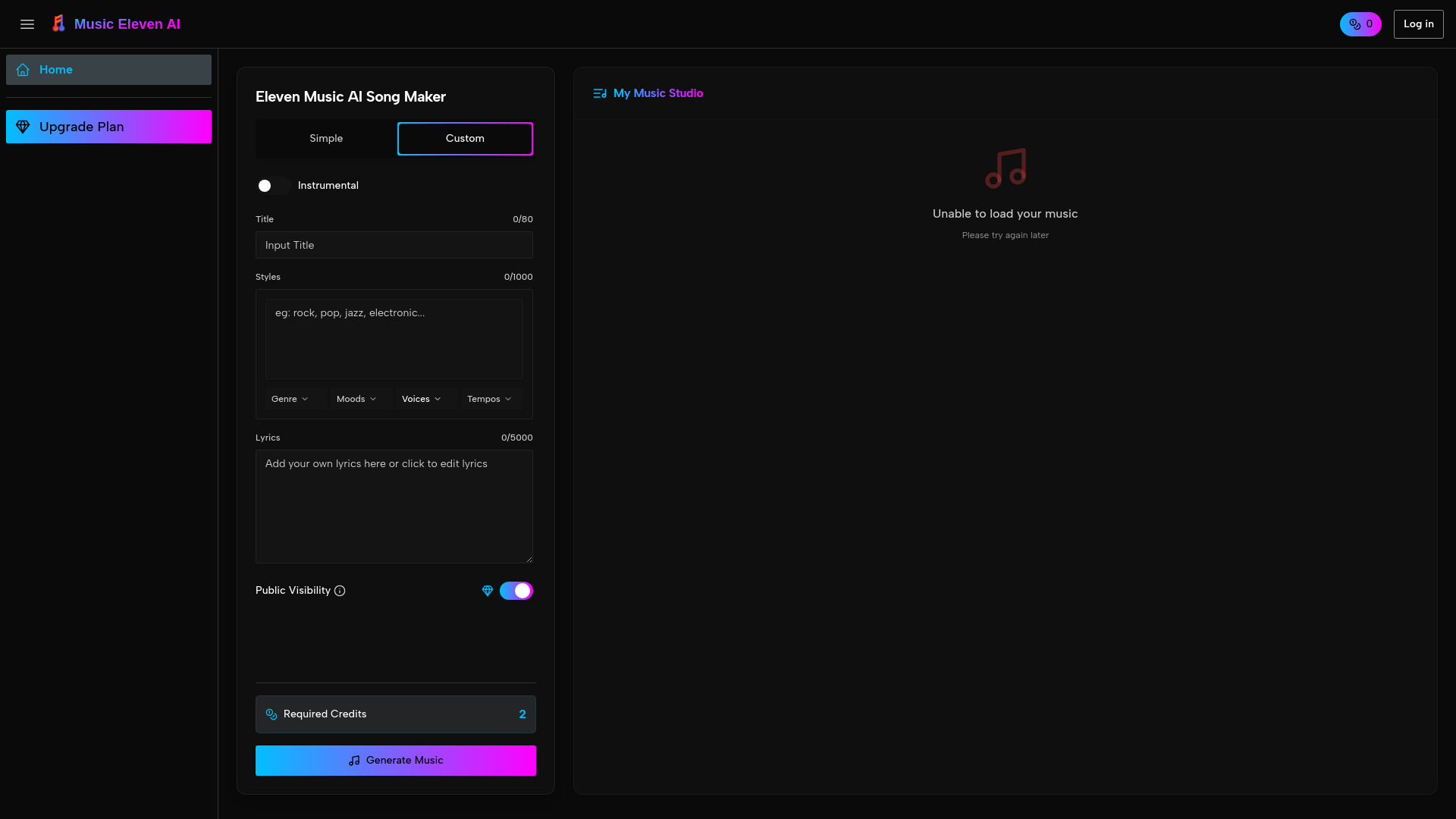
Music Eleven AI website preview

What Is Music Eleven AI?

Music Eleven AI is an AI music generator that turns written ideas into original soundtracks in approximately 30 seconds. Instead of searching through stock libraries or building a composition from scratch, you can describe the sound you want and generate music suited to your project. From upbeat tracks for social media to atmospheric scores for presentations, the platform helps creators produce music without traditional recording equipment or extensive musical training.

With more than 30 music genres, customizable settings, and royalty-free licensing options, Music Eleven AI brings music production into everyday creative workflows. Video editors, podcasters, marketers, and independent developers can explore different musical directions, download their preferred results, and incorporate them into finished content. Commercial use should always follow the platform’s current licensing terms and any conditions associated with your subscription.

How to Create Music With Music Eleven AI

Start by writing a short description of the track you need. Include its purpose, musical style, mood, and preferred instruments to give the AI a clear direction. For example, try “uplifting electronic background music for a workout tutorial” or “gentle acoustic guitar with a relaxed weekend atmosphere.” You can also begin with a genre template or style preset when you want a starting point without composing a detailed prompt.

Music Eleven AI uses your instructions to generate a composition in around 30 seconds. Listen to the preview, decide whether the result fits your project, and refine the available settings if needed. Adjusting the tempo, instrumentation, key, or emotional character can help bring the track closer to your creative brief. Once satisfied, download the audio in a supported format and add it to your editing workflow.

For more specific results, describe both what the music should sound like and how it will be used. A podcast introduction may need a memorable opening, while background music for a tutorial should leave space for speech. Available WAV, MP3, and stem exports provide different levels of flexibility for publishing, editing, and mixing, with 48kHz output supporting professional audio workflows.

Key Features of Music Eleven AI

  • Text-to-Music Creation: Describe a musical idea in everyday language and let the AI turn it into a complete composition. Prompts can communicate genre, atmosphere, instruments, and intended use without requiring notation or production terminology.
  • More Than 30 Music Genres: Explore styles such as electronic, pop, classical, rock, hip-hop, and ambient. Genre presets offer a starting point for matching your soundtrack to a video, campaign, podcast, or interactive experience.
  • Flexible Creative Controls: Shape your music through available adjustments to BPM, key, instrumentation, arrangement, and mood. These controls help you move beyond a first draft and develop a sound that better supports your content.
  • Multiple Audio Export Options: Choose WAV for high-quality editing, MP3 for convenient sharing, or stems for working with separate musical elements. Support for 48kHz audio makes the generated material suitable for a range of production environments.
  • Royalty-Free Licensing: Use eligible generated tracks in commercial content under the applicable license. This can simplify sourcing music for monetized videos, advertising, client work, and other projects without arranging a separate license for every use.
  • Generation in Approximately 30 Seconds: Produce a musical starting point quickly, compare alternative ideas, and test different creative directions. Fast generation helps reduce the time between planning a soundtrack and hearing how it works with your content.

Why Choose Music Eleven AI?

Finding suitable music can become a time-consuming part of content production. Stock tracks may not match the pace or atmosphere of your project, while commissioning an original score can require a larger budget and longer turnaround. Music Eleven AI offers another approach: describe what you need, generate a track quickly, and refine the result to suit your creative direction.

The platform combines accessible music generation with controls that support more deliberate experimentation. Beginners can start with straightforward prompts and presets, while experienced creators can explore variations in tempo, arrangement, and instrumentation. This makes it useful for both quick background tracks and projects that require a more specific musical identity.

Its export options also help connect AI-generated music with existing production tools. Whether you edit video, assemble podcast episodes, or mix audio in a digital audio workstation, downloadable files can fit into your established process. Royalty-free licensing may further simplify project planning, provided you check the relevant usage rights, restrictions, and subscription requirements before publishing.

Use Cases and Applications

Video and Social Media Content: Create background music for YouTube videos, short-form clips, tutorials, and product demonstrations. By specifying the desired energy and instrumentation, creators can develop tracks that complement their visuals and leave enough space for dialogue or narration.

Podcast Intros and Audio Branding: Generate opening themes, transition cues, and closing music that help give a show a recognizable sound. Exploring related prompts can provide options for different episode formats while keeping the overall musical style consistent.

Marketing and Business Presentations: Produce music for promotional videos, advertisements, internal communications, and presentation decks. A carefully written prompt can guide the soundtrack toward a particular campaign mood, whether confident and energetic or calm and informative.

Games and Creative Prototypes: Independent developers and designers can use generated tracks to explore the atmosphere of a scene, level, or interactive concept. Quick iterations make it easier to compare musical directions before deciding which approach best supports the experience.

Product source: Music Eleven AI official website. Check the provider for current plans, limits and availability.

FAQ

Music Eleven AI questions and answers

Product context and practical checks for evaluating Music Eleven AI.

What is Music Eleven AI used for?

Turn text into professional, royalty-free music in 30 seconds with Music Eleven AI. Enjoy 30+ genres, commercial licensing, and WAV/MP3/STEM exports.

How do I get started with Music Eleven AI?

Start by writing a short description of the track you need. Include its purpose, musical style, mood, and preferred instruments to give the AI a clear direction. For example, try “uplifting electronic background music for a workout tutorial” or “gentle acoustic guitar with a relaxed weekend atmosphere.” You can also begin with a genre template or style preset when you want a starting point without composing a detailed prompt.Music Eleven AI uses your instructions to generate a composition in around 30 seconds. Listen to the preview, decide whether the result fits your project, and refine the available settings if needed. Adjusting the tempo, instrumentation, key, or emotional character can help bring the track closer to your creative brief. Once satisfied, download the audio in a supported format and add it to your editing workflow.For more specific results, describe both what the music should sound like and how it will be used. A podcast introduction may need a memorable opening, while background music for a tutorial should leave space for speech. Available WAV, MP3, and stem exports provide different levels of flexibility for publishing, editing, and mixing, with 48kHz output supporting professional audio workflows.

Which capabilities are described for Music Eleven AI?

Text-to-Music Creation: Describe a musical idea in everyday language and let the AI turn it into a complete composition. Prompts can communicate genre, atmosphere, instruments, and intended use without requiring notation or production terminology. More Than 30 Music Genres: Explore styles such as electronic, pop, classical, rock, hip-hop, and ambient. Genre presets offer a starting point for matching your soundtrack to a video, campaign, podcast, or interactive experience. Flexible Creative Controls: Shape your music through available adjustments to BPM, key, instrumentation, arrangement, and mood. These controls help you move beyond a first draft and develop a sound that better supports your content. Multiple Audio Export Options: Choose WAV for high-quality editing, MP3 for convenient sharing, or stems for working with separate musical elements. Support for 48kHz audio makes the generated material suitable for a range of production environments. Royalty-Free Licensing: Use eligible generated tracks in commercial content under the applicable license. This can simplify sourcing music for monetized videos, advertising, client work, and other projects without arranging a separate license for every use. Generation in Approximately 30 Seconds: Produce a musical starting point quickly, compare alternative ideas, and test different creative directions. Fast generation helps reduce the time between planning a soundtrack and hearing how it works with your content.

What projects can I evaluate Music Eleven AI for?

Video and Social Media Content: Create background music for YouTube videos, short-form clips, tutorials, and product demonstrations. By specifying the desired energy and instrumentation, creators can develop tracks that complement their visuals and leave enough space for dialogue or narration.Podcast Intros and Audio Branding: Generate opening themes, transition cues, and closing music that help give a show a recognizable sound. Exploring related prompts can provide options for different episode formats while keeping the overall musical style consistent.Marketing and Business Presentations: Produce music for promotional videos, advertisements, internal communications, and presentation decks. A carefully written prompt can guide the soundtrack toward a particular campaign mood, whether confident and energetic or calm and informative.Games and Creative Prototypes: Independent developers and designers can use generated tracks to explore the atmosphere of a scene, level, or interactive concept. Quick iterations make it easier to compare musical directions before deciding which approach best supports the experience.

How does Music Eleven AI handle text-to-music creation?

Text-to-Music Creation: Describe a musical idea in everyday language and let the AI turn it into a complete composition. Prompts can communicate genre, atmosphere, instruments, and intended use without requiring notation or production terminology.

How does Music Eleven AI handle more than 30 music genres?

More Than 30 Music Genres: Explore styles such as electronic, pop, classical, rock, hip-hop, and ambient. Genre presets offer a starting point for matching your soundtrack to a video, campaign, podcast, or interactive experience.

What should I compare before choosing a Music Eleven AI plan?

Check Music Eleven AI’s current pricing page for included usage, renewal terms and any credit charges. Compare the cost of a usable result, including retries, rather than assuming that account registration includes free usage.

What inputs should I prepare for a Music Eleven AI trial?

Compare support for source documents, style instructions, outlines and length limits. Check whether citations link to real material rather than merely looking like references.

How can I check the quality of a Music Eleven AI result?

Verify names, dates, quotations and factual claims against the original sources. Edit tone, remove repetition and make sure the text answers the intended reader’s question.

Where is the official Music Eleven AI website?

The website linked from this profile is https://musiceleven.ai. Use the provider’s own documentation, account area and support channels to confirm current product details.

Visit Music Eleven AI