Writing Assistants

MoodSpace - Chrome Extension

Achieve your goals with MoodSpace - a personalized Chrome extension designed to help you reach your full potential.

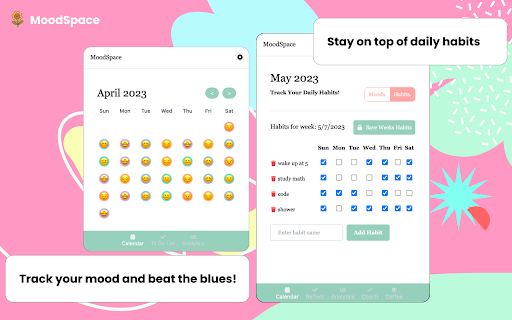
MoodSpace - Chrome Extension website preview

MoodSpace - Chrome Extension Website screenshot

Introducing MoodSpace - Chrome Extension: Personalized Goal-Reaching

Experience a revolutionary productivity and wellness extension designed to help you achieve your goals through personalized insights and unwavering support.

Unlock Your Potential with MoodSpace - Chrome Extension

Enhance your browsing experience by installing the MoodSpace extension on your browser. From tracking your moods and to-dos to setting intentions and reflecting on your progress, MoodSpace empowers you to embark on a journey of self-growth and personal development. With the aid of AI analytics, gain valuable insights and receive personalized coaching for continuous improvement.

Discover the Core Features of MoodSpace - Chrome Extension

Track Your Daily Progress

Set Intentions for Success

Effortlessly Jot Down Your Thoughts

Share Your Intentions with Supportive Friends

Ensure Journal Privacy with Lock Feature

Data Encryption for Enhanced Security

AI Coaching and Goal Setting for Optimal Performance

Track Your Daily Habits Efficiently

Set Notifications and Reminders for Proactive Planning

Explore the Use Cases of MoodSpace - Chrome Extension

Keep Track of Your Daily Progress

Set Intentions for Personal Growth and Success

Reflect on Your Experiences and Gain Valuable Insights

Share Your Intentions for Accountability and Motivation

Product source: MoodSpace - Chrome Extension official website. Check the provider for current plans, limits and availability.

FAQ

MoodSpace - Chrome Extension questions and answers

Product context and practical checks for evaluating MoodSpace - Chrome Extension.

What is MoodSpace - Chrome Extension used for?

Achieve your goals with MoodSpace - a personalized Chrome extension designed to help you reach your full potential.

How do I get started with MoodSpace - Chrome Extension?

Open the official MoodSpace - Chrome Extension website and identify the workflow that matches your task. Prepare a brief with a subject, composition, lighting and required output size. Test a first generation and a targeted revision to see how much control you retain.

Which capabilities are described for MoodSpace - Chrome Extension?

Track Your Daily ProgressSet Intentions for SuccessEffortlessly Jot Down Your ThoughtsShare Your Intentions with Supportive FriendsEnsure Journal Privacy with Lock FeatureData Encryption for Enhanced SecurityAI Coaching and Goal Setting for Optimal PerformanceTrack Your Daily Habits EfficientlySet Notifications and Reminders for Proactive Planning

What projects can I evaluate MoodSpace - Chrome Extension for?

Keep Track of Your Daily ProgressSet Intentions for Personal Growth and SuccessReflect on Your Experiences and Gain Valuable InsightsShare Your Intentions for Accountability and Motivation

What should I compare before choosing a MoodSpace - Chrome Extension plan?

Check MoodSpace - Chrome Extension’s current pricing page for included usage, renewal terms and any credit charges. Compare the cost of a usable result, including retries, rather than assuming that account registration includes free usage.

What inputs should I prepare for a MoodSpace - Chrome Extension trial?

Look for text prompts, image references, masks or sketches as appropriate. Compare composition control, supported upload types and the ability to revise a selected area.

How can I check the quality of a MoodSpace - Chrome Extension result?

Inspect text, hands, edges, reflections and repeated objects at full size. Check that important product or brand details survive editing.

Which export options should I check in MoodSpace - Chrome Extension?

Compare pixel dimensions, transparency, file formats and any enlargement options. Confirm that the downloaded result works in your design or publishing software.

What is a practical way to test MoodSpace - Chrome Extension against alternatives?

Prepare a brief with a subject, composition, lighting and required output size. Test a first generation and a targeted revision to see how much control you retain.

Where is the official MoodSpace - Chrome Extension website?

The website linked from this profile is https://chromewebstore.google.com/detail/moodspace/jfkcnjgdhdndmoccolfpndjncofeoeoh. Use the provider’s own documentation, account area and support channels to confirm current product details.

Visit MoodSpace - Chrome Extension