Text to Image

Midjourney AI

Create images with Midjourney AI! Enjoy a free trial and preset prompts for an excellent art generation experience. Your versatile art solution!

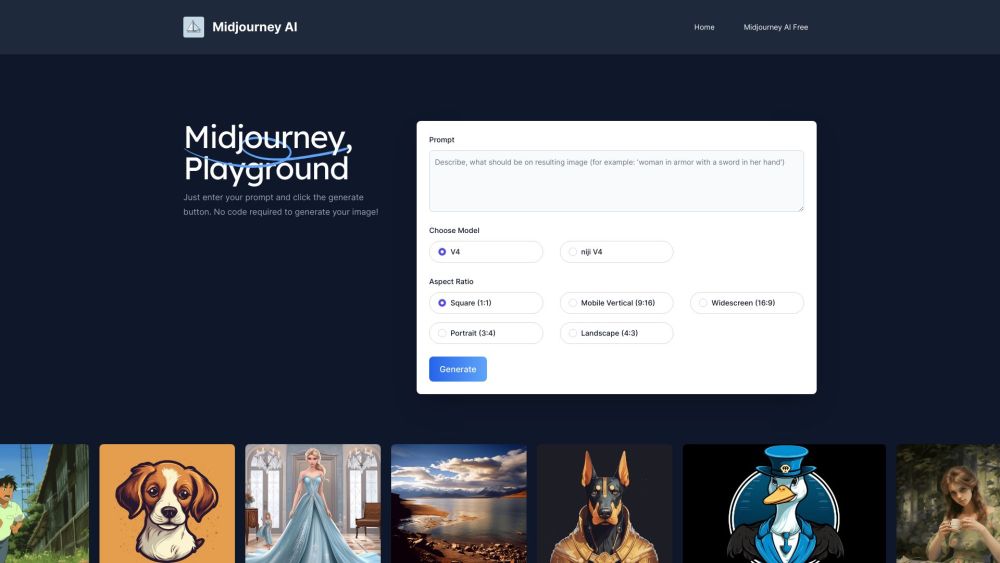
Midjourney AI website preview

Midjourney AI Website screenshot

What is Midjourney AI?

Midjourney AI is a cutting-edge AI art generator that transforms textual descriptions into captivating images. With a user-friendly free trial and a collection of preset prompts, it offers a seamless image creation experience. Midjourney AI stands out as a versatile alternative to the traditional Midjourney platform.

How to use Midjourney AI?

1. Navigate to the Midjourney AI website at midjourneyai.ai.
2. Select your preferred Model (e.g., V4 niji).
3. Choose the desired Aspect Ratio for your image (e.g., Square, Widescreen).
4. Input your text prompt in the designated field.
5. Click the 'Generate' button.
6. Wait approximately one minute for your image to be generated.
7. Download your high-definition image for free.
No coding skills are required to use Midjourney AI!

Midjourney AI's Core Features

1. Text-to-image generation: Converts text descriptions into visually stunning images. 2. Free trial: Enjoy 20 free image generations without any upfront cost. 3. High-definition downloads: Access and download your AI-generated images in high resolution. 4. Flexible aspect ratios: Choose from various aspect ratios to fit your needs. 5. Preset prompts: Utilize ready-made prompts to easily generate high-quality AI artwork.

Midjourney AI's Use Cases

1. Logos: Create unique logos through AI-generated art. 2. Portraits: Produce realistic or stylized portraits from textual prompts. 3. Architecture: Visualize architectural concepts and designs with AI. 4. Artistic projects: Generate unique art pieces or enhance existing projects with AI.

Product source: Midjourney AI official website. Check the provider for current plans, limits and availability.

FAQ

Midjourney AI questions and answers

Product context and practical checks for evaluating Midjourney AI.

What is Midjourney AI used for?

Create images with Midjourney AI! Enjoy a free trial and preset prompts for an excellent art generation experience. Your versatile art solution!

How do I get started with Midjourney AI?

1. Navigate to the Midjourney AI website at midjourneyai.ai. 2. Select your preferred Model (e.g., V4 niji). 3. Choose the desired Aspect Ratio for your image (e.g., Square, Widescreen). 4. Input your text prompt in the designated field. 5. Click the 'Generate' button. 6. Wait approximately one minute for your image to be generated. 7. Download your high-definition image for free. No coding skills are required to use Midjourney AI!

Which capabilities are described for Midjourney AI?

1. Text-to-image generation: Converts text descriptions into visually stunning images. 2. Free trial: Enjoy 20 free image generations without any upfront cost. 3. High-definition downloads: Access and download your AI-generated images in high resolution. 4. Flexible aspect ratios: Choose from various aspect ratios to fit your needs. 5. Preset prompts: Utilize ready-made prompts to easily generate high-quality AI artwork.

What projects can I evaluate Midjourney AI for?

1. Logos: Create unique logos through AI-generated art. 2. Portraits: Produce realistic or stylized portraits from textual prompts. 3. Architecture: Visualize architectural concepts and designs with AI. 4. Artistic projects: Generate unique art pieces or enhance existing projects with AI. Midjourney AI Support Email & Customer Service Contact For customer service, you can reach Midjourney AI at: [email protected]. Midjourney AI Company Information Company Name: Mira Muse LLC Address: 81807 E. County Road 22, Deer Trail, CO 80105, US. Midjourney AI Pricing For pricing information, visit: https://miramuseai.net/subscription. Midjourney AI Social Media Links Facebook: https://www.facebook.com/sharer.php?u=https://miramuseai.net/ LinkedIn: https://www.linkedin.com/sharing/share-offsite/?url=https://miramuseai.net/ Twitter: https://twitter.com/intent/tweet?url=https://miramuseai.net/ Pinterest: https://pinterest.com/pin/create/button/?url=https://miramuseai.net/

What should I compare before choosing a Midjourney AI plan?

For pricing information, visit: https://miramuseai.net/subscription. Confirm current prices and allowances on the provider’s website before purchasing.

What inputs should I prepare for a Midjourney AI trial?

Look for text prompts, image references, masks or sketches as appropriate. Compare composition control, supported upload types and the ability to revise a selected area.

How can I check the quality of a Midjourney AI result?

Inspect text, hands, edges, reflections and repeated objects at full size. Check that important product or brand details survive editing.

Which export options should I check in Midjourney AI?

Compare pixel dimensions, transparency, file formats and any enlargement options. Confirm that the downloaded result works in your design or publishing software.

What is a practical way to test Midjourney AI against alternatives?

Prepare a brief with a subject, composition, lighting and required output size. Test a first generation and a targeted revision to see how much control you retain.

Where is the official Midjourney AI website?

The website linked from this profile is https://www.midjourneyai.ai. Use the provider’s own documentation, account area and support channels to confirm current product details.

Visit Midjourney AI