AI tool profile

MelodyCraft AI

Create original songs, rap & lyrics with MelodyCraft AI—11 Suno V5–powered tools. Free to start, no credit card needed. Try now!

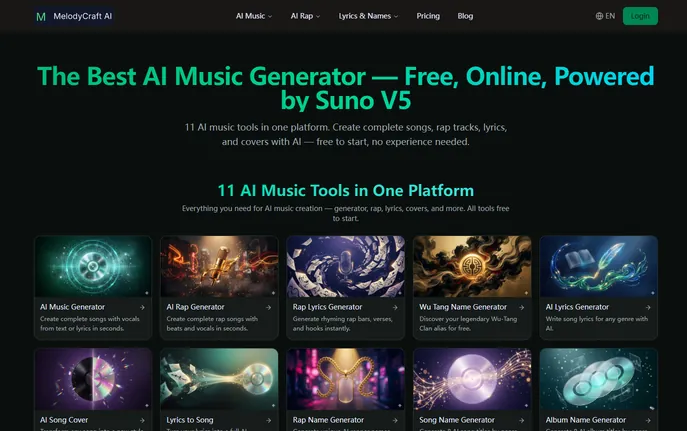
MelodyCraft AI website preview

What is MelodyCraft AI?

MelodyCraft AI is an innovative, browser-based music creation ecosystem built entirely on Suno V5—the latest generation of AI audio synthesis. It integrates 11 purpose-built tools into a single, seamless interface, empowering creators to compose full songs with expressive vocals, craft dynamic rap verses, write polished lyrics, reimagine existing tracks as AI covers, and even generate evocative song titles and album concepts—no musical training, plugins, or downloads required. Recognized on aitop-tools.com as a top-tier AI music suite, MelodyCraft AI redefines accessibility in digital music production.

How to Use MelodyCraft AI

Getting started takes seconds: open MelodyCraft AI in any modern browser, select your preferred tool from the lineup of 11, then input a prompt (e.g., “upbeat synth-pop love song about summer rain”) or drop in your own lyrics. Within half a minute—typically 30–60 seconds—the AI delivers a fully produced track featuring synchronized vocals, melody, harmony, and instrumentation. Whether you're sketching a hook at 2 a.m. or refining a verse for a client project, the platform adapts: use *Concept-to-Track* mode for ideation or *Lyrics-to-Song* mode when your words are ready for sonic realization. With genre tags spanning over 70 distinct styles—from hyperpop and reggaeton to cinematic orchestral and vaporwave—you can audition sounds, refine moods, and discover unexpected creative directions instantly.

Key Features of MelodyCraft AI

  • 11 Integrated Music Tools: Go beyond basic generation—access dedicated AI modules for song composition, rap verse & bar construction, lyric writing, vocal cover recreation, AI-powered song naming, album title ideation, playlist curation, beat sketching, mood-based arrangement, tempo & key adaptation, and vocal style transfer.
  • Suno V5-Powered Audio Engine: Leverages cutting-edge vocal modeling for natural timbre, emotional phrasing, breath control, and genre-appropriate articulation—delivering studio-ready WAV/MP3 exports with rich stereo imaging and balanced mix fidelity.
  • Adaptive Input Flexibility: Start from zero with descriptive prompts—or jump straight into production using your own lyrics, chord progressions (via text notation), or even reference audio snippets for stylistic alignment.
  • 70+ Curated Music Styles: Explore deeply trained genre models including indie folk, K-pop, Afrobeats, chiptune, gqom, bossa nova, emo rap, ambient techno, bluegrass, and more—each optimized for authentic instrumentation, rhythm patterns, and vocal delivery.

Why Choose MelodyCraft AI?

MelodyCraft AI eliminates fragmentation. Instead of juggling separate lyric apps, beat makers, and vocal synthesizers, you get one unified workflow—from spark of inspiration to finished master. It’s designed for real-world creativity: new users receive 15 complimentary credits (ideal for testing all 11 tools) plus 6 free daily credits—zero payment info needed. For professional use, subscription plans include commercial rights for monetized platforms (YouTube, Spotify, TikTok, podcasts, games, ads) and unlimited downloads with full copyright ownership. As featured on aitop-tools.com, MelodyCraft AI isn’t just another AI music tool—it’s your co-writer, producer, and session vocalist, all in one tab.

Use Cases and Applications

Educators create custom theme songs for classroom projects; indie filmmakers score short films with original AI-composed soundtracks; podcast hosts generate unique intros/outros weekly; TikTok creators produce viral hooks in under a minute; rappers test flow variations across trap, drill, and boom bap templates; and marketing agencies develop branded jingles tailored to audience demographics—all without hiring composers or booking studios. Songwriters also rely on its AI Lyrics Generator to break through blocks, then instantly hear those lines sung back with melodic contour and emotional nuance.

Product source: MelodyCraft AI official website. Check the provider for current plans, limits and availability.

FAQ

MelodyCraft AI questions and answers

Product context and practical checks for evaluating MelodyCraft AI.

What is MelodyCraft AI used for?

Create original songs, rap & lyrics with MelodyCraft AI—11 Suno V5–powered tools. Free to start, no credit card needed. Try now!

How do I get started with MelodyCraft AI?

Getting started takes seconds: open MelodyCraft AI in any modern browser, select your preferred tool from the lineup of 11, then input a prompt (e.g., “upbeat synth-pop love song about summer rain”) or drop in your own lyrics. Within half a minute—typically 30–60 seconds—the AI delivers a fully produced track featuring synchronized vocals, melody, harmony, and instrumentation. Whether you're sketching a hook at 2 a.m. or refining a verse for a client project, the platform adapts: use *Concept-to-Track* mode for ideation or *Lyrics-to-Song* mode when your words are ready for sonic realization. With genre tags spanning over 70 distinct styles—from hyperpop and reggaeton to cinematic orchestral and vaporwave—you can audition sounds, refine moods, and discover unexpected creative directions instantly.

Which capabilities are described for MelodyCraft AI?

11 Integrated Music Tools: Go beyond basic generation—access dedicated AI modules for song composition, rap verse & bar construction, lyric writing, vocal cover recreation, AI-powered song naming, album title ideation, playlist curation, beat sketching, mood-based arrangement, tempo & key adaptation, and vocal style transfer. Suno V5-Powered Audio Engine: Leverages cutting-edge vocal modeling for natural timbre, emotional phrasing, breath control, and genre-appropriate articulation—delivering studio-ready WAV/MP3 exports with rich stereo imaging and balanced mix fidelity. Adaptive Input Flexibility: Start from zero with descriptive prompts—or jump straight into production using your own lyrics, chord progressions (via text notation), or even reference audio snippets for stylistic alignment. 70+ Curated Music Styles: Explore deeply trained genre models including indie folk, K-pop, Afrobeats, chiptune, gqom, bossa nova, emo rap, ambient techno, bluegrass, and more—each optimized for authentic instrumentation, rhythm patterns, and vocal delivery.

What projects can I evaluate MelodyCraft AI for?

Educators create custom theme songs for classroom projects; indie filmmakers score short films with original AI-composed soundtracks; podcast hosts generate unique intros/outros weekly; TikTok creators produce viral hooks in under a minute; rappers test flow variations across trap, drill, and boom bap templates; and marketing agencies develop branded jingles tailored to audience demographics—all without hiring composers or booking studios. Songwriters also rely on its AI Lyrics Generator to break through blocks, then instantly hear those lines sung back with melodic contour and emotional nuance.

How does MelodyCraft AI handle 11 integrated music tools?

11 Integrated Music Tools: Go beyond basic generation—access dedicated AI modules for song composition, rap verse & bar construction, lyric writing, vocal cover recreation, AI-powered song naming, album title ideation, playlist curation, beat sketching, mood-based arrangement, tempo & key adaptation, and vocal style transfer.

How does MelodyCraft AI handle suno v5-powered audio engine?

Suno V5-Powered Audio Engine: Leverages cutting-edge vocal modeling for natural timbre, emotional phrasing, breath control, and genre-appropriate articulation—delivering studio-ready WAV/MP3 exports with rich stereo imaging and balanced mix fidelity.

What should I compare before choosing a MelodyCraft AI plan?

Check MelodyCraft AI’s current pricing page for included usage, renewal terms and any credit charges. Compare the cost of a usable result, including retries, rather than assuming that account registration includes free usage.

What inputs should I prepare for a MelodyCraft AI trial?

Look for text prompts, image references, masks or sketches as appropriate. Compare composition control, supported upload types and the ability to revise a selected area.

How can I check the quality of a MelodyCraft AI result?

Inspect text, hands, edges, reflections and repeated objects at full size. Check that important product or brand details survive editing.

Where is the official MelodyCraft AI website?

The website linked from this profile is https://melodycraftai.com/. Use the provider’s own documentation, account area and support channels to confirm current product details.

Visit MelodyCraft AI