Text to Image

mediaai

mediaai: Turn photos into AI art & videos—effortlessly. Creative power, unleashed.

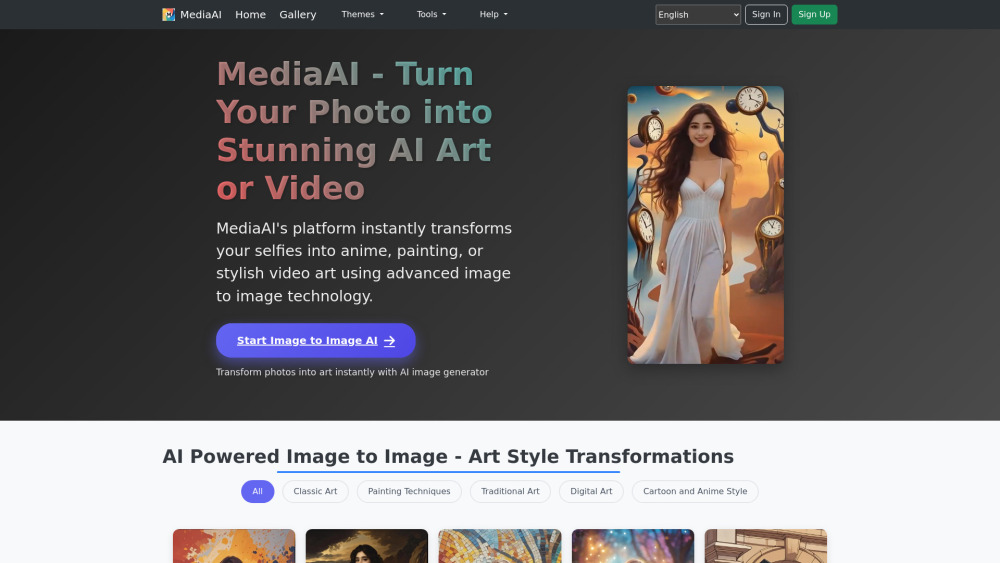
mediaai website preview

mediaai Website screenshot

What is mediaai?

mediaai is a next-generation AI creative studio — where photography meets fine art and motion. Built on state-of-the-art diffusion models and multimodal neural architectures, it seamlessly converts still images into expressive, high-fidelity AI art or cinematic video interpretations. Whether you're reimagining a casual selfie as a Renaissance portrait, animating a family photo into a gentle looping vignette, or transforming pet portraits into hand-painted masterpieces, mediaai delivers professional-grade results in seconds. Trained on curated datasets spanning centuries of visual culture — from classical oil techniques to contemporary digital aesthetics — the platform offers more than 100 meticulously engineered artistic filters, each optimized for texture, lighting, and stylistic fidelity. It’s purpose-built for meaningful moments: wedding albums reborn as impressionist series, birthday snapshots elevated into animated storyboards, and childhood photos rendered in timeless illustrative styles.

How to use mediaai?

Getting started with mediaai is intuitive and instant. Begin by uploading any photo or short video clip — no editing skills needed. Then explore the dynamic style gallery: choose from pre-trained genres like Ukiyo-e woodblock, cyberpunk synthwave, or soft-focus watercolor — or fine-tune parameters to craft your own signature aesthetic. With one click, mediaai’s proprietary transformation engine processes your input, preserving facial integrity, compositional balance, and emotional resonance while applying rich stylistic interpretation. Within seconds, preview your AI-generated artwork at full resolution. Download lossless PNG or MP4 files, apply watermark-free sharing options, or export directly to social platforms — all while maintaining native aspect ratios and pixel-perfect clarity.

mediaai's Core Features

Intelligent image-to-art conversion with semantic fidelity

100+ curated, culturally grounded art styles — from Baroque to generative surrealism

Photo-to-video animation with natural motion synthesis

Style cloning & custom palette training (Pro tier)

Ultra-HD export (up to 8K resolution)

Text-guided stylization (prompt-enhanced transformations)

AI-powered enhancement suite: noise reduction, upscaling, and lighting optimization

Historical photo revitalization — colorization, scratch removal, and grain restoration

Ethical face-aware swapping (opt-in consent & identity preservation)

Age progression/regression with anatomically coherent rendering

mediaai's Use Cases

Elevating everyday photos into gallery-worthy digital paintings or animated reels.

Breathing life into cherished memories — turning still portraits into subtle, emotive motion pieces.

Designing bespoke visual narratives for milestone celebrations: anniversary slideshows, birthday invitations, or vow renewal visuals.

Reinterpreting pet portraits across iconic artistic movements — from Van Gogh swirls to Klimt gold leaf motifs.

Transforming children’s photos into whimsical illustrations, storybook scenes, or nostalgic sepia-toned vignettes.

Applying historically accurate brushwork simulation — Impressionist dabs, Cubist fragmentation, or Art Nouveau linework.

Exploring medium-specific reinterpretations: charcoal sketch, ink wash, stained glass, or digital collage effects.

Generating imaginative worlds — dreamlike landscapes, architectural fantasies, or mythological tableaux — rooted in your original image.

Honoring cultural heritage through AI-stylized renditions: Persian miniature, Mughal fresco, West African textile patterns, or Indigenous motif integration.

Adapting personal imagery into beloved animation universes — Studio Ghibli warmth, Looney Tunes energy, or modern anime aesthetics.

Product source: mediaai official website. Check the provider for current plans, limits and availability.

FAQ

mediaai questions and answers

Product context and practical checks for evaluating mediaai.

What is mediaai used for?

mediaai: Turn photos into AI art & videos—effortlessly. Creative power, unleashed.

How do I get started with mediaai?

Getting started with mediaai is intuitive and instant. Begin by uploading any photo or short video clip — no editing skills needed. Then explore the dynamic style gallery: choose from pre-trained genres like Ukiyo-e woodblock, cyberpunk synthwave, or soft-focus watercolor — or fine-tune parameters to craft your own signature aesthetic. With one click, mediaai’s proprietary transformation engine processes your input, preserving facial integrity, compositional balance, and emotional resonance while applying rich stylistic interpretation. Within seconds, preview your AI-generated artwork at full resolution. Download lossless PNG or MP4 files, apply watermark-free sharing options, or export directly to social platforms — all while maintaining native aspect ratios and pixel-perfect clarity.

Which capabilities are described for mediaai?

Intelligent image-to-art conversion with semantic fidelity100+ curated, culturally grounded art styles — from Baroque to generative surrealismPhoto-to-video animation with natural motion synthesisStyle cloning & custom palette training (Pro tier)Ultra-HD export (up to 8K resolution)Text-guided stylization (prompt-enhanced transformations)AI-powered enhancement suite: noise reduction, upscaling, and lighting optimizationHistorical photo revitalization — colorization, scratch removal, and grain restorationEthical face-aware swapping (opt-in consent & identity preservation)Age progression/regression with anatomically coherent rendering

What projects can I evaluate mediaai for?

Elevating everyday photos into gallery-worthy digital paintings or animated reels.Breathing life into cherished memories — turning still portraits into subtle, emotive motion pieces.Designing bespoke visual narratives for milestone celebrations: anniversary slideshows, birthday invitations, or vow renewal visuals.Reinterpreting pet portraits across iconic artistic movements — from Van Gogh swirls to Klimt gold leaf motifs.Transforming children’s photos into whimsical illustrations, storybook scenes, or nostalgic sepia-toned vignettes.Applying historically accurate brushwork simulation — Impressionist dabs, Cubist fragmentation, or Art Nouveau linework.Exploring medium-specific reinterpretations: charcoal sketch, ink wash, stained glass, or digital collage effects.Generating imaginative worlds — dreamlike landscapes, architectural fantasies, or mythological tableaux — rooted in your original image.Honoring cultural heritage through AI-stylized renditions: Persian miniature, Mughal fresco, West African textile patterns, or Indigenous motif integration.Adapting personal imagery into beloved animation universes — Studio Ghibli warmth, Looney Tunes energy, or modern anime aesthetics.

What should I compare before choosing a mediaai plan?

Check mediaai’s current pricing page for included usage, renewal terms and any credit charges. Compare the cost of a usable result, including retries, rather than assuming that account registration includes free usage.

What inputs should I prepare for a mediaai trial?

Compare text prompts, reference frames, source footage and audio support. Check duration, aspect ratio and whether the tool lets you keep a subject consistent between shots.

How can I check the quality of a mediaai result?

Watch the entire clip for motion errors, distorted objects, changing identities, lip-sync problems and abrupt transitions. Inspect the downloaded file as well as the preview.

Which export options should I check in mediaai?

Check export resolution, frame rate, aspect ratio, audio tracks and watermark rules. A good preview is not a substitute for an export that fits your publishing channel.

What is a practical way to test mediaai against alternatives?

Use a short shot with one subject and one camera movement. Keep the prompt and duration constant, then compare usable seconds and the number of regenerations.

Where is the official mediaai website?

The website linked from this profile is https://www.mediaai.art. Use the provider’s own documentation, account area and support channels to confirm current product details.

Visit mediaai