AI Email Assistant

MailAttach - Chrome Extension

MailAttach - Chrome Extension: Never forget attachments again! Prevent email sending without attachments, saving you time and embarrassment. Get it now!

MailAttach - Chrome Extension website preview

MailAttach - Chrome Extension Website screenshot

Introducing MailAttach - Chrome Extension: Prevent Email Sending without Attachments

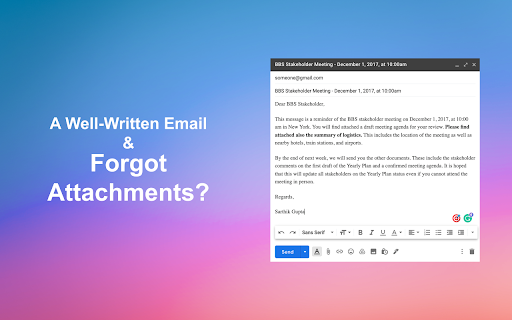
MailAttach is a powerful email extension designed to enhance your email experience by analyzing your email content and preventing you from sending emails without attachments. With MailAttach, you can bid farewell to those embarrassing moments when you forget to attach important files before hitting the send button.

How to Use MailAttach - Chrome Extension

Using MailAttach is a breeze. Simply install the extension, compose your email as usual, and let MailAttach take care of the rest. It will intelligently scan your email content and provide you with attachment alerts, ensuring that you never forget to include the necessary files before sending.

Core Features of MailAttach - Chrome Extension

Content Analysis for Attachments

MailAttach employs advanced content analysis algorithms to scan your email and detect whether attachments are missing. It saves you the trouble of manually double-checking each email, allowing you to focus on your work with peace of mind.

Warning Before Sending Without Attachments

Never again will you accidentally send an email without the intended attachments. MailAttach provides timely warnings, reminding you to attach files before sending, and preventing any embarrassing mishaps.

Privacy-Focused with No External Server Handling Data

Your privacy is of utmost importance to us. MailAttach operates locally on your Chrome browser, ensuring that your email content remains secure and confidential. Your data never leaves your device, giving you total peace of mind.

Use Cases of MailAttach - Chrome Extension

Avoid Sending Emails Without Attachments

MailAttach is your reliable companion in the world of emails. It prevents you from making the common mistake of sending emails without attachments, saving you valuable time and avoiding potential misunderstandings.

Quickly Add Forgotten Attachments

Even if you forget to attach files initially, MailAttach has got you covered. With just a few clicks, you can easily add the forgotten attachments before sending your email, ensuring that your recipients receive all the necessary files.

Ensure Email Professionalism

With MailAttach, you can maintain a high level of professionalism in your emails. By consistently including the appropriate attachments, you demonstrate attention to detail and enhance your overall communication effectiveness.

Product source: MailAttach - Chrome Extension official website. Check the provider for current plans, limits and availability.

FAQ

MailAttach - Chrome Extension questions and answers

Product context and practical checks for evaluating MailAttach - Chrome Extension.

What is MailAttach - Chrome Extension used for?

MailAttach - Chrome Extension: Never forget attachments again! Prevent email sending without attachments, saving you time and embarrassment. Get it now!

How do I get started with MailAttach - Chrome Extension?

Using MailAttach is a breeze. Simply install the extension, compose your email as usual, and let MailAttach take care of the rest. It will intelligently scan your email content and provide you with attachment alerts, ensuring that you never forget to include the necessary files before sending.

Which capabilities are described for MailAttach - Chrome Extension?

Content Analysis for AttachmentsMailAttach employs advanced content analysis algorithms to scan your email and detect whether attachments are missing. It saves you the trouble of manually double-checking each email, allowing you to focus on your work with peace of mind.Warning Before Sending Without AttachmentsNever again will you accidentally send an email without the intended attachments. MailAttach provides timely warnings, reminding you to attach files before sending, and preventing any embarrassing mishaps.Privacy-Focused with No External Server Handling DataYour privacy is of utmost importance to us. MailAttach operates locally on your Chrome browser, ensuring that your email content remains secure and confidential. Your data never leaves your device, giving you total peace of mind.

What projects can I evaluate MailAttach - Chrome Extension for?

Avoid Sending Emails Without AttachmentsMailAttach is your reliable companion in the world of emails. It prevents you from making the common mistake of sending emails without attachments, saving you valuable time and avoiding potential misunderstandings.Quickly Add Forgotten AttachmentsEven if you forget to attach files initially, MailAttach has got you covered. With just a few clicks, you can easily add the forgotten attachments before sending your email, ensuring that your recipients receive all the necessary files.Ensure Email ProfessionalismWith MailAttach, you can maintain a high level of professionalism in your emails. By consistently including the appropriate attachments, you demonstrate attention to detail and enhance your overall communication effectiveness.

What should I compare before choosing a MailAttach - Chrome Extension plan?

Check MailAttach - Chrome Extension’s current pricing page for included usage, renewal terms and any credit charges. Compare the cost of a usable result, including retries, rather than assuming that account registration includes free usage.

What inputs should I prepare for a MailAttach - Chrome Extension trial?

Compare support for source documents, style instructions, outlines and length limits. Check whether citations link to real material rather than merely looking like references.

How can I check the quality of a MailAttach - Chrome Extension result?

Verify names, dates, quotations and factual claims against the original sources. Edit tone, remove repetition and make sure the text answers the intended reader’s question.

Which export options should I check in MailAttach - Chrome Extension?

Check export to plain text, Markdown, documents or your publishing system. Formatting, headings and working links matter when moving a draft into production.

What is a practical way to test MailAttach - Chrome Extension against alternatives?

Use a real brief and a short source document. Compare factual accuracy, structure and editing time rather than accepting the longest or most confident draft.

Where is the official MailAttach - Chrome Extension website?

The website linked from this profile is https://chromewebstore.google.com/detail/mailattach/hmomedbefhfgcmgpkamdldilmcpacggk. Use the provider’s own documentation, account area and support channels to confirm current product details.

Visit MailAttach - Chrome Extension