AI YouTube Assistant

LunaNotes

LunaNotes Chrome Extension: Boost YouTube learning with note-taking, time-stamped highlights, and easy sharing. Stay organized and maximize your learning!

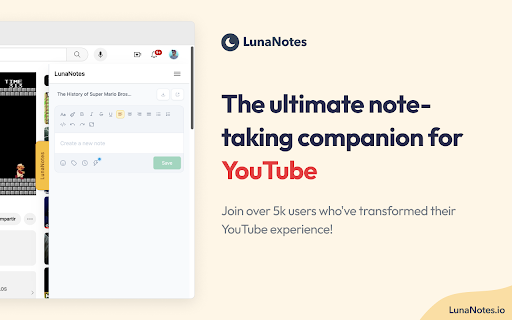
LunaNotes website preview

LunaNotes - Chrome Extension Website screenshot

What is LunaNotes AI Chrome Extension?

LunaNotes is a powerful Chrome extension designed to revolutionize your YouTube learning by enabling seamless note-taking directly on videos. Whether you're watching tutorials, lectures, or how-to videos, LunaNotes makes it easy to capture key insights and ideas while staying focused on the content.

How to Use LunaNotes AI Chrome Extension?

Using LunaNotes is simple. While watching YouTube videos, you can instantly take notes, highlight important moments with screenshots, and annotate them. Features like timestamps and tagging make organizing your notes a breeze. With cross-device syncing, your notes are accessible from anywhere, and AI-powered suggestions and integrations streamline the process.

Key Features of LunaNotes AI Chrome Extension

Advanced Note Editor

Enjoy a rich note-taking experience with a robust editor that supports text formatting, screenshots, and quick annotations.

Screenshot Capture and Annotation

Take screenshots from the video and annotate them with ease using a user-friendly editor.

Timestamps & Tag Management

Organize notes efficiently by adding timestamps and leveraging a centralized tag management system.

Cross-Device Compatibility

Access your notes from any device with LunaNotes’ seamless syncing feature.

AI-Driven Integrations

Leverage AI for faster note completions and smart integrations with other platforms.

Active Community

Join a rapidly growing community of learners and content creators using LunaNotes to enhance their YouTube experience.

Popular Use Cases for LunaNotes AI Chrome Extension

Detailed Note-Taking During Educational Videos

Capture important information while watching lectures, tutorials, or documentaries.

Efficient Organization with Tags & Timestamps

Structure your notes using tags and timestamps for quick reference and easy navigation.

Product source: LunaNotes official website. Check the provider for current plans, limits and availability.

FAQ

LunaNotes questions and answers

Product context and practical checks for evaluating LunaNotes.

What is LunaNotes used for?

LunaNotes Chrome Extension: Boost YouTube learning with note-taking, time-stamped highlights, and easy sharing. Stay organized and maximize your learning!

How do I get started with LunaNotes?

Using LunaNotes is simple. While watching YouTube videos, you can instantly take notes, highlight important moments with screenshots, and annotate them. Features like timestamps and tagging make organizing your notes a breeze. With cross-device syncing, your notes are accessible from anywhere, and AI-powered suggestions and integrations streamline the process.

Which capabilities are described for LunaNotes?

Advanced Note EditorEnjoy a rich note-taking experience with a robust editor that supports text formatting, screenshots, and quick annotations.Screenshot Capture and AnnotationTake screenshots from the video and annotate them with ease using a user-friendly editor.Timestamps & Tag ManagementOrganize notes efficiently by adding timestamps and leveraging a centralized tag management system.Cross-Device CompatibilityAccess your notes from any device with LunaNotes’ seamless syncing feature.AI-Driven IntegrationsLeverage AI for faster note completions and smart integrations with other platforms.Active CommunityJoin a rapidly growing community of learners and content creators using LunaNotes to enhance their YouTube experience.

What projects can I evaluate LunaNotes for?

Detailed Note-Taking During Educational VideosCapture important information while watching lectures, tutorials, or documentaries.Efficient Organization with Tags & TimestampsStructure your notes using tags and timestamps for quick reference and easy navigation.

What should I compare before choosing a LunaNotes plan?

Check LunaNotes’s current pricing page for included usage, renewal terms and any credit charges. Compare the cost of a usable result, including retries, rather than assuming that account registration includes free usage.

What inputs should I prepare for a LunaNotes trial?

Check supported documents, datasets and source access. Establish whether the product can inspect your actual material rather than answer from general knowledge.

How can I check the quality of a LunaNotes result?

Follow citations to the original source, recalculate important numbers and check the date and scope of the evidence. Distinguish an explanation from a verified result.

Which export options should I check in LunaNotes?

Look for usable citations, tables, downloadable data and reproducible steps. A clear answer should let another person inspect how the conclusion was reached.

What is a practical way to test LunaNotes against alternatives?

Choose a question with known sources and a checkable result. Compare citation accuracy, omissions and reproducibility rather than response length.

Where is the official LunaNotes website?

The website linked from this profile is https://chromewebstore.google.com/detail/lunanotes-take-notes-on-y/oehoffnnkgcdacmbkhmlbjedinpampak. Use the provider’s own documentation, account area and support channels to confirm current product details.

Visit LunaNotes