AI tool profile

LiveLingo

Speak freely in 35 languages with LiveLingo’s AI voice translator. Try 3 free minutes daily online—no signup. Get phone translation with Pro.

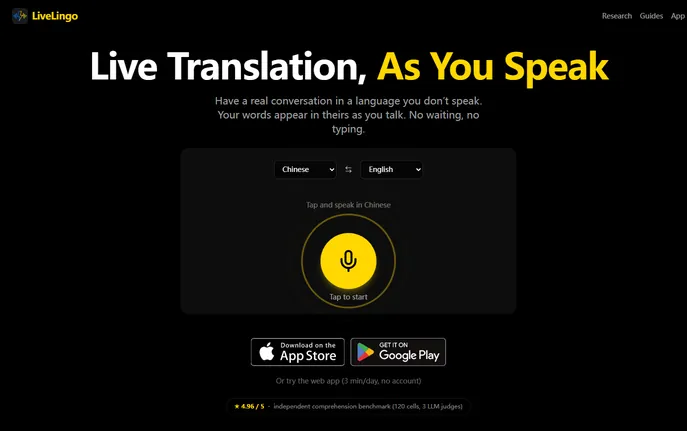
LiveLingo website preview

What Is LiveLingo - Voice Translator?

LiveLingo is an AI voice translator that delivers spoken and written translations across 35 languages. Its streaming approach helps conversations flow with fewer interruptions for typing. Accessible through a web browser and listed on aitop-tools.com, it offers a free daily allowance for trying voice translation.

How to Use LiveLingo - Voice Translator

To begin, launch the web app, select the language you will speak and the language you want to translate into, and allow microphone access. Speak naturally, then follow the translated text or listen to the audio output as your conversation progresses.

For additional capabilities, Pro includes translated outbound calls, AI-generated meeting memos, and downloadable PDF transcripts. People receiving your calls can answer on their usual phone without downloading an app.

Key Features of LiveLingo - Voice Translator

  • Streaming Voice Translation: Get translations as you speak, helping limit delays during exchanges.

  • Support for 35 Languages: Communicate across supported languages such as Mandarin, Spanish, Arabic, and Japanese.

  • Web-Based Access: Use the browser app without installation, or access tab-audio captions through a separate Chrome extension.

  • Tools for Work: Paid features combine translated calling, automated meeting notes, and PDF transcript exports.

Why Choose LiveLingo - Voice Translator?

LiveLingo brings voice translation to everyday discussions, with a free daily trial allowance to help you explore its features. The browser app can run alongside Zoom, Teams, or Google Meet without a meeting plugin. Paid subscriptions provide more usage for extended conversations and international business calls.

Use Cases and Applications

Use LiveLingo to ask for directions abroad, order food, or talk with relatives who speak another language. Business buyers can also use it to discuss product requirements and clarify details with overseas suppliers.

Product source: LiveLingo official website. Check the provider for current plans, limits and availability.

FAQ

LiveLingo questions and answers

Product context and practical checks for evaluating LiveLingo.

What is LiveLingo used for?

Speak freely in 35 languages with LiveLingo’s AI voice translator. Try 3 free minutes daily online—no signup. Get phone translation with Pro.

How do I get started with LiveLingo?

To begin, launch the web app, select the language you will speak and the language you want to translate into, and allow microphone access. Speak naturally, then follow the translated text or listen to the audio output as your conversation progresses.For additional capabilities, Pro includes translated outbound calls, AI-generated meeting memos, and downloadable PDF transcripts. People receiving your calls can answer on their usual phone without downloading an app.

Which capabilities are described for LiveLingo?

Streaming Voice Translation: Get translations as you speak, helping limit delays during exchanges. Support for 35 Languages: Communicate across supported languages such as Mandarin, Spanish, Arabic, and Japanese. Web-Based Access: Use the browser app without installation, or access tab-audio captions through a separate Chrome extension. Tools for Work: Paid features combine translated calling, automated meeting notes, and PDF transcript exports.

What projects can I evaluate LiveLingo for?

Use LiveLingo to ask for directions abroad, order food, or talk with relatives who speak another language. Business buyers can also use it to discuss product requirements and clarify details with overseas suppliers.

How does LiveLingo handle streaming voice translation?

Streaming Voice Translation: Get translations as you speak, helping limit delays during exchanges.

How does LiveLingo handle support for 35 languages?

Support for 35 Languages: Communicate across supported languages such as Mandarin, Spanish, Arabic, and Japanese.

What should I compare before choosing a LiveLingo plan?

Check LiveLingo’s current pricing page for included usage, renewal terms and any credit charges. Compare the cost of a usable result, including retries, rather than assuming that account registration includes free usage.

What inputs should I prepare for a LiveLingo trial?

Compare recording length, file types, language support and speaker handling. For voice generation, check pronunciation controls and permission to use any reference voice.

How can I check the quality of a LiveLingo result?

Listen for mispronounced names, unnatural pauses, clipped words and noise. For transcripts, compare the text with the recording and correct speaker labels.

Where is the official LiveLingo website?

The website linked from this profile is https://www.livelingo.io. Use the provider’s own documentation, account area and support channels to confirm current product details.

Visit LiveLingo