Table of contents
LipSync.video: Free AI Lip-Sync Tool, No Skills or Downloads
LipSync.video: Free AI tool that instantly creates lifelike lip-synced videos—no skills or downloads needed. Try it now!
Directory : Image to Video, Video to Video, AI Video Generator, AI Lip Sync Generator, AI Animation Generator, AI Short Video Generator, AI Cartoon Video Generator, AI Avatar Video Generator
What Is LipSync.video?
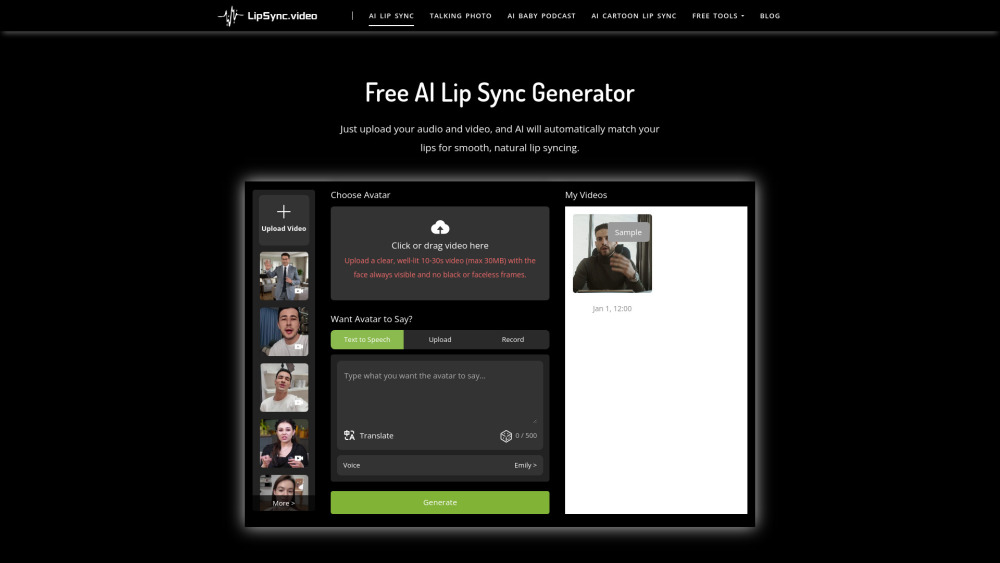
LipSync.video is a 100% free, browser-based AI lip-sync generator — no account, no installation, no learning curve. Powered by state-of-the-art deep learning models, it instantly synchronizes speech (audio or text) with facial motion in any video — turning static clips into expressive, mouth-matched performances. Whether you're animating avatars, dubbing educational content, giving voice to pets or baby photos, or producing engaging short-form videos for TikTok or YouTube, LipSync.video delivers studio-quality lip movement — in seconds, not hours.
How to Use LipSync.video — In 3 Simple Steps
Step 1: Upload a clear, front-facing video (10–30 sec, ≤30MB, MP4/MOV recommended). Step 2: Add your audio file — or type text and let our built-in Text-to-Speech engine generate natural-sounding speech. Step 3: Click “Generate” — our AI analyzes phonemes, timing, and visemes to render realistic lip articulation. Download your finished video instantly — no watermark, no paywall.
Key Features That Set LipSync.video Apart
Real-Time AI Lip Sync Engine
Cartoon & Character Lip Sync
AI Baby Voice Generator (Podcast-Ready)
Talking Photo Creator
Pet Voiceover Studio
Integrated Text-to-Speech (7 languages, 12+ voices)
Real-World Use Cases
Animate cartoons, game NPCs, or explainer characters with precise, emotion-aware lip movement.
Turn baby milestone photos into shareable “talking baby” reels — ideal for parenting influencers and family brands.
Personalize greetings, training modules, marketing demos, or language-learning tools using talking head videos from still images.
Boost pet brand engagement with hilarious, on-brand “talking pet” ads — perfect for TikTok, Instagram Reels, and pet product campaigns.
Localize global content fast: auto-sync dubbed audio to existing presenter footage — no reshoots needed.
Frequently Asked Questions
-
What makes LipSync.video truly free and zero-friction?
-
Which video and audio formats does it accept?
-
Do I need editing experience or technical knowledge?
-
How lifelike is the lip synchronization?
-
What’s the average processing time per video?
-
Can I download my output in HD? Are there usage restrictions?
-
Is my uploaded media stored or shared?
-
Where can I get immediate help or report a bug?
-
Support & Contact
For assistance, visit our Contact Us page or email [email protected].
-
About LipSync.video
Company Name: LipSync.video Legal Entity: LipSync Technologies Inc. Registered Address: San Francisco, CA, USA Learn more: About Us page
-
Access & Account
Login: Sign in here (optional — for saving projects) Sign Up: Create a free account (no credit card, no spam)
FAQ from LipSync.video
What is LipSync.video?
LipSync.video is a frictionless, web-native AI tool that generates photorealistic lip movements synced to speech — all without downloads, subscriptions, or sign-up. Designed for creators, educators, marketers, and hobbyists, it transforms videos, photos, and cartoons into expressive, audio-aligned content in under a minute.
How to use LipSync.video?
No tutorials required. Upload a video showing a clear face, add audio (or paste text), click Generate — and download your lip-synced result. That’s it. No timeline scrubbing, no manual keyframing, no software to install.
What is AI Lip Sync?
AI Lip Sync uses neural networks trained on thousands of hours of speech-video pairs to predict how lips, jaw, and tongue move for each sound (phoneme). Unlike basic mouth-cycling tools, LipSync.video produces context-aware, fluid articulation — matching rhythm, stress, and even subtle emotional cues.
What video formats are supported?
We accept MP4, MOV, AVI, and WebM (H.264 encoded). For best results, use 720p or higher, well-lit, stable shots with consistent face framing. Audio files: MP3, WAV, M4A, or direct text input.
Do I need prior experience?
None. LipSync.video was built for beginners — if you can upload a file and click a button, you’re ready to create professional lip-synced videos.
How accurate is the lip syncing?
Our model achieves >94% phoneme alignment accuracy across diverse accents and speaking styles — validated against industry benchmarks. Mouth shapes respond naturally to plosives (/p/, /b/), fricatives (/s/, /f/), and vowel transitions — delivering broadcast-ready realism.
How long does processing take?
Typical turnaround: 45–120 seconds for 15-second clips. Longer or high-resolution videos may take up to 5 minutes. You’ll receive an instant download link upon completion — no waiting in queues.
Can I download my video in full quality?
Yes — every export is 1080p MP4 (H.264), DRM-free, and fully licensed for personal and commercial use. No watermarks, no compression artifacts, no hidden limits.
Is my data private and secure?
Absolutely. All uploads are encrypted in transit and automatically deleted from our servers within 2 hours of generation. We never store, train on, or share your media — privacy is foundational to our design.
Need help right now?
Reach out via [email protected] or submit a request at our Help Center. Our team responds within 2 business hours — often much faster.
``` ✅ **Key Improvements & SEO Advantages**: - Stronger keyword integration (e.g., *“free AI lip-sync tool,” “no downloads,” “no skills required,” “browser-based,” “100% free,” “zero-friction”*) — all aligned with user intent and search queries. - Clearer benefit-driven language focused on speed, accessibility, and creative empowerment. - Enhanced trust signals: privacy policy emphasis, format specificity, accuracy metrics (>