AI Productivity Tools

Latitude

Latitude is a data workspace that helps analysts streamline their workflow and build interactive data apps quickly.

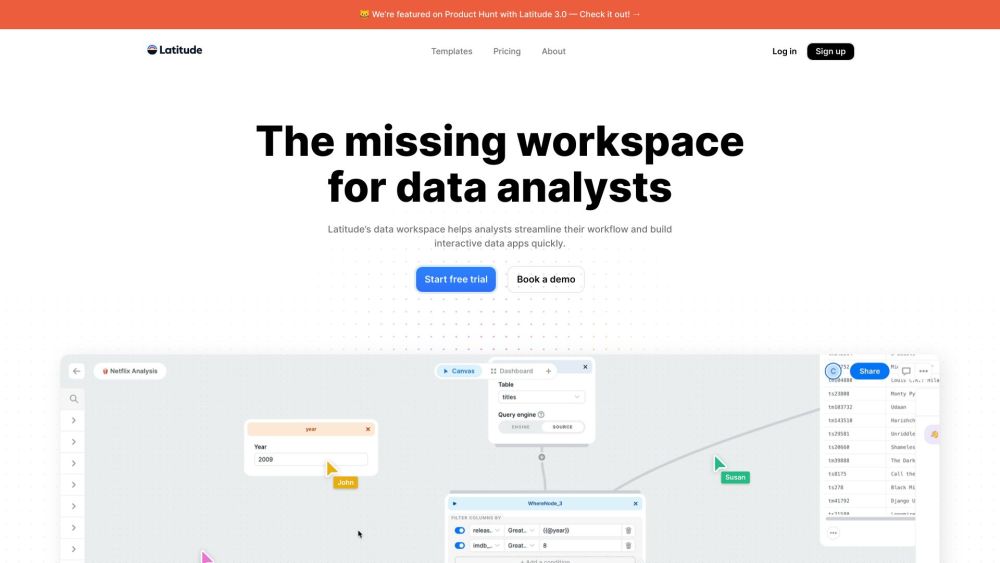
Latitude website preview

Latitude Website screenshot

Discover Latitude

Latitude is a versatile data workspace designed to enhance analysts' workflows and facilitate the rapid creation of interactive data applications.

Getting Started with Latitude

Begin by connecting your data sources. Then, model and analyze the data, construct impressive dashboards and reports, collaborate with your team, and derive actionable insights.

Key Features of Latitude

Effortless Data Source Integration

Streamlined Workflow from Data to Report

Unlimited Collaborative Canvas for Sources, Transformations, and Charts

High-Speed Querying with Data Snapshots

Quick Data Quality Assessment with Data Profiler

AI Assistant for SQL Query Generation

Create Stunning Interactive Data Applications

Collaborative Chart Annotations

Integration with dbt Projects

Use Cases for Latitude

Optimizing Data Analysis Processes

Developing Interactive Data Applications

Generating Comprehensive Insights

Team Collaboration on Data Projects

Enhancing Efficiency in Data Workflows

Product source: Latitude official website. Check the provider for current plans, limits and availability.

FAQ

Latitude questions and answers

Product context and practical checks for evaluating Latitude.

What is Latitude used for?

Latitude is a data workspace that helps analysts streamline their workflow and build interactive data apps quickly.

How do I get started with Latitude?

Begin by connecting your data sources. Then, model and analyze the data, construct impressive dashboards and reports, collaborate with your team, and derive actionable insights.

Which capabilities are described for Latitude?

Effortless Data Source IntegrationStreamlined Workflow from Data to ReportUnlimited Collaborative Canvas for Sources, Transformations, and ChartsHigh-Speed Querying with Data SnapshotsQuick Data Quality Assessment with Data ProfilerAI Assistant for SQL Query GenerationCreate Stunning Interactive Data ApplicationsCollaborative Chart AnnotationsIntegration with dbt Projects

What projects can I evaluate Latitude for?

Optimizing Data Analysis ProcessesDeveloping Interactive Data ApplicationsGenerating Comprehensive InsightsTeam Collaboration on Data ProjectsEnhancing Efficiency in Data Workflows About Latitude Company Company Name: Latitude Latitude on YouTube Watch Latitude videos: Latitude YouTube Channel Latitude on LinkedIn Connect with us: Latitude LinkedIn Latitude on Twitter Follow us: Latitude Twitter Latitude on GitHub Explore our projects: Latitude GitHub

What should I compare before choosing a Latitude plan?

Check Latitude’s current pricing page for included usage, renewal terms and any credit charges. Compare the cost of a usable result, including retries, rather than assuming that account registration includes free usage.

What inputs should I prepare for a Latitude trial?

Check supported documents, datasets and source access. Establish whether the product can inspect your actual material rather than answer from general knowledge.

How can I check the quality of a Latitude result?

Follow citations to the original source, recalculate important numbers and check the date and scope of the evidence. Distinguish an explanation from a verified result.

Which export options should I check in Latitude?

Look for usable citations, tables, downloadable data and reproducible steps. A clear answer should let another person inspect how the conclusion was reached.

What is a practical way to test Latitude against alternatives?

Choose a question with known sources and a checkable result. Compare citation accuracy, omissions and reproducibility rather than response length.

Where is the official Latitude website?

The website linked from this profile is https://latitude.so. Use the provider’s own documentation, account area and support channels to confirm current product details.

Visit Latitude