AI Productivity Tools

Kuse

Meet Kuse: the genius “baby” of ChatGPT, Notion & whiteboards. Turn chaos into structured, visual, reusable deliverables—on one smart canvas.

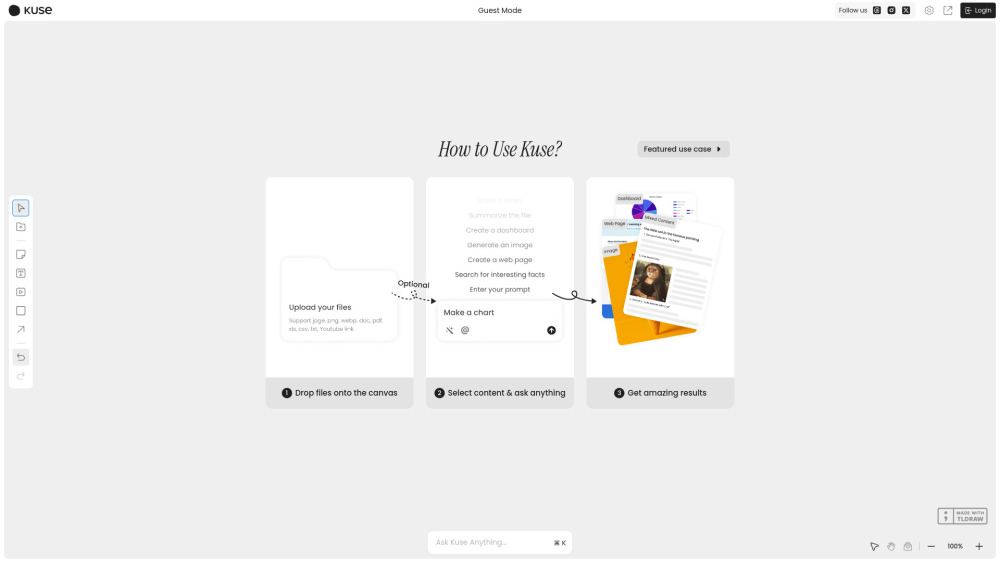
Kuse website preview

Kuse Website screenshot

Introducing Kuse: Where AI Meets Intelligent Canvas Design

Kuse reimagines AI not as a conversational assistant—but as a co-creator embedded in your workflow. Upload raw materials—PDFs, spreadsheets, video clips, URLs, or even voice notes—and watch Kuse transform them into purpose-built, visually organized, and deeply contextual outputs. Whether you're drafting a client proposal, restructuring a presentation, building a Notion-style knowledge base, or sketching out a whiteboard strategy session, Kuse interprets intent, audience, and context to generate smart, reusable canvases—structured, editable, and alive with AI intelligence.

From fragmented inputs to polished, visual deliverables—instantly, intuitively, intelligently.

Why Kuse Stands Apart

1. Universal Input Intelligence — Understands more than text.

Go beyond plain chat: Kuse parses tables from Excel, extracts key insights from lecture videos, interprets diagrams in PDFs, and even summarizes linked web content—all while preserving structure, hierarchy, and nuance.

2. Canvas-First Thinking — Your ideas, visually orchestrated.

No more switching between tabs, apps, or formats. Kuse’s dynamic canvas merges ChatGPT’s reasoning, Notion’s modularity, and whiteboard spontaneity—giving you spatial control, real-time AI augmentation, and persistent, reusable layouts.

3. Smart Format Memory — Consistency, built-in.

Kuse learns your preferences—tone, branding, document structure, slide rhythm—and applies them across every output. One prompt, multiple formats, unified voice.

4. Output Without Limits — Generate *and* deploy.

Create polished Word docs, responsive PDF reports, presentation decks, interactive web pages, Notion-compatible blocks—or export clean Markdown for version control. All from a single, intelligent canvas.

  • Get in Touch With Kuse

    Have questions? Need support? Reach our team at [email protected]. For refunds, billing, or account assistance, visit our support portal.

  • About Kuse

    Kuse is developed by Kuse Labs Inc., an AI-native productivity studio focused on structured creativity.

    Registered address: 220 Innovation Drive, San Francisco, CA 94107, USA.

    Learn our story, mission, and values on the About Us page.

  • Log In to Your Kuse Workspace

    Access your smart canvases anytime: Sign in to Kuse

  • Start Building With Kuse

    Join thousands of creators, strategists, and teams: Create your free Kuse account

Product source: Kuse official website. Check the provider for current plans, limits and availability.

FAQ

Kuse questions and answers

Product context and practical checks for evaluating Kuse.

What is Kuse used for?

Meet Kuse: the genius “baby” of ChatGPT, Notion & whiteboards. Turn chaos into structured, visual, reusable deliverables—on one smart canvas.

How do I get started with Kuse?

Open the official Kuse website and identify the workflow that matches your task. Prepare a brief with a subject, composition, lighting and required output size. Test a first generation and a targeted revision to see how much control you retain.

How does Kuse handle kuse labs inc.?

About Kuse Kuse is developed by Kuse Labs Inc., an AI-native productivity studio focused on structured creativity. Registered address: 220 Innovation Drive, San Francisco, CA 94107, USA. Learn our story, mission, and values on the About Us page.

What should I compare before choosing a Kuse plan?

Check Kuse’s current pricing page for included usage, renewal terms and any credit charges. Compare the cost of a usable result, including retries, rather than assuming that account registration includes free usage.

What inputs should I prepare for a Kuse trial?

Look for text prompts, image references, masks or sketches as appropriate. Compare composition control, supported upload types and the ability to revise a selected area.

How can I check the quality of a Kuse result?

Inspect text, hands, edges, reflections and repeated objects at full size. Check that important product or brand details survive editing.

Which export options should I check in Kuse?

Compare pixel dimensions, transparency, file formats and any enlargement options. Confirm that the downloaded result works in your design or publishing software.

What is a practical way to test Kuse against alternatives?

Prepare a brief with a subject, composition, lighting and required output size. Test a first generation and a targeted revision to see how much control you retain.

What should I review before uploading material to Kuse?

Read the provider’s rules on access, retention, deletion and use of uploaded material. Start with a non-confidential sample that you have permission to use.

Where is the official Kuse website?

The website linked from this profile is https://kuse.ai. Use the provider’s own documentation, account area and support channels to confirm current product details.

Visit Kuse