AI Advertising Assistant

Kumo

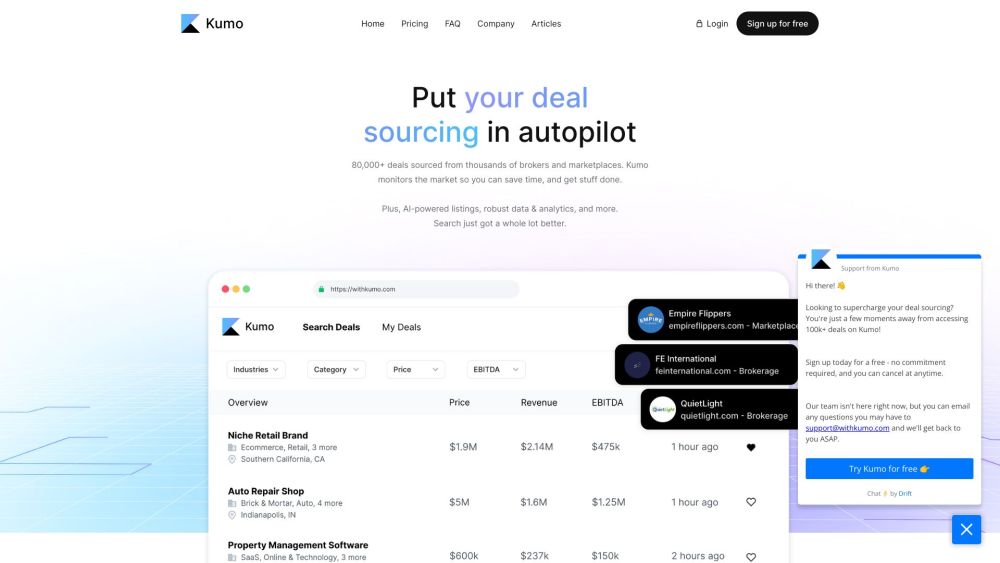
Kumo: The top deal sourcing platform, aggregating 100,000+ business listings from marketplaces, brokerages, and proprietary sources for easy access.

Kumo website preview

Kumo Website screenshot

What is Kumo?

Kumo stands out as a premier deal sourcing platform, consolidating an extensive array of business listings from various marketplaces, brokerages, and exclusive sources into one user-friendly interface.

How to use Kumo?

Kumo allows users to efficiently search and filter deals using multiple criteria such as asking price, EBITDA, industry, and business type. The platform offers real-time insights and detailed information on each listing, enabling users to make well-informed decisions.

Kumo's Core Features

Kumo offers the following core features:

  1. AI-powered listings: Kumo’s AI system streamlines business listings into concise bullet points, making information easily digestible.
  2. Robust data & analytics: Kumo’s data engine meticulously cleans and merges business listings from numerous brokers, ensuring a comprehensive and updated database.
  3. Unlimited access to deal flow: Users receive continuous access to an ever-refreshing stream of deals, ensuring they have the latest information.
  4. Save and track deals: Users can save deals, add personal notes, and easily access them through their profile.
  5. Global coverage: Kumo sources deals worldwide, offering a broad spectrum of opportunities.

Kumo's Use Cases

Kumo is ideal for:

  • Business owners aiming to sell their company.
  • Investors and entrepreneurs looking for new investment prospects.
  • Brokers and agents specializing in deal sourcing.

Product source: Kumo official website. Check the provider for current plans, limits and availability.

FAQ

Kumo questions and answers

Product context and practical checks for evaluating Kumo.

What is Kumo used for?

Kumo: The top deal sourcing platform, aggregating 100,000+ business listings from marketplaces, brokerages, and proprietary sources for easy access.

How do I get started with Kumo?

Kumo allows users to efficiently search and filter deals using multiple criteria such as asking price, EBITDA, industry, and business type. The platform offers real-time insights and detailed information on each listing, enabling users to make well-informed decisions.

Which capabilities are described for Kumo?

Kumo offers the following core features: AI-powered listings: Kumo’s AI system streamlines business listings into concise bullet points, making information easily digestible. Robust data & analytics: Kumo’s data engine meticulously cleans and merges business listings from numerous brokers, ensuring a comprehensive and updated database. Unlimited access to deal flow: Users receive continuous access to an ever-refreshing stream of deals, ensuring they have the latest information. Save and track deals: Users can save deals, add personal notes, and easily access them through their profile. Global coverage: Kumo sources deals worldwide, offering a broad spectrum of opportunities.

What projects can I evaluate Kumo for?

Kumo is ideal for: Business owners aiming to sell their company. Investors and entrepreneurs looking for new investment prospects. Brokers and agents specializing in deal sourcing. Kumo Support Email & Customer service contact & Refund contact etc. Contact Kumo support via email: [email protected]. Kumo Company Learn more about Kumo by visiting the about us page. Kumo Login Kumo Login Link: https://app.withkumo.com/signin Kumo Sign up Kumo Sign up Link: https://app.withkumo.com/signup Kumo Pricing Kumo Pricing Link: https://www.withkumo.com/pricing Kumo LinkedIn Kumo LinkedIn Link: https://www.linkedin.com/company/withkumo Kumo Twitter Kumo Twitter Link: https://twitter.com/withkumo_

What should I compare before choosing a Kumo plan?

Kumo Pricing Link: https://www.withkumo.com/pricing Confirm current prices and allowances on the provider’s website before purchasing.

What inputs should I prepare for a Kumo trial?

Identify the files, text or account connections your task needs. Confirm that the product accepts those inputs and offers controls for reviewing its work.

How can I check the quality of a Kumo result?

Test one representative task and inspect the result for accuracy and completeness. Record where manual corrections or extra tools are needed.

Which export options should I check in Kumo?

Check export formats, integrations and whether you can keep using your work outside the service. Test a real export before committing to a longer plan.

What is a practical way to test Kumo against alternatives?

Choose one task with a clear success condition. Keep the input consistent, record the time spent reviewing and compare the complete workflow cost.

Where is the official Kumo website?

The website linked from this profile is https://withkumo.com. Use the provider’s own documentation, account area and support channels to confirm current product details.

Visit Kumo