Table of contents
Kolors Virtual Try-On : AI-Powered, Image Upload, Reviews, Pricing
Transform your online shopping with Kolors Virtual Try-On! This AI tool lets you virtually try clothes via image uploads. Experience accurate fittings, explore pricing, reviews, core features, and compare alternatives—all in one place. Revolutionize how you shop today!
Directory : AI Photo & Image Generator, AI Image Enhancer, Photo & Image Editor, AI Photo Enhancer, AI Clothing Generator
Discover Kolors Virtual Try-On
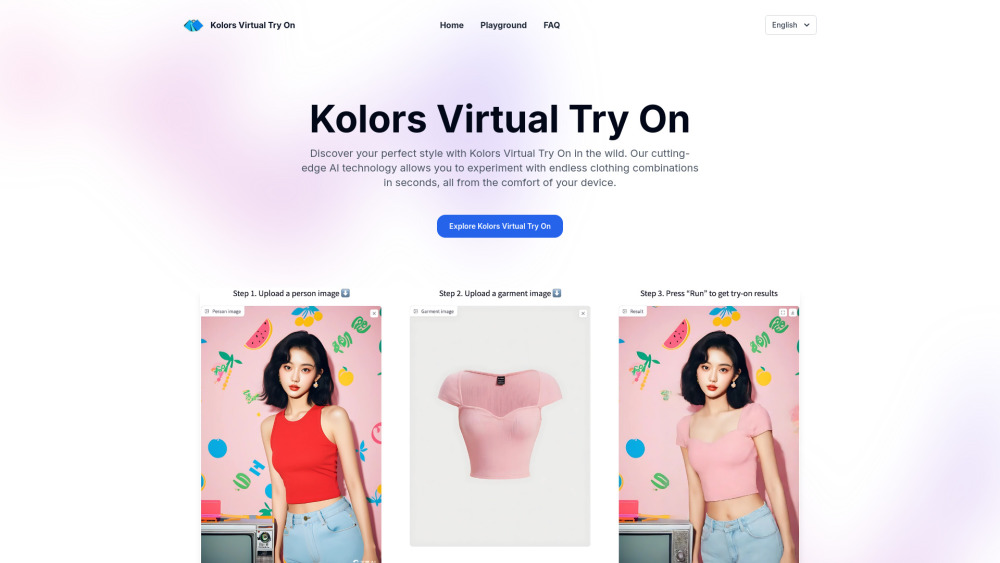
Kolors Virtual Try-On is an innovative AI-driven platform designed to let users experience trying on clothes virtually. Simply upload your photo and the image of the garment you're interested in, and see how it looks on you without leaving your home.
How Does Kolors Virtual Try-On Work?
To get started, upload a clear photo of yourself along with the clothing item you'd like to try on. Then, click the 'Generate' button, and within moments, you'll have a realistic preview of how the outfit would look on you.
Key Features of Kolors Virtual Try-On
AI-Powered Technology
Efficient and Secure Processing
Compatibility with Various Garments
Highly Realistic Results
Practical Applications of Kolors Virtual Try-On
Empowering fashion influencers to display outfits across different body types.
Supporting online retailers in enhancing customer satisfaction and reducing return rates.
Frequently Asked Questions about Kolors Virtual Try-On
-
What exactly is Kolors Virtual Try-On?
-
Which file formats are accepted for uploads?
-
How quickly can I expect my virtual try-on result?
-
Is it possible to try on multiple garments simultaneously?
-
About Kolors Virtual Try-On Company
Kolors Virtual Try-On is developed by the company known as Kolors Virtual Try-On.
FAQ from Kolors Virtual Try-On
What is Kolors Virtual Try-On?
Kolors Virtual Try-On leverages advanced AI technology to enable users to visualize how clothing would fit them through image uploads.
How do I use Kolors Virtual Try-On?
Simply upload your photo alongside the garment's image, and initiate the process by clicking 'Generate'. Your virtual try-on will be ready in no time.
Which image formats are compatible?
Kolors Virtual Try-On accepts popular formats such as JPEG, PNG, and WEBP.
How long does the generation process take?
Typically, results are generated within a matter of seconds after uploading images.
Can I try on more than one piece of clothing at the same time?
While only one garment can be processed at a time, you can swiftly switch between multiple items by repeating the process individually for each one.