AI Photo Enhancer

Keepyobread

Keepyobread: AI-powered real estate tool that enhances photos & writes compelling listing descriptions—faster, smarter, sold sooner.

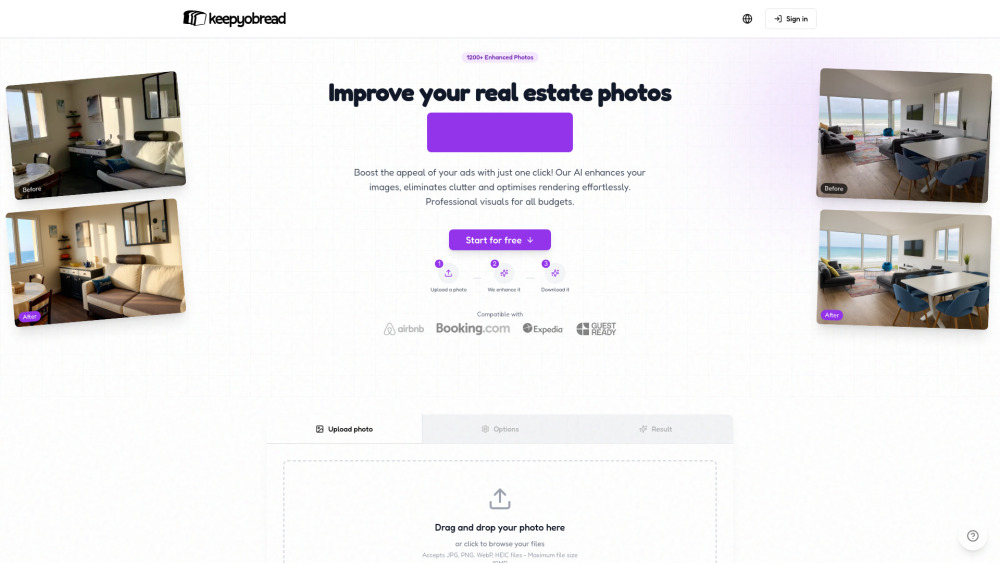
Keepyobread website preview

Keepyobread Website screenshot

Introducing Keepyobread: Smarter Listings, Stronger Bookings

Keepyobread is a purpose-built AI assistant for short-term rental hosts and property professionals. It transforms raw property images into polished, platform-ready visuals—and crafts compelling, search-intelligent listing descriptions—tailored specifically for Airbnb, Booking.com, Vrbo, and similar marketplaces. With intelligent enhancement, contextual editing, and conversion-focused copy generation, Keepyobread eliminates guesswork, saves hours per listing, and helps properties stand out in crowded feeds—all without design experience or software subscriptions.

Getting Started with Keepyobread in 3 Simple Steps

Start by uploading one or more high-resolution property photos. Next, choose your preferred enhancement profile—whether “Airbnb-Ready,” “Luxury Realism,” or “Natural Light Optimized”—or let Keepyobread’s smart defaults do the heavy lifting. Finally, download your refined images and click ‘Generate Description’ to receive a unique, keyword-rich, guest-centric listing summary—ready to copy, paste, and publish.

Power Features That Drive Performance

One-click AI photo enhancement with adaptive tone mapping

Smart clutter erasure—removing trash bins, cables, personal items, and distractions

Realism slider: dial between authentic warmth and elevated polish

SEO-aware description engine—trained on top-performing listings across 12+ markets

Dynamic lighting rebalancing—fixing underexposed corners, harsh shadows, and color casts

Encrypted private gallery—your uploads never leave secure infrastructure

Who Benefits Most from Keepyobread?

Airbnb & Booking hosts seeking faster bookings and higher occupancy rates.

Property managers scaling portfolios—enhancing dozens of listings weekly with consistent quality.

Photographers and listing agents adding AI-powered value to their service packages.

New hosts launching their first space—creating professional-grade assets before the first guest arrives.

Product source: Keepyobread official website. Check the provider for current plans, limits and availability.

FAQ

Keepyobread questions and answers

Product context and practical checks for evaluating Keepyobread.

What is Keepyobread used for?

Keepyobread: AI-powered real estate tool that enhances photos & writes compelling listing descriptions—faster, smarter, sold sooner.

How do I get started with Keepyobread?

Start by uploading one or more high-resolution property photos. Next, choose your preferred enhancement profile—whether “Airbnb-Ready,” “Luxury Realism,” or “Natural Light Optimized”—or let Keepyobread’s smart defaults do the heavy lifting. Finally, download your refined images and click ‘Generate Description’ to receive a unique, keyword-rich, guest-centric listing summary—ready to copy, paste, and publish.

Which capabilities are described for Keepyobread?

One-click AI photo enhancement with adaptive tone mappingSmart clutter erasure—removing trash bins, cables, personal items, and distractionsRealism slider: dial between authentic warmth and elevated polishSEO-aware description engine—trained on top-performing listings across 12+ marketsDynamic lighting rebalancing—fixing underexposed corners, harsh shadows, and color castsEncrypted private gallery—your uploads never leave secure infrastructure

What should I compare before choosing a Keepyobread plan?

Check Keepyobread’s current pricing page for included usage, renewal terms and any credit charges. Compare the cost of a usable result, including retries, rather than assuming that account registration includes free usage.

What inputs should I prepare for a Keepyobread trial?

Look for text prompts, image references, masks or sketches as appropriate. Compare composition control, supported upload types and the ability to revise a selected area.

How can I check the quality of a Keepyobread result?

Inspect text, hands, edges, reflections and repeated objects at full size. Check that important product or brand details survive editing.

Which export options should I check in Keepyobread?

Compare pixel dimensions, transparency, file formats and any enlargement options. Confirm that the downloaded result works in your design or publishing software.

What is a practical way to test Keepyobread against alternatives?

Prepare a brief with a subject, composition, lighting and required output size. Test a first generation and a targeted revision to see how much control you retain.

What should I review before uploading material to Keepyobread?

Read the provider’s rules on access, retention, deletion and use of uploaded material. Start with a non-confidential sample that you have permission to use.

Where is the official Keepyobread website?

The website linked from this profile is https://keepyobread.com. Use the provider’s own documentation, account area and support channels to confirm current product details.

Visit Keepyobread