Text to Image

insMind AI Design Generator

insMind AI Design Generator empowers you to create professional graphic designs at no cost. With just one click, you can generate exceptional AI-driven designs tailored for marketing, promotion, and business purposes, eliminating the need to hire a designer. Create designs with AI now!

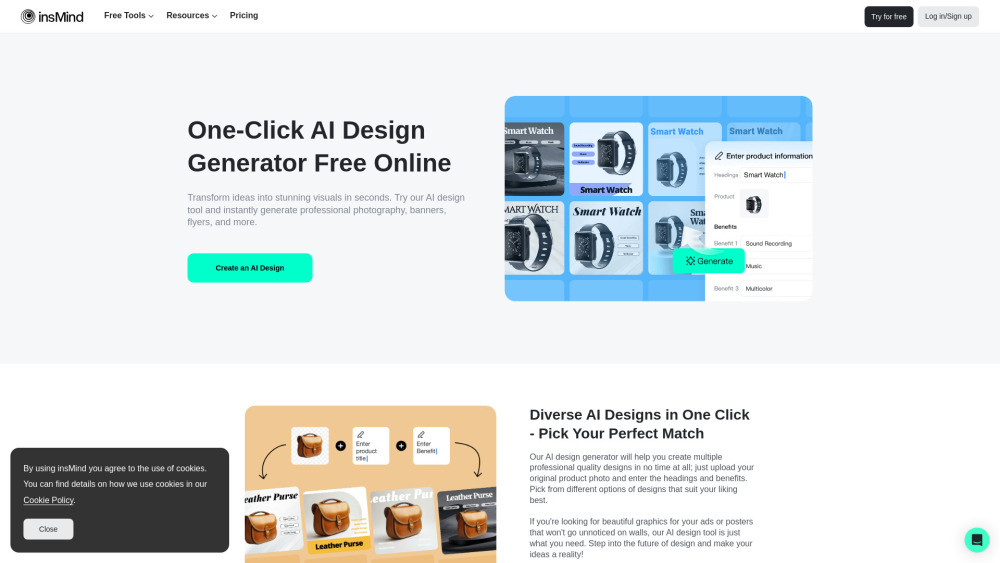
insMind AI Design Generator website preview

insMind AI Design Generator Website screenshot

What is insMind AI Design Generator?

The insMind AI Design Generator is a revolutionary tool that leverages artificial intelligence to streamline the design process for businesses and individuals. This online platform is perfect for those who want to save time and reduce costs associated with traditional design methods. Whether you need marketing visuals, product photos, ads, or social media content, insMind AI simplifies it all. No need for expensive design software or professional skills—insMind AI empowers you to create visually stunning graphics effortlessly, helping you maintain a professional online presence and drive your brand's growth with ease.

How to Use insMind AI Design Generator?

Using the insMind AI Design Generator is straightforward and quick. Follow these steps to get started: Step 1: Head to the insMind website and find the AI Design Generator in the main navigation. Enter the AI Design workspace to begin. Step 2: Upload your product images and provide the key benefits of your product. The AI tool will instantly generate multiple design variations tailored specifically to your input. If the first batch doesn't meet your expectations, simply click "Generate New Designs" to see more options. Step 3: Choose the design that best fits your needs and click "Edit" to make any final adjustments. Use insMind’s smart resize tool to automatically format your design for various platforms like Amazon, Facebook, Instagram, and more. Once satisfied, download the finalized image.

Core Features of insMind AI Design Generator

Instant Design Generation: Create AI-driven designs with a single click.

Diverse Design Options: Access a wide range of design results tailored to your specifications.

Adaptive Resize: Effortlessly resize designs for different platforms, ensuring a perfect fit every time.

Free and Customizable: Enjoy fast, personalized design services without any cost.

Use Cases for insMind AI Design Generator

E-commerce: Enhance your online store with professional-grade visuals, banners, and product photos. insMind’s AI makes it easy to create compelling visuals optimized for platforms like Amazon, eBay, and Shopify, helping you improve your product presentation and increase sales.

Advertising: Simplify the creation of eye-catching ad banners for your campaigns. From Google display ads to social media banners, insMind AI enables you to produce engaging and effective promotional materials that drive better results.

Marketing: Easily generate flyers, brochures, and posters that capture your brand's message. Perfect for small businesses, startups, or anyone needing high-quality marketing collateral on a budget.

Social Media: Maintain a cohesive visual presence across all social media platforms. Quickly create images for posts, ads, and stories that are perfectly sized for each network, from Facebook to LinkedIn, enhancing audience engagement.

  • Support and Contact Information

    For customer service, reach out to insMind AI Design Generator via email at: [email protected].

  • About insMind AI Design Generator

    To learn more about insMind, visit our About Us page.

  • insMind AI Design Generator Login

    Access your design workspace here: Login Link.

  • Pricing Information

    Explore pricing options on our Pricing Page.

  • Follow insMind AI Design Generator on Social Media

    Stay updated with the latest from insMind on Facebook, YouTube, TikTok, Twitter, and Pinterest.

Product source: insMind AI Design Generator official website. Check the provider for current plans, limits and availability.

FAQ

insMind AI Design Generator questions and answers

Product context and practical checks for evaluating insMind AI Design Generator.

What is insMind AI Design Generator used for?

insMind AI Design Generator empowers you to create professional graphic designs at no cost. With just one click, you can generate exceptional AI-driven designs tailored for marketing, promotion, and business purposes, eliminating the need to hire a designer. Create designs with AI now!

How do I get started with insMind AI Design Generator?

Using the insMind AI Design Generator is straightforward and quick. Follow these steps to get started: Step 1: Head to the insMind website and find the AI Design Generator in the main navigation. Enter the AI Design workspace to begin. Step 2: Upload your product images and provide the key benefits of your product. The AI tool will instantly generate multiple design variations tailored specifically to your input. If the first batch doesn't meet your expectations, simply click "Generate New Designs" to see more options. Step 3: Choose the design that best fits your needs and click "Edit" to make any final adjustments. Use insMind’s smart resize tool to automatically format your design for various platforms like Amazon, Facebook, Instagram, and more. Once satisfied, download the finalized image.

Which capabilities are described for insMind AI Design Generator?

Instant Design Generation: Create AI-driven designs with a single click.Diverse Design Options: Access a wide range of design results tailored to your specifications.Adaptive Resize: Effortlessly resize designs for different platforms, ensuring a perfect fit every time.Free and Customizable: Enjoy fast, personalized design services without any cost.

What projects can I evaluate insMind AI Design Generator for?

E-commerce: Enhance your online store with professional-grade visuals, banners, and product photos. insMind’s AI makes it easy to create compelling visuals optimized for platforms like Amazon, eBay, and Shopify, helping you improve your product presentation and increase sales.Advertising: Simplify the creation of eye-catching ad banners for your campaigns. From Google display ads to social media banners, insMind AI enables you to produce engaging and effective promotional materials that drive better results.Marketing: Easily generate flyers, brochures, and posters that capture your brand's message. Perfect for small businesses, startups, or anyone needing high-quality marketing collateral on a budget.Social Media: Maintain a cohesive visual presence across all social media platforms. Quickly create images for posts, ads, and stories that are perfectly sized for each network, from Facebook to LinkedIn, enhancing audience engagement. Support and Contact Information For customer service, reach out to insMind AI Design Generator via email at: [email protected]. About insMind AI Design Generator To learn more about insMind, visit our About Us page. insMind AI Design Generator Login Access your design workspace here: Login Link. Pricing Information Explore pricing options on our Pricing Page. Follow insMind AI Design Generator on Social Media Stay updated with the latest from insMind on Facebook, YouTube, TikTok, Twitter, and Pinterest.

What should I compare before choosing a insMind AI Design Generator plan?

Explore pricing options on our Pricing Page. Confirm current prices and allowances on the provider’s website before purchasing.

What inputs should I prepare for a insMind AI Design Generator trial?

Compare text prompts, reference frames, source footage and audio support. Check duration, aspect ratio and whether the tool lets you keep a subject consistent between shots.

How can I check the quality of a insMind AI Design Generator result?

Watch the entire clip for motion errors, distorted objects, changing identities, lip-sync problems and abrupt transitions. Inspect the downloaded file as well as the preview.

Which export options should I check in insMind AI Design Generator?

Check export resolution, frame rate, aspect ratio, audio tracks and watermark rules. A good preview is not a substitute for an export that fits your publishing channel.

What is a practical way to test insMind AI Design Generator against alternatives?

Use a short shot with one subject and one camera movement. Keep the prompt and duration constant, then compare usable seconds and the number of regenerations.

Where is the official insMind AI Design Generator website?

The website linked from this profile is https://www.insmind.com/ai-design-generator. Use the provider’s own documentation, account area and support channels to confirm current product details.

Visit insMind AI Design Generator