Text&ampWriting

Image to Image AI Tech

Transform images instantly with AI! Free, professional-grade image-to-image generator—no skills needed. Try it now!

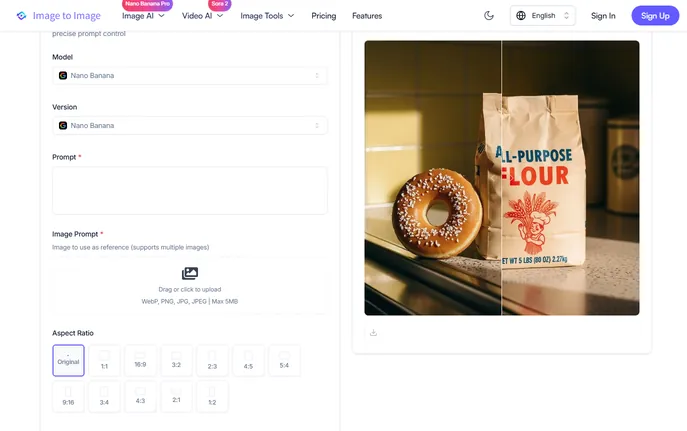
Image to Image AI Tech website preview

What is Image to Image AI Tech?

Image to Image AI Tech is a next-generation, no-code AI image transformation engine—designed from the ground up to turn any photo, sketch, or screenshot into a polished, expressive visual in seconds. Unlike traditional AI art tools that start from text alone, this platform intelligently *reinterprets your image* through the lens of your creative intent—blending visual context with natural language prompts to produce outputs that are both faithful to your source and boldly imaginative. Free, instant, and built for zero technical barriers, it’s AI image editing reimagined for everyone.

How to Use Image to Image AI Tech

Using Image to Image AI Tech couldn’t be simpler: upload one or more images (JPG, PNG, WebP, JPEG—up to 5MB each), type a clear, descriptive prompt (e.g., “make it cinematic, golden hour lighting, film grain”), and click generate. Within ~15 seconds, you’ll receive high-resolution results—no sign-up, no downloads, no learning curve. The free tier gives you 15 fresh credits every day, so you can iterate freely, test ideas, and refine styles without limits. Whether you’re turning doodles into digital paintings, modernizing vintage portraits, or generating consistent brand visuals from a single template—Image to Image AI Tech delivers professional-grade transformations, instantly and effortlessly.

Experiment freely: swap prompts, layer multiple reference images, adjust tone or texture—and watch how subtle changes unlock dramatically different outcomes. This isn’t just automation; it’s collaborative creativity, powered by AI that listens, understands, and elevates your vision.

Key Features of Image to Image AI Tech

  • True Image-Centric AI Processing: At its core, Image to Image AI Tech doesn’t treat your input as background noise—it analyzes composition, lighting, structure, and semantics to guide transformations with surgical precision. Your original image remains the anchor; the AI becomes your co-creator.
  • Multi-Reference Fusion Engine: Go beyond single-image edits. Upload several source images—say, a product photo, a texture swatch, and a mood board snippet—and let the AI synthesize them into a cohesive, stylistically unified output. This capability unlocks storytelling depth and design flexibility unmatched by standard diffusion-based tools.
  • Natural-Language Prompt Intelligence: No jargon required. Describe what you want in plain English (“turn this into a watercolor illustration, soft edges, pastel palette”)—and the system interprets nuance, hierarchy, and artistic intent, not just keywords. Control over style, fidelity, abstraction level, and detail intensity is built-in and intuitive.
  • Production-Ready Output Quality: Every result is rendered at high resolution (up to 1024×1024+), optimized for clarity, color accuracy, and scalability. Outputs retain clean edges, natural gradients, and structural integrity—making them ideal for social posts, pitch decks, print assets, or client deliverables—straight out of the generator.

Why Choose Image to Image AI Tech?

Because great AI shouldn’t demand expertise—it should dissolve friction. Image to Image AI Tech was built for creators who value speed *and* substance: students prototyping concepts, marketers scaling visual campaigns, indie developers crafting assets, or hobbyists exploring their imagination. It skips the steep learning curves, subscription lock-ins, and vague outputs plaguing many AI tools—replacing them with transparency, reliability, and delightful immediacy.

Its standout advantage? A proprietary architecture trained specifically on *image-to-image translation*, not just text-to-image generation. That means stronger preservation of spatial relationships, truer color transfer, and far more predictable, editable results. Featured among top-tier AI tools on platforms like aitop-tools.com and trusted by thousands across 78 countries, Image to Image AI Tech proves that powerful AI doesn’t need to be complex—to be extraordinary.

Use Cases and Applications

From classroom to boardroom, Image to Image AI Tech adapts seamlessly. Educators use it to visualize historical scenes or scientific concepts from textbook diagrams. UX designers rapidly prototype interface variations using wireframes as inputs. E-commerce brands generate lifestyle mockups from flat product shots—no photoshoots needed. Social media managers create scroll-stopping post variants in under a minute, all aligned to seasonal themes or campaign tones.

Photographers apply non-destructive stylistic filters—like analog film emulation or painterly reinterpretation—while retaining original subject integrity. Game devs convert concept sketches into consistent asset sets. Even nonprofits leverage it to localize advocacy imagery across cultures and languages—keeping emotional resonance intact while adapting visuals meaningfully. Wherever visual iteration matters, Image to Image AI Tech accelerates insight, inspiration, and impact.

Product source: Image to Image AI Tech official website. Check the provider for current plans, limits and availability.

FAQ

Image to Image AI Tech questions and answers

Product context and practical checks for evaluating Image to Image AI Tech.

What is Image to Image AI Tech used for?

Transform images instantly with AI! Free, professional-grade image-to-image generator—no skills needed. Try it now!

How do I get started with Image to Image AI Tech?

Using Image to Image AI Tech couldn’t be simpler: upload one or more images (JPG, PNG, WebP, JPEG—up to 5MB each), type a clear, descriptive prompt (e.g., “make it cinematic, golden hour lighting, film grain”), and click generate. Within ~15 seconds, you’ll receive high-resolution results—no sign-up, no downloads, no learning curve. The free tier gives you 15 fresh credits every day, so you can iterate freely, test ideas, and refine styles without limits. Whether you’re turning doodles into digital paintings, modernizing vintage portraits, or generating consistent brand visuals from a single template—Image to Image AI Tech delivers professional-grade transformations, instantly and effortlessly.Experiment freely: swap prompts, layer multiple reference images, adjust tone or texture—and watch how subtle changes unlock dramatically different outcomes. This isn’t just automation; it’s collaborative creativity, powered by AI that listens, understands, and elevates your vision.

Which capabilities are described for Image to Image AI Tech?

True Image-Centric AI Processing: At its core, Image to Image AI Tech doesn’t treat your input as background noise—it analyzes composition, lighting, structure, and semantics to guide transformations with surgical precision. Your original image remains the anchor; the AI becomes your co-creator. Multi-Reference Fusion Engine: Go beyond single-image edits. Upload several source images—say, a product photo, a texture swatch, and a mood board snippet—and let the AI synthesize them into a cohesive, stylistically unified output. This capability unlocks storytelling depth and design flexibility unmatched by standard diffusion-based tools. Natural-Language Prompt Intelligence: No jargon required. Describe what you want in plain English (“turn this into a watercolor illustration, soft edges, pastel palette”)—and the system interprets nuance, hierarchy, and artistic intent, not just keywords. Control over style, fidelity, abstraction level, and detail intensity is built-in and intuitive. Production-Ready Output Quality: Every result is rendered at high resolution (up to 1024×1024+), optimized for clarity, color accuracy, and scalability. Outputs retain clean edges, natural gradients, and structural integrity—making them ideal for social posts, pitch decks, print assets, or client deliverables—straight out of the generator.

What projects can I evaluate Image to Image AI Tech for?

From classroom to boardroom, Image to Image AI Tech adapts seamlessly. Educators use it to visualize historical scenes or scientific concepts from textbook diagrams. UX designers rapidly prototype interface variations using wireframes as inputs. E-commerce brands generate lifestyle mockups from flat product shots—no photoshoots needed. Social media managers create scroll-stopping post variants in under a minute, all aligned to seasonal themes or campaign tones.Photographers apply non-destructive stylistic filters—like analog film emulation or painterly reinterpretation—while retaining original subject integrity. Game devs convert concept sketches into consistent asset sets. Even nonprofits leverage it to localize advocacy imagery across cultures and languages—keeping emotional resonance intact while adapting visuals meaningfully. Wherever visual iteration matters, Image to Image AI Tech accelerates insight, inspiration, and impact.

How does Image to Image AI Tech handle true image-centric ai processing?

True Image-Centric AI Processing: At its core, Image to Image AI Tech doesn’t treat your input as background noise—it analyzes composition, lighting, structure, and semantics to guide transformations with surgical precision. Your original image remains the anchor; the AI becomes your co-creator.

How does Image to Image AI Tech handle multi-reference fusion engine?

Multi-Reference Fusion Engine: Go beyond single-image edits. Upload several source images—say, a product photo, a texture swatch, and a mood board snippet—and let the AI synthesize them into a cohesive, stylistically unified output. This capability unlocks storytelling depth and design flexibility unmatched by standard diffusion-based tools.

What should I compare before choosing a Image to Image AI Tech plan?

Check Image to Image AI Tech’s current pricing page for included usage, renewal terms and any credit charges. Compare the cost of a usable result, including retries, rather than assuming that account registration includes free usage.

What inputs should I prepare for a Image to Image AI Tech trial?

Look for text prompts, image references, masks or sketches as appropriate. Compare composition control, supported upload types and the ability to revise a selected area.

How can I check the quality of a Image to Image AI Tech result?

Inspect text, hands, edges, reflections and repeated objects at full size. Check that important product or brand details survive editing.

Where is the official Image to Image AI Tech website?

The website linked from this profile is https://imagetoimage.tech/. Use the provider’s own documentation, account area and support channels to confirm current product details.

Visit Image to Image AI Tech