AI Developer Tools

iftrue

iftrue: AI Copilot for Engineering Managers in Slack—automates standups, tracks velocity, and boosts team performance. Try it today!

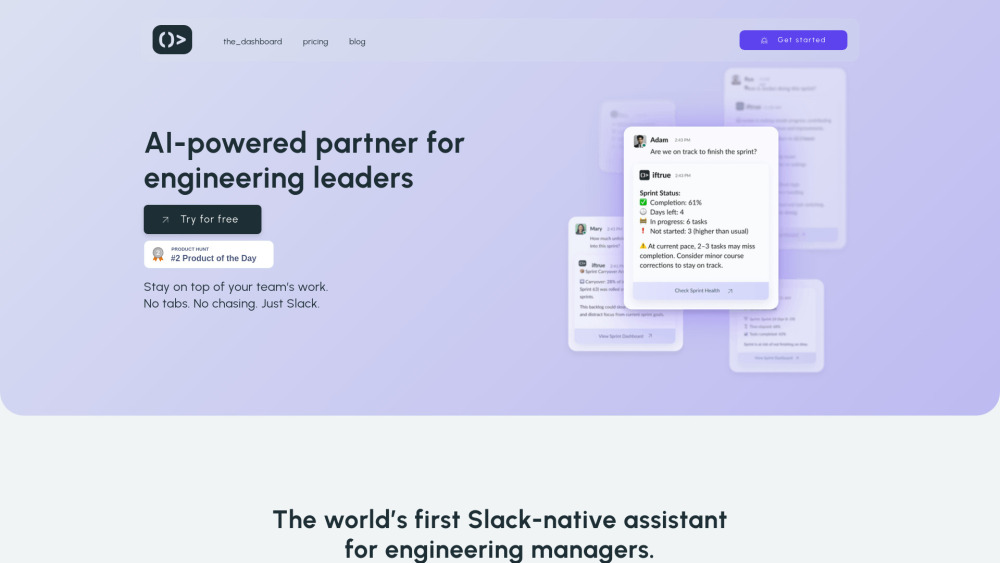
iftrue website preview

iftrue Website screenshot

Introducing iftrue: Your AI Copilot for Engineering Management — Built for Slack

iftrue redefines how engineering leaders lead — not with more dashboards, but with intelligent, contextual support where work already happens: Slack. It’s an AI-native copilot purpose-built for engineering managers, tech leads, and platform teams who need real-time visibility, proactive risk signals, and actionable guidance — all without switching apps. By syncing live data from GitHub, Jira, and team activity, iftrue surfaces what matters most: delivery health, developer experience bottlenecks, sprint readiness, and hidden blockers — turning raw tool data into leadership intelligence.

How iftrue Works — Effortlessly, in Slack

No new login. No extra tabs. Just type @iftrue in any Slack channel or DM to ask questions like “Who’s blocked this sprint?” or “Show me DORA trends over the last 30 days.” It responds instantly with verified insights pulled from your connected tools — no manual reporting, no context-switching. Behind the scenes, iftrue runs silent daily check-ins, surfaces anomalies before they escalate, and auto-generates concise stand-up briefs so your team spends less time recapping and more time shipping.

Key Capabilities of iftrue

Slack-first AI interface — conversational, contextual, always available

Native integrations with GitHub & Jira — no API wrangling required

Automated daily team check-ins — lightweight, async, insight-rich

Proactive risk alerts — flagging scope creep, cycle time spikes, or PR bottlenecks

Scalable team enablement — designed for startups to enterprise engineering orgs

Developer Experience (DevEx) pulse surveys — embedded in workflow, not email

Unlimited repository coverage — track every active codebase

Interactive analytics dashboard — visualizing delivery health & team dynamics

12-month rolling data history — benchmark progress, not just snapshots

Context-aware responses — understands your team’s stack, sprint rhythm, and org structure

Stand-up acceleration — pre-fills talking points, highlights dependencies, suggests action items

Sprint planning intelligence — forecasts capacity, identifies carryover risks, recommends story sequencing

DORA + delivery signal analysis — measuring what truly impacts velocity and stability

Real-World Impact — What Engineering Leaders Use iftrue For

Quickly diagnosing why a sprint is trending off-track — before the retro.

Spotting recurring friction points — like long-lived PRs or CI flakiness — across squads.

Prioritizing leadership attention based on objective delivery signals, not gut feel.

Running tighter, outcome-focused stand-ups — with data-driven talking points, not status updates.

Improving retention and flow by identifying and acting on DevEx pain points early.

Aligning engineering goals with business outcomes using standardized, measurable metrics.

Planning sprints grounded in actual throughput, not idealized capacity estimates.

Delegating follow-ups with confidence — backed by evidence, not assumptions.

Product source: iftrue official website. Check the provider for current plans, limits and availability.

FAQ

iftrue questions and answers

Product context and practical checks for evaluating iftrue.

What is iftrue used for?

iftrue: AI Copilot for Engineering Managers in Slack—automates standups, tracks velocity, and boosts team performance. Try it today!

How do I get started with iftrue?

No new login. No extra tabs. Just type @iftrue in any Slack channel or DM to ask questions like “Who’s blocked this sprint?” or “Show me DORA trends over the last 30 days.” It responds instantly with verified insights pulled from your connected tools — no manual reporting, no context-switching. Behind the scenes, iftrue runs silent daily check-ins, surfaces anomalies before they escalate, and auto-generates concise stand-up briefs so your team spends less time recapping and more time shipping.

Which capabilities are described for iftrue?

Slack-first AI interface — conversational, contextual, always availableNative integrations with GitHub & Jira — no API wrangling requiredAutomated daily team check-ins — lightweight, async, insight-richProactive risk alerts — flagging scope creep, cycle time spikes, or PR bottlenecksScalable team enablement — designed for startups to enterprise engineering orgsDeveloper Experience (DevEx) pulse surveys — embedded in workflow, not emailUnlimited repository coverage — track every active codebaseInteractive analytics dashboard — visualizing delivery health & team dynamics12-month rolling data history — benchmark progress, not just snapshotsContext-aware responses — understands your team’s stack, sprint rhythm, and org structureStand-up acceleration — pre-fills talking points, highlights dependencies, suggests action itemsSprint planning intelligence — forecasts capacity, identifies carryover risks, recommends story sequencingDORA + delivery signal analysis — measuring what truly impacts velocity and stability

What projects can I evaluate iftrue for?

Quickly diagnosing why a sprint is trending off-track — before the retro.Spotting recurring friction points — like long-lived PRs or CI flakiness — across squads.Prioritizing leadership attention based on objective delivery signals, not gut feel.Running tighter, outcome-focused stand-ups — with data-driven talking points, not status updates.Improving retention and flow by identifying and acting on DevEx pain points early.Aligning engineering goals with business outcomes using standardized, measurable metrics.Planning sprints grounded in actual throughput, not idealized capacity estimates.Delegating follow-ups with confidence — backed by evidence, not assumptions.

What should I compare before choosing a iftrue plan?

Check iftrue’s current pricing page for included usage, renewal terms and any credit charges. Compare the cost of a usable result, including retries, rather than assuming that account registration includes free usage.

What inputs should I prepare for a iftrue trial?

Identify the files, text or account connections your task needs. Confirm that the product accepts those inputs and offers controls for reviewing its work.

How can I check the quality of a iftrue result?

Test one representative task and inspect the result for accuracy and completeness. Record where manual corrections or extra tools are needed.

Which export options should I check in iftrue?

Check export formats, integrations and whether you can keep using your work outside the service. Test a real export before committing to a longer plan.

What is a practical way to test iftrue against alternatives?

Choose one task with a clear success condition. Keep the input consistent, record the time spent reviewing and compare the complete workflow cost.

Where is the official iftrue website?

The website linked from this profile is https://iftrue.co. Use the provider’s own documentation, account area and support channels to confirm current product details.

Visit iftrue