AI Writing Assistants

Huntr

Huntr: AI-powered job search tool that writes resumes, auto-fills apps, and tracks opportunities—all in one place. Land your dream job faster.

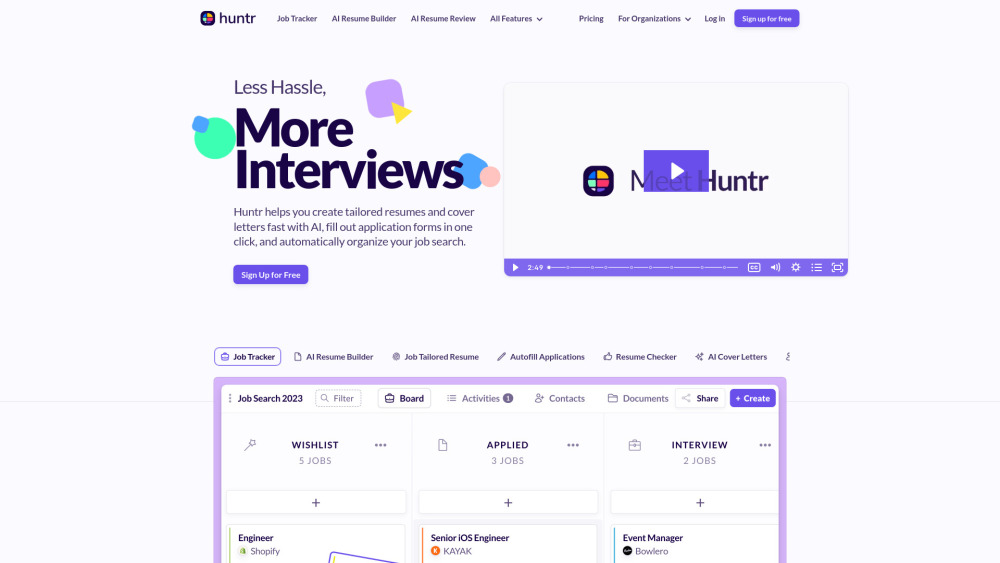
Huntr website preview

Huntr Website screenshot

Introducing Huntr: Your AI Co-Pilot for Smarter Job Searching

Huntr redefines modern job hunting—not as a scattergun application spree, but as a strategic, AI-guided career launchpad. Built from the ground up for today’s competitive market, it combines intelligent resume engineering, frictionless application automation, and real-time job pipeline management in one unified platform. Whether you're a recent graduate, a career changer, or an experienced professional, Huntr adapts to your goals—generating compelling, ATS-optimized documents, auto-filling forms across thousands of employer sites, and transforming chaotic spreadsheets into a dynamic, insight-rich job tracker. Beyond individuals, Huntr empowers institutions—from coding bootcamps to university career services—to scale personalized job readiness support at no added administrative overhead.

Getting Started with Huntr—Fast, Focused, Frictionless

Launch your job search in minutes: import your LinkedIn profile or paste a job description to generate a first-draft resume powered by industry-specific language models. Then refine it with AI-driven suggestions—tailoring tone, emphasizing achievements, and embedding precise keywords from the target role. With the one-click Chrome extension, apply across platforms like LinkedIn, Greenhouse, and Workday without retyping a single field. Meanwhile, Huntr silently logs every application, interview stage, recruiter contact, and follow-up deadline—turning passive job hunting into an active, measurable growth process.

Huntr’s Intelligent Feature Suite

Smart Resume Engine: Build & Optimize in Real Time

Unified Job Tracker: Visual Pipeline + Progress Analytics

One-Click Autofill Extension: Works on 98% of Career Sites

Context-Aware Cover Letter Studio

ATS-Ready Resume Auditor (Score + Actionable Fixes)

Job-to-Resume Keyword Mapper & Gap Analyzer

Real-World Ways Huntr Delivers Results

Transform a generic resume into a laser-focused, role-specific document—complete with quantified impact statements and keyword alignment—in under 90 seconds.

Eliminate 15+ minutes per application by auto-populating forms—even on custom-built career pages that lack standard HTML fields.

Replace messy Notion boards or Excel trackers with an intuitive dashboard showing application velocity, response rates, and interview conversion trends.

Detect hidden weaknesses in your resume—like passive language, vague verbs, or missing metrics—and receive line-by-line rewrite prompts.

Generate polished, human-sounding cover letters that reflect your voice—not generic AI templates—by training the model on your past applications and preferences.

Product source: Huntr official website. Check the provider for current plans, limits and availability.

FAQ

Huntr questions and answers

Product context and practical checks for evaluating Huntr.

What is Huntr used for?

Huntr: AI-powered job search tool that writes resumes, auto-fills apps, and tracks opportunities—all in one place. Land your dream job faster.

How do I get started with Huntr?

Launch your job search in minutes: import your LinkedIn profile or paste a job description to generate a first-draft resume powered by industry-specific language models. Then refine it with AI-driven suggestions—tailoring tone, emphasizing achievements, and embedding precise keywords from the target role. With the one-click Chrome extension, apply across platforms like LinkedIn, Greenhouse, and Workday without retyping a single field. Meanwhile, Huntr silently logs every application, interview stage, recruiter contact, and follow-up deadline—turning passive job hunting into an active, measurable growth process.

What should I compare before choosing a Huntr plan?

Check Huntr’s current pricing page for included usage, renewal terms and any credit charges. Compare the cost of a usable result, including retries, rather than assuming that account registration includes free usage.

What inputs should I prepare for a Huntr trial?

Compare support for source documents, style instructions, outlines and length limits. Check whether citations link to real material rather than merely looking like references.

How can I check the quality of a Huntr result?

Verify names, dates, quotations and factual claims against the original sources. Edit tone, remove repetition and make sure the text answers the intended reader’s question.

Which export options should I check in Huntr?

Check export to plain text, Markdown, documents or your publishing system. Formatting, headings and working links matter when moving a draft into production.

What is a practical way to test Huntr against alternatives?

Use a real brief and a short source document. Compare factual accuracy, structure and editing time rather than accepting the longest or most confident draft.

What should I review before uploading material to Huntr?

Read the provider’s rules on access, retention, deletion and use of uploaded material. Start with a non-confidential sample that you have permission to use.

How can I check whether Huntr fits my existing workflow?

List the steps before and after using Huntr, including preparation, review and export. Test that complete sequence and check whether handoffs require manual conversion or another paid service.

Where is the official Huntr website?

The website linked from this profile is https://huntr.co. Use the provider’s own documentation, account area and support channels to confirm current product details.

Visit Huntr