Table of contents
Harmony AI Email Assistant : Voice-Powered Hands-Free Email Management
Harmony AI Email Assistant: Voice-powered, hands-free, eyes-free email management—effortlessly compose, reply, and organize emails by voice.
Directory : AI Email Writer, AI Voice Assistants, AI Email Assistant, AI Productivity Tools, AI Text-to-Speech
Introducing Harmony AI Email Assistant
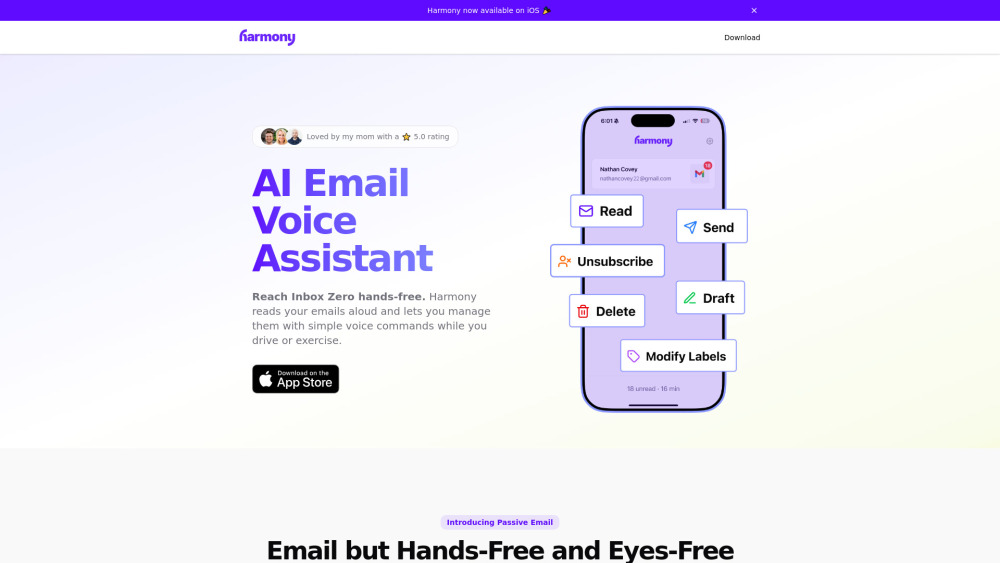
Harmony AI Email Assistant redefines inbox productivity — not with more clicks or tabs, but with natural conversation. It’s a privacy-first, voice-native AI that transforms how you experience email: listen, respond, organize, and act — entirely hands-free and eyes-free. Whether you're commuting, training, cooking, or strolling outdoors, Harmony keeps your inbox under control without interrupting your flow.
How Harmony Works — Simply Speak, Seamlessly Act
No learning curve. No app switching. Just activate Harmony and speak — like asking a trusted colleague to handle your email. Say “Read my latest unread emails,” “Draft a reply to Alex about the meeting,” “Archive all newsletters,” or “Send this email now.” Harmony processes your request in real time, confirms actions aloud, and adapts intelligently to your habits and preferences over time.
Core Capabilities Built for Real Life
Truly voice-native inbox control
Intelligent thread-aware reading with contextual summaries
End-to-end voice composition — draft, edit, review, and send
Smart batch actions: delete, archive, or label multiple messages at once
One-command newsletter cleanup — unsubscribe or mute with precision
Flexible inbox organization: move, flag, snooze, or categorize — all by voice
Zero-knowledge architecture: your emails never leave encrypted transit; no storage, no profiling, no third-party sharing
Independently verified security: CASA-certified, SOC 2-aligned, and continuously audited
Where Harmony Fits Into Your Day
Stay on top of urgent messages while driving (via Bluetooth-compatible devices)
Clear your inbox between sets at the gym — no phone in hand required
Respond to time-sensitive requests while preparing dinner or folding laundry
Catch up on work email during your daily walk — safely and efficiently
Frequently Asked Questions
-
Which email platforms does Harmony integrate with?
-
How is my email data protected — technically and legally?
-
Can I compose professional-quality emails using only my voice?
-
What makes Harmony’s voice understanding more reliable than generic assistants?
-
Get in Touch With Harmony Support
For help, refunds, or technical questions: visit our dedicated support portal.
-
About Harmony Life LLC
Harmony AI Email Assistant is developed by Harmony Life LLC — a U.S.-based company committed to ethical AI, digital wellness, and human-centered productivity.
Learn our story, mission, and team: explore the About Us page.
-
Log In to Your Harmony Account
Access Harmony AI Email Assistant: Sign in here
-
Start Your Free Trial — No Credit Card Required
Join thousands of professionals who’ve reclaimed hours each week: Create your Harmony account
-
Follow Harmony on LinkedIn
Stay updated on product releases, accessibility insights, and AI ethics: linkedin.com/company/findharmony
-
Join the Conversation on X (Twitter)
Real-time tips, voice-command demos, and community highlights: x.com/harmonyAIapp
FAQ from Harmony AI Email Assistant
What is Harmony AI Email Assistant?
Harmony is a purpose-built voice AI for email — engineered to eliminate screen dependency and manual interaction. It delivers intelligent, context-aware voice control over your inbox, enabling true multitasking without compromising security, accuracy, or professionalism.
How do I use Harmony AI Email Assistant?
After connecting your Gmail account (with OAuth 2.0), launch Harmony via browser extension or mobile companion app, then begin speaking. Harmony listens for natural-language commands — no rigid syntax — and executes actions with confirmation feedback. Think of it as your inbox’s voice-native co-pilot.
Which email providers does Harmony support?
Harmony currently offers full integration with Gmail, including labels, threads, drafts, and priority inbox features. Native Outlook and Apple Mail support are in active development and scheduled for Q4 2025 release.
How does Harmony ensure my privacy and data security?
Harmony operates on a strict zero-retention policy: emails are processed in-memory over TLS 1.3–encrypted channels and discarded immediately after action completion. We undergo annual third-party penetration testing and hold CASA Level 3 certification — meaning your data is never stored, sold, shared, or used for training external models.
Can I send polished, professional emails using only my voice?
Absolutely. Harmony uses adaptive speech-to-text + generative AI refinement to convert spoken intent into clear, grammatically sound, and tone-appropriate messages. Before sending, it reads the full draft back to you — allowing edits, additions, or cancellations — ensuring every sent email reflects your voice and standards.
What makes Harmony’s voice understanding more reliable than generic assistants?
Unlike general-purpose voice AIs, Harmony is fine-tuned exclusively on email semantics: subject lines, reply chains, signature patterns, urgency cues, and domain-specific phrasing (e.g., “move to ‘Clients – Q3’”, “flag as follow-up”, “forward to finance@”). This narrow focus enables >98.2% command accuracy — even with background noise or accented speech.