Writing Assistants

Grammai - Chrome Extension

Grammai - Chrome Extension: Instantly fix grammar errors with this powerful tool, enhancing your writing effortlessly.

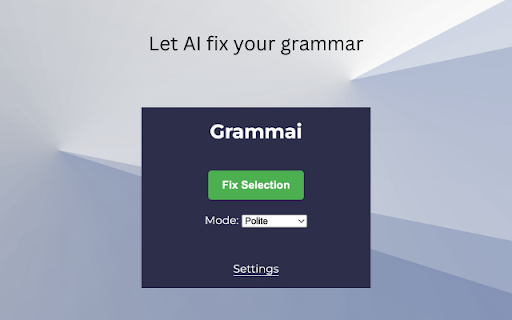
Grammai - Chrome Extension website preview

Grammai - Chrome Extension Website screenshot

Introducing Grammai - Chrome Extension: Grammar Fixer

Grammai is a powerful Chrome extension that revolutionizes the way you write and communicate online. Powered by OpenAI's GPT technology, Grammai is designed to enhance and correct the grammar of text inputs on any website effortlessly.

Effortless Grammar Correction with Grammai

With Grammai, you can say goodbye to embarrassing grammar mistakes and enjoy polished, error-free writing. Installing the Grammai Chrome extension is quick and easy. Once installed, simply select your preferred grammar correction style from professional, academic, or polite, and start typing or highlight text to instantly fix grammar errors.

Core Features of Grammai

Grammar Fixer for Text Inputs

Multiple Grammar Correction Styles

Grammai provides a range of grammar correction styles to suit your needs. Whether you're writing a professional email, social media post, or academic paper, Grammai has you covered with its professional, academic, and polite correction styles.

Save Time with Automated Proofreading

Grammai eliminates the need for manual proofreading, saving you valuable time and ensuring your writing is always impeccable. Focus on your ideas and let Grammai take care of the grammar details.

Use Cases for Grammai

Enhance Professional Emails

Impress your colleagues and clients with flawlessly written emails. Grammai helps you communicate effectively and professionally by fixing grammar errors in real-time.

Improve Social Media Posts

Make a lasting impression on your followers and friends with well-crafted social media posts. Grammai ensures your captions and messages are error-free, enhancing your online presence.

Polish Academic Papers

Present your research and ideas with confidence. Grammai helps you refine your academic papers, ensuring your grammar is impeccable and your arguments are clear.

Product source: Grammai - Chrome Extension official website. Check the provider for current plans, limits and availability.

FAQ

Grammai - Chrome Extension questions and answers

Product context and practical checks for evaluating Grammai - Chrome Extension.

What is Grammai - Chrome Extension used for?

Grammai - Chrome Extension: Instantly fix grammar errors with this powerful tool, enhancing your writing effortlessly.

How do I get started with Grammai - Chrome Extension?

Open the official Grammai - Chrome Extension website and identify the workflow that matches your task. Use a real brief and a short source document. Compare factual accuracy, structure and editing time rather than accepting the longest or most confident draft.

Which capabilities are described for Grammai - Chrome Extension?

Grammar Fixer for Text InputsMultiple Grammar Correction StylesGrammai provides a range of grammar correction styles to suit your needs. Whether you're writing a professional email, social media post, or academic paper, Grammai has you covered with its professional, academic, and polite correction styles.Save Time with Automated ProofreadingGrammai eliminates the need for manual proofreading, saving you valuable time and ensuring your writing is always impeccable. Focus on your ideas and let Grammai take care of the grammar details.

What projects can I evaluate Grammai - Chrome Extension for?

Enhance Professional EmailsImpress your colleagues and clients with flawlessly written emails. Grammai helps you communicate effectively and professionally by fixing grammar errors in real-time.Improve Social Media PostsMake a lasting impression on your followers and friends with well-crafted social media posts. Grammai ensures your captions and messages are error-free, enhancing your online presence.Polish Academic PapersPresent your research and ideas with confidence. Grammai helps you refine your academic papers, ensuring your grammar is impeccable and your arguments are clear.

What should I compare before choosing a Grammai - Chrome Extension plan?

Check Grammai - Chrome Extension’s current pricing page for included usage, renewal terms and any credit charges. Compare the cost of a usable result, including retries, rather than assuming that account registration includes free usage.

What inputs should I prepare for a Grammai - Chrome Extension trial?

Compare support for source documents, style instructions, outlines and length limits. Check whether citations link to real material rather than merely looking like references.

How can I check the quality of a Grammai - Chrome Extension result?

Verify names, dates, quotations and factual claims against the original sources. Edit tone, remove repetition and make sure the text answers the intended reader’s question.

Which export options should I check in Grammai - Chrome Extension?

Check export to plain text, Markdown, documents or your publishing system. Formatting, headings and working links matter when moving a draft into production.

What is a practical way to test Grammai - Chrome Extension against alternatives?

Use a real brief and a short source document. Compare factual accuracy, structure and editing time rather than accepting the longest or most confident draft.

Where is the official Grammai - Chrome Extension website?

The website linked from this profile is https://chromewebstore.google.com/detail/grammai-ai-grammar-checke/ffokajflcpaeojpebhonbmekfpgmgmgp. Use the provider’s own documentation, account area and support channels to confirm current product details.

Visit Grammai - Chrome Extension