AI tool profile

GradingPal

GradingPal: Free AI tool for K-12 teachers—grade essays, handwriting & math 10x faster with rubric-based AI. US teachers only. Try now!

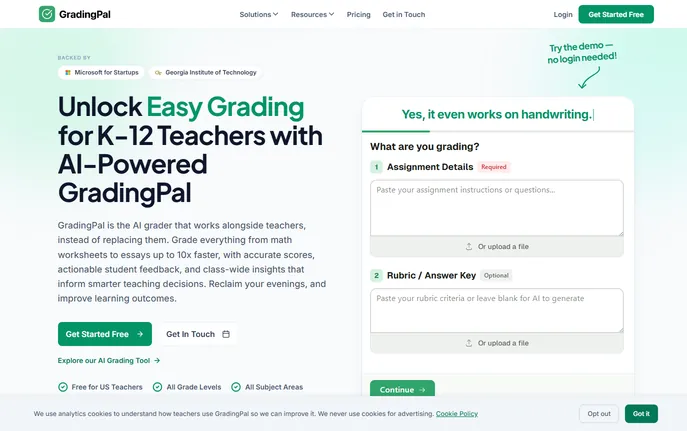
GradingPal website preview

What is GradingPal?

GradingPal is a specialized AI grading assistant designed from the ground up for K–12 educators. It’s not a repurposed chatbot or generic LLM — it’s a pedagogically grounded platform trained on real classroom artifacts: student essays, scanned math work, rubric-scored DBQs, lab write-ups, and handwritten responses. By combining subject-specific AI models with teacher-defined rubrics, GradingPal accelerates grading by up to 10x, while preserving instructional intent and academic rigor. Thousands of teachers across U.S. public, charter, and private schools rely on GradingPal for consistent scoring, nuanced feedback, and actionable class-level insights — all without compromising educator autonomy. Best of all: GradingPal is 100% free for U.S. K–12 teachers, no subscription, no trial period, and no credit card needed.

How to Use GradingPal

GradingPal streamlines grading into a clean, four-phase process built for realism — not theory. First, upload your assignment instructions, your custom or standards-aligned rubric, and student work (PDFs, Google Docs, JPEG scans, or even photos of handwritten pages). The AI then analyzes each submission against your criteria, delivering draft scores and tailored commentary in seconds. In the next step, explore the Insights Hub — a visual, standards-mapped overview showing mastery trends, common misconceptions, and skill-level clusters across your class. Then, review, edit, or override any AI-generated output with one click — because you’re the expert, not the algorithm. Finally, push finalized grades and feedback directly to students via email or sync them instantly to Google Classroom — no manual copy-pasting required.

Key Features of GradingPal

  • Rubric-First AI Grading Engine: Supports essays, math proofs, short-answer science questions, annotated historical documents, coding assignments, and more — with deep recognition of handwritten math notation, diagrams, and cross-disciplinary reasoning. Cuts grading time by up to 80% while maintaining fidelity to your rubric.
  • Standards-Driven Insights Hub: Turn raw scores into teaching intelligence: see which Common Core, NGSS, or state standards are lagging, identify cohort-wide gaps in argumentation or computational fluency, and receive lesson-ready suggestions aligned to your next unit.
  • Teacher-Voiced Feedback Generator: Customize tone, depth, and focus — select “supportive,” “growth-oriented,” “concise,” or “college-prep” modes — and let GradingPal generate comments that sound like *you*, referencing specific evidence from the student’s work and linking directly to learning goals.
  • Google Classroom Native Sync: One-click connection imports rosters, assignments, and submissions — then exports reviewed grades, annotated feedback, and rubric scores back to Classroom with full gradebook compatibility and timestamped audit trails.
  • Privacy-First Architecture: Fully compliant with FERPA, COPPA, and state education data laws. All student data is encrypted in transit and at rest, never stored beyond session use, and excluded from AI training pipelines. Districts can request a signed Data Processing Agreement (DPA) at no cost.

Why Choose GradingPal?

While many AI tools claim to “help teachers,” GradingPal was co-designed *with* educators — especially those grading high-stakes, complex, or time-intensive work: AP English essays, multi-step algebra solutions, source-based history responses, and inquiry-driven science reports. Our team benchmarked over 1,500 real student submissions across six leading language and multimodal models — then fine-tuned our system to match the judgment patterns of veteran teachers. The result? Teachers using GradingPal report saving an average of **7–9 hours weekly**, redirecting that time toward intervention planning, family outreach, or curriculum design — all while students receive feedback faster and more consistently. Most importantly, GradingPal operates on a core principle: AI assists, but teachers assess. Every score, comment, and insight passes through your lens before it reaches a learner. Explore GradingPal today on aitop-tools.com, the leading independent directory for vetted, classroom-ready AI tools in education.

Product source: GradingPal official website. Check the provider for current plans, limits and availability.

FAQ

GradingPal questions and answers

Product context and practical checks for evaluating GradingPal.

What is GradingPal used for?

GradingPal: Free AI tool for K-12 teachers—grade essays, handwriting & math 10x faster with rubric-based AI. US teachers only. Try now!

How do I get started with GradingPal?

GradingPal streamlines grading into a clean, four-phase process built for realism — not theory. First, upload your assignment instructions, your custom or standards-aligned rubric, and student work (PDFs, Google Docs, JPEG scans, or even photos of handwritten pages). The AI then analyzes each submission against your criteria, delivering draft scores and tailored commentary in seconds. In the next step, explore the Insights Hub — a visual, standards-mapped overview showing mastery trends, common misconceptions, and skill-level clusters across your class. Then, review, edit, or override any AI-generated output with one click — because you’re the expert, not the algorithm. Finally, push finalized grades and feedback directly to students via email or sync them instantly to Google Classroom — no manual copy-pasting required.

Which capabilities are described for GradingPal?

Rubric-First AI Grading Engine: Supports essays, math proofs, short-answer science questions, annotated historical documents, coding assignments, and more — with deep recognition of handwritten math notation, diagrams, and cross-disciplinary reasoning. Cuts grading time by up to 80% while maintaining fidelity to your rubric. Standards-Driven Insights Hub: Turn raw scores into teaching intelligence: see which Common Core, NGSS, or state standards are lagging, identify cohort-wide gaps in argumentation or computational fluency, and receive lesson-ready suggestions aligned to your next unit. Teacher-Voiced Feedback Generator: Customize tone, depth, and focus — select “supportive,” “growth-oriented,” “concise,” or “college-prep” modes — and let GradingPal generate comments that sound like *you*, referencing specific evidence from the student’s work and linking directly to learning goals. Google Classroom Native Sync: One-click connection imports rosters, assignments, and submissions — then exports reviewed grades, annotated feedback, and rubric scores back to Classroom with full gradebook compatibility and timestamped audit trails. Privacy-First Architecture: Fully compliant with FERPA, COPPA, and state education data laws. All student data is encrypted in transit and at rest, never stored beyond session use, and excluded from AI training pipelines. Districts can request a signed Data Processing Agreement (DPA) at no cost.

How does GradingPal handle rubric-first ai grading engine?

Rubric-First AI Grading Engine: Supports essays, math proofs, short-answer science questions, annotated historical documents, coding assignments, and more — with deep recognition of handwritten math notation, diagrams, and cross-disciplinary reasoning. Cuts grading time by up to 80% while maintaining fidelity to your rubric.

How does GradingPal handle standards-driven insights hub?

Standards-Driven Insights Hub: Turn raw scores into teaching intelligence: see which Common Core, NGSS, or state standards are lagging, identify cohort-wide gaps in argumentation or computational fluency, and receive lesson-ready suggestions aligned to your next unit.

What should I compare before choosing a GradingPal plan?

Check GradingPal’s current pricing page for included usage, renewal terms and any credit charges. Compare the cost of a usable result, including retries, rather than assuming that account registration includes free usage.

What inputs should I prepare for a GradingPal trial?

Compare support for source documents, style instructions, outlines and length limits. Check whether citations link to real material rather than merely looking like references.

How can I check the quality of a GradingPal result?

Verify names, dates, quotations and factual claims against the original sources. Edit tone, remove repetition and make sure the text answers the intended reader’s question.

Which export options should I check in GradingPal?

Check export to plain text, Markdown, documents or your publishing system. Formatting, headings and working links matter when moving a draft into production.

Where is the official GradingPal website?

The website linked from this profile is https://www.gradingpal.com. Use the provider’s own documentation, account area and support channels to confirm current product details.

Visit GradingPal