Other

GPT Snippet Saver

GPT Snippet Saver: Easily save, organize, and access ChatGPT insights with this Chrome extension. Boost productivity by keeping key info at your fingertips!

GPT Snippet Saver website preview

GPT Snippet Saver - Chrome Extension Website screenshot

What is GPT Snippet Saver Chrome Extension?

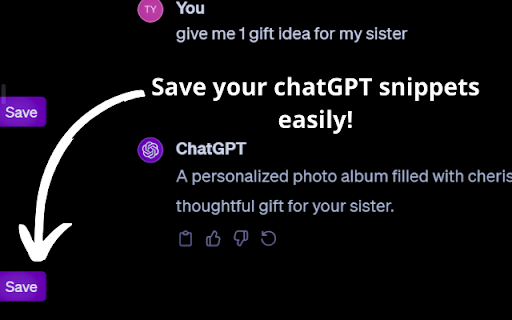
The 'GPT Snippet Saver' is a powerful Chrome extension designed to help users easily capture, store, and organize key insights from ChatGPT conversations for later use.

How to Use GPT Snippet Saver Chrome Extension?

Simply install the extension from the Chrome Web Store, engage in a conversation with ChatGPT, and save snippets of valuable information with a single click.

Key Features of GPT Snippet Saver Chrome Extension

Quick & Easy Saving

Capture relevant parts of ChatGPT responses effortlessly.

Seamless Integration

Integrates smoothly into the Chrome browser for a streamlined experience.

Efficient Organization

Snippets are automatically organized, making retrieval easy.

Shareable Insights

Share saved snippets with colleagues, classmates, or teammates effortlessly.

Privacy First

Your saved data is stored locally, ensuring full control over your information.

Use Cases for GPT Snippet Saver Chrome Extension

Market Researchers

Professionals gathering valuable data for business insights.

Students

Capture essential study material from ChatGPT for better exam preparation.

Creatives

Save snippets of inspiration to fuel your creative projects.

Anyone Leveraging AI

Anyone looking to extract and organize knowledge from ChatGPT discussions.

Product source: GPT Snippet Saver official website. Check the provider for current plans, limits and availability.

FAQ

GPT Snippet Saver questions and answers

Product context and practical checks for evaluating GPT Snippet Saver.

What is GPT Snippet Saver used for?

GPT Snippet Saver: Easily save, organize, and access ChatGPT insights with this Chrome extension. Boost productivity by keeping key info at your fingertips!

How do I get started with GPT Snippet Saver?

Simply install the extension from the Chrome Web Store, engage in a conversation with ChatGPT, and save snippets of valuable information with a single click.

Which capabilities are described for GPT Snippet Saver?

Quick & Easy SavingCapture relevant parts of ChatGPT responses effortlessly.Seamless IntegrationIntegrates smoothly into the Chrome browser for a streamlined experience.Efficient OrganizationSnippets are automatically organized, making retrieval easy.Shareable InsightsShare saved snippets with colleagues, classmates, or teammates effortlessly.Privacy FirstYour saved data is stored locally, ensuring full control over your information.

What projects can I evaluate GPT Snippet Saver for?

Market ResearchersProfessionals gathering valuable data for business insights.StudentsCapture essential study material from ChatGPT for better exam preparation.CreativesSave snippets of inspiration to fuel your creative projects.Anyone Leveraging AIAnyone looking to extract and organize knowledge from ChatGPT discussions.

What should I compare before choosing a GPT Snippet Saver plan?

Check GPT Snippet Saver’s current pricing page for included usage, renewal terms and any credit charges. Compare the cost of a usable result, including retries, rather than assuming that account registration includes free usage.

What inputs should I prepare for a GPT Snippet Saver trial?

Identify the files, text or account connections your task needs. Confirm that the product accepts those inputs and offers controls for reviewing its work.

How can I check the quality of a GPT Snippet Saver result?

Test one representative task and inspect the result for accuracy and completeness. Record where manual corrections or extra tools are needed.

Which export options should I check in GPT Snippet Saver?

Check export formats, integrations and whether you can keep using your work outside the service. Test a real export before committing to a longer plan.

What is a practical way to test GPT Snippet Saver against alternatives?

Choose one task with a clear success condition. Keep the input consistent, record the time spent reviewing and compare the complete workflow cost.

Where is the official GPT Snippet Saver website?

The website linked from this profile is https://chromewebstore.google.com/detail/chatgpt-snippet-saver/hngolfeaafcbeidamknalniaoifhchcc. Use the provider’s own documentation, account area and support channels to confirm current product details.

Visit GPT Snippet Saver