AI Search Engine

GPT Search - Chrome Extension

GPT Search - Chrome Extension: Quickly find past ChatGPT conversations with ease. Efficient search tool to access chat history instantly!

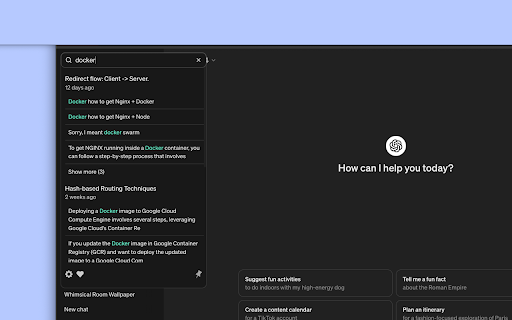
GPT Search - Chrome Extension website preview

GPT Search - Chrome Extension Website screenshot

What is GPT Search - Chrome Extension?

GPT Search is a powerful Chrome extension designed to streamline the process of searching through your ChatGPT chat history with speed and ease.

How to use the GPT Search - Chrome Extension?

Using GPT Search is simple: just type your desired keyword or phrase into the search bar, and the extension will display relevant results instantly.

Core Features of the GPT Search - Chrome Extension

Lightning-fast searches after initial cache

Advanced search capabilities with operators

Fully integrates into the ChatGPT interface

Privacy-first approach: no personal data collection

Use Cases of GPT Search - Chrome Extension

Easily locate past conversations

Keep track of ongoing discussions

Retrieve essential details from historical chats

Product source: GPT Search - Chrome Extension official website. Check the provider for current plans, limits and availability.

FAQ

GPT Search - Chrome Extension questions and answers

Product context and practical checks for evaluating GPT Search - Chrome Extension.

What is GPT Search - Chrome Extension used for?

GPT Search - Chrome Extension: Quickly find past ChatGPT conversations with ease. Efficient search tool to access chat history instantly!

How do I get started with GPT Search - Chrome Extension?

Using GPT Search is simple: just type your desired keyword or phrase into the search bar, and the extension will display relevant results instantly.

Which capabilities are described for GPT Search - Chrome Extension?

Lightning-fast searches after initial cacheAdvanced search capabilities with operatorsFully integrates into the ChatGPT interfacePrivacy-first approach: no personal data collection

What projects can I evaluate GPT Search - Chrome Extension for?

Easily locate past conversationsKeep track of ongoing discussionsRetrieve essential details from historical chats

What should I compare before choosing a GPT Search - Chrome Extension plan?

Check GPT Search - Chrome Extension’s current pricing page for included usage, renewal terms and any credit charges. Compare the cost of a usable result, including retries, rather than assuming that account registration includes free usage.

What inputs should I prepare for a GPT Search - Chrome Extension trial?

Check supported documents, datasets and source access. Establish whether the product can inspect your actual material rather than answer from general knowledge.

How can I check the quality of a GPT Search - Chrome Extension result?

Follow citations to the original source, recalculate important numbers and check the date and scope of the evidence. Distinguish an explanation from a verified result.

Which export options should I check in GPT Search - Chrome Extension?

Look for usable citations, tables, downloadable data and reproducible steps. A clear answer should let another person inspect how the conclusion was reached.

What is a practical way to test GPT Search - Chrome Extension against alternatives?

Choose a question with known sources and a checkable result. Compare citation accuracy, omissions and reproducibility rather than response length.

Where is the official GPT Search - Chrome Extension website?

The website linked from this profile is https://chromewebstore.google.com/detail/gpt-search/glhkbfoibolghhfikadjikgfmaknpelb. Use the provider’s own documentation, account area and support channels to confirm current product details.

Visit GPT Search - Chrome Extension